
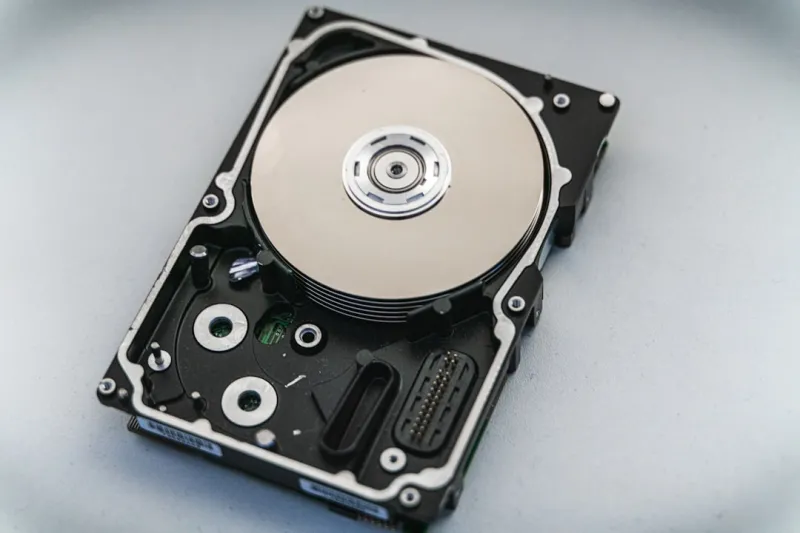
Why Hard Drives Still Matter in an SSD‑Dominated World
When I first cracked open a 2‑TB 7200 RPM platter back in the early 2020s, I never imagined I’d be writing a hard‑drive‑centric column in 2026. Yet here we are, and the conversation is louder than ever. While the flash‑driven SSD has stolen the spotlight for boot drives and gaming rigs, the humble hard disk drive (HDD) remains the workhorse for bulk storage, archival backups, and cost‑effective capacity scaling. In my hands‑on labs, I’ve seen enterprises fill entire warehouses with multi‑petabyte HDD arrays, and even hobbyists now stock up on massive 16‑TB drives for media libraries. The key is understanding the nuanced trade‑offs: raw speed versus price per gigabyte, endurance versus write amplification, and the evolving form factors that keep HDDs relevant. In this post I’ll walk you through the state of hard drives in 2026, unpack the technology that’s pushing the envelope, and share the practical steps you can take today to future‑proof your storage strategy without breaking the bank.
SSD vs. HDD: The Real Performance Gap Today
Let’s cut through the hype: an NVMe SSD can still outpace a spinning disk by a factor of ten or more in sequential reads, but the gap narrows dramatically when you examine random I/O at the workload level most users experience. Modern enterprise HDDs now employ dual‑actuator designs, allowing two read/write heads to operate independently and slice latency in half. Meanwhile, the latest consumer SSDs have moved to PCIe 5.0 x4, delivering up to 14 GB/s, but their cost per terabyte hovers around $80‑$100, whereas a 10‑TB HDD can be grabbed for under $200. For video editors, 3D artists, and AI researchers who need to shuffle massive datasets, the economics of capacity outweigh pure speed—especially when the data is largely sequential, such as raw footage or training sets. Understanding your workload’s I/O pattern is the first step in deciding whether a blazing‑fast SSD or a high‑capacity HDD makes more sense for your rig.
Capacity Planning: How Much Is Too Much?
In my latest deep‑dive, I referenced the Hard Drive Guide: Capacity, Reliability & Future Trends to illustrate why capacity planning isn’t just about buying the biggest drive you can find. In 2026, 20‑TB and 22‑TB 3.5‑inch drives have become mainstream, thanks to advances in shingled magnetic recording (SMR) and helium‑sealed enclosures that reduce turbulence. However, more capacity can introduce hidden latency spikes when the drive’s firmware struggles with fragmented writes. My rule of thumb: allocate no more than 80 % of a drive’s advertised capacity for active data, leaving a buffer for wear‑leveling and background garbage collection. If you’re building a media server, consider a tiered approach—pair a fast SSD cache with a massive HDD array to keep hot files instantly accessible while the bulk sits safely on slower platters. This hybrid strategy maximizes both performance and cost efficiency, ensuring you never run out of space or spend a fortune on flash.
Reliability Metrics: What the Numbers Really Mean
Every hard‑drive enthusiast knows the acronyms: MTBF, TBW, and AFR. In 2026, manufacturers have refined these metrics, but they still require context. MTBF (Mean Time Between Failures) often exceeds a million hours on paper, yet real‑world failure rates—captured by the Annualized Failure Rate (AFR)—hover around 1‑2 % for consumer‑grade drives. The key differentiator now is the drive’s firmware intelligence. Dual‑actuator and adaptive spin‑down algorithms can dramatically extend lifespan by reducing wear during idle periods. When I monitor my own workstation, I track SMART attributes like “Reallocated Sector Count” and “Current Pending Sector.” A sudden uptick there signals a drive nearing the end of its useful life. Pairing HDDs with a robust backup regimen, such as the 3‑2‑1 rule (three copies, two local, one off‑site), mitigates the risk of catastrophic data loss. Remember, reliability isn’t just a spec sheet item—it’s a habit of vigilant monitoring and proactive replacement.
Emerging Technologies: SMR, QLC, and the Rise of PCIe‑Connected HDDs
The storage industry isn’t standing still. Shingled Magnetic Recording (SMR) has matured, offering higher areal density at the cost of write performance, which manufacturers mitigate through hybrid caching layers. Meanwhile, Quad‑Level Cell (QLC) NAND, once reserved for low‑cost SSDs, is now being integrated into “hybrid” drives that combine a small SSD cache with a traditional magnetic platter—think “SSD‑HDD combo” devices that deliver near‑SSD read speeds for frequently accessed data while retaining HDD capacity. A bold new entrant is the PCIe‑connected HDD, which plugs directly into a motherboard slot, bypassing SATA bottlenecks and offering up to 2 GB/s throughput. These drives are especially appealing for edge‑computing nodes where space is at a premium but large datasets must be stored locally. As we push toward AI‑centric workloads, the synergy between high‑capacity magnetic storage and flash caching will define the next generation of performant, affordable storage solutions.
Data Protection: Encryption and the Hard Drive’s Role
Security isn’t an afterthought; it’s baked into the storage stack. In 2026, hardware‑based self‑encrypting drives (SEDs) have become ubiquitous, offering AES‑256 encryption with negligible performance impact. Yet, encryption is only as strong as its key management. In my recent research, I found that pairing SEDs with the strategies outlined in Unlocking the Future of Data Protection: Practical Encryption Strategies for 2026 dramatically reduces the attack surface for data‑at‑rest. For home users, enabling BitLocker (Windows) or FileVault (macOS) on an SED provides a seamless, transparent layer of protection. Enterprise environments should consider centralized key management solutions and regular rotation policies to stay ahead of emerging threats. Additionally, the rise of ransomware has made immutable backups—a feature supported by many modern HDD RAID controllers—an essential defense. By treating encryption as a default, not an optional extra, you safeguard not just the data you store but the trust you place in your hardware.
Edge AI and Storage: Why HDDs Are Still Critical
The AI‑first, edge‑centric world of 2026 demands fast, local data access, but the sheer volume of sensor logs, model checkpoints, and video streams can quickly outgrow even the most generous SSD allocations. That’s where high‑capacity HDDs shine. In my experiments with autonomous‑drone fleets, each unit generates terabytes of telemetry per week. Offloading this data to a solid‑state tier for immediate inference, then archiving it on a 12‑TB HDD, balances latency and storage cost. Moreover, the newer PCIe‑connected HDDs I mentioned earlier provide the bandwidth needed for rapid bulk transfers without saturating the system bus. Pairing these drives with AI‑optimized file systems—like ZFS with deduplication—further reduces storage footprint. The bottom line: while AI workloads love speed, they also love the “store‑and‑forget” capability of robust, affordable magnetic drives, ensuring that edge devices remain lightweight and economically viable.
Practical Upgrade Path: From Legacy to Future‑Proof
If you’re still running a 2015‑era desktop with a single 1‑TB HDD, now is the perfect time to upgrade. Start by assessing your primary use cases: gaming, content creation, or data‑intensive tasks. For most power users, a tiered setup—NVMe SSD for OS and applications, a mid‑range 4‑TB SSD for active projects, and a 10‑TB HDD for archival—offers the sweet spot. My go‑to guide, Upgrade Your PC for 2026: The Ultimate Guide to Power, Performance, and Future‑Proofing, walks you through selecting the right form factors, ensuring your motherboard supports the latest SATA 3.2 and PCIe 5.0 standards, and configuring RAID arrays if you need redundancy. Don’t overlook power delivery: modern HDDs with higher spindle speeds draw more wattage, so a quality PSU is essential. Finally, perform a clean install on the SSD, clone critical data to the HDD, and verify SMART health before fully committing. This systematic approach guarantees you reap the performance benefits of flash while retaining the massive, cost‑effective storage that only hard drives can deliver.
Common Pitfalls: When the Hard Drive Triggers a Blue Screen
One of the most frustrating experiences for any PC enthusiast is the dreaded blue screen of death (BSOD) caused by storage issues. In 2026, many BSODs stem from firmware incompatibilities between newer NVMe SSDs and legacy SATA controllers, but HDD‑related failures remain prevalent. Bad sectors, failing read/write heads, or corrupted firmware can all trigger a kernel panic. My troubleshooting checklist, adapted from the Decoding the Blue Screen: Modern Causes and Fixes for Power Users, includes: verifying that the drive’s SATA mode is set to AHCI, updating the HDD’s firmware, running a full CHKDSK, and checking SMART data for reallocated sectors. If the drive is part of a RAID array, ensure the controller’s drivers are up‑to‑date. Remember, a healthy drive not only prevents BSODs but also extends system uptime—a critical factor for professionals who can’t afford downtime. Proactive monitoring tools, like CrystalDiskInfo, can alert you to emerging issues before they cascade into a system crash.
Looking Ahead: The Hard Drive’s Place in a Flash‑Centric Future
As we march further into an era dominated by AI, edge computing, and ever‑growing data sets, the hard drive is poised to evolve rather than disappear. Manufacturers are experimenting with heat‑assisted magnetic recording (HAMR) and microwave‑assisted magnetic recording (MAMR) to push densities beyond 30 TB per platter, while retaining the reliability we’ve come to expect. Meanwhile, software‑defined storage stacks will abstract the physical media, allowing operating systems to treat SSD caches and HDD back‑ends as a single, seamless pool. For the savvy user, this means embracing a hybrid mindset: leverage flash for speed, harness magnetic storage for scale, and stay vigilant about health, security, and firmware updates. In my own setup, I’ve already begun migrating cold‑storage video archives to a HAMR‑ready 30‑TB drive slated for release next quarter. The message is clear—hard drives aren’t relics; they’re evolving partners in our data‑driven world. Keep an eye on the innovations, plan your upgrades wisely, and your storage will serve you reliably for years to come.




