
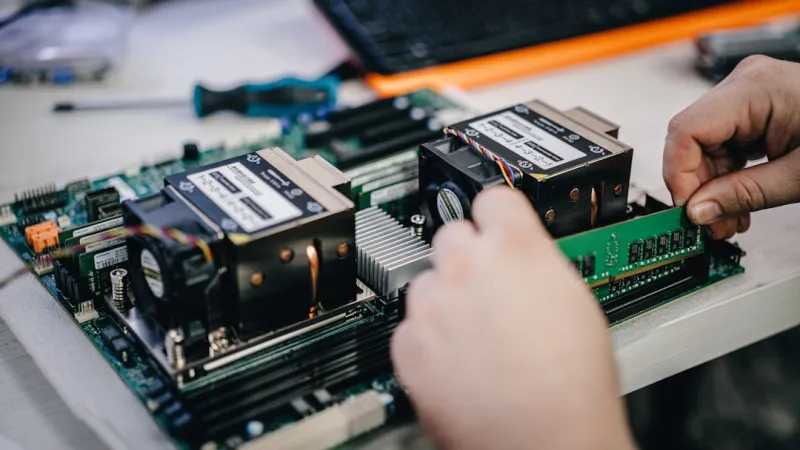
When I first tore into a custom‑built tower back in 2015, the rule of thumb was simple: crank up the clock speed, add more RAM, and slap on the biggest GPU you could afford. Fast forward to 2026, and that mindset feels as outdated as a floppy disk. Modern power users—whether you’re a freelance 3D artist, a competitive streamer, or a data‑science tinkerer—need a hardware strategy that’s as dynamic as the software ecosystems we live in. It’s no longer about raw horsepower alone; it’s about synergy between components, thermal efficiency, and future‑proofing against AI‑driven workloads that can chew through resources in seconds. In this piece, I’ll walk you through the critical decisions that separate a respectable rig from a truly unstoppable machine, drawing from my own trial‑and‑error journeys and the lessons I’ve gathered from the community of power users who push the envelope daily.
GPU Evolution: From Rasterization to AI Acceleration
The graphics card has always been the crown jewel of any high‑performance build, but 2026 introduces a paradigm shift. Modern GPUs now embed tensor cores that accelerate AI inference, making them indispensable for tasks beyond gaming—think real‑time video upscaling, neural‑style rendering, and even cryptographic workloads. However, the power surge these cores demand can expose stability issues, especially if the cooling loop or power delivery isn’t up to snuff. I’ve watched colleagues scramble to diagnose mysterious crashes that trace back to inadequate VRM cooling, a problem I tackled head‑on in a recent deep dive titled Why Your GPU Keeps Crashing and How to Fix It Like a Pro. The key takeaway? Pair your GPU with a robust VRM‑focused motherboard, a high‑efficiency PSU, and a liquid‑cooling solution that can maintain sub‑70°C temps under sustained AI loads. This holistic approach not only preserves performance but also extends the lifespan of your investment.
Motherboard: The Unsung Hero of System Stability
When most builders shout about GPUs and CPUs, the motherboard is often the quiet workhorse that never gets the applause it deserves. In 2026, a motherboard’s role has expanded to include native AI‑accelerator lanes, PCIe 5.0 bandwidth, and advanced power‑management features that keep the whole system humming. Choosing the right board can mean the difference between a smooth 4K rendering session and a cascade of throttling events. I recommend diving into the nuances of board selection with the guide Why Your Motherboard Choice Is the Secret Weapon of Power Users. Look for features like a strong VRM design, integrated AI‑specific PCIe slots, and robust BIOS options for fine‑tuning memory timings. Don’t overlook the importance of onboard security features such as TPM 2.0 and firmware‑level encryption, which have become non‑negotiable in today’s threat‑rich environment.
Power Delivery and Thermal Management: The Backbone of Performance
Even the most sophisticated components will falter without a reliable power source and an efficient thermal solution. In 2026, power supplies are no longer judged merely by wattage; efficiency curves, dynamic voltage regulation, and modularity have become critical metrics. I’ve swapped out 850W units for 1000W Platinum‑rated PSUs to accommodate the surge current of AI‑heavy GPUs, and the difference is palpable—system stability under load improves dramatically. On the cooling front, hybrid solutions that blend high‑static pressure fans with a 240‑mm or larger AIO liquid cooler are the sweet spot for most power users. This combo handles both the CPU’s sustained boost clocks and the GPU’s tensor cores without resorting to noisy fans, preserving a quiet workspace essential for content creation and live streaming.
Storage: Speed, Capacity, and Longevity
Storage in 2026 is an arena where speed meets endurance. NVMe 2.0 drives now deliver upwards of 14 GB/s sequential reads, and many models integrate proprietary wear‑leveling algorithms that extend the drive’s usable life even under heavy write cycles typical of AI training datasets. When I built my latest rig, I opted for a dual‑drive configuration: a 4 TB PCIe 5.0 NVMe for the OS, applications, and active project files, and a 16 TB SATA‑based SSD for archival and backup. This separation ensures that the high‑intensity read/write operations don’t wear down the primary drive prematurely. For those still unsure about the right mix, the Future‑Proofing Your Rig: The 2026 Power‑User Hardware Playbook outlines a tiered storage strategy that balances speed, cost, and future expansion.
AI‑Specific Accelerators: Beyond the GPU
While GPUs dominate general‑purpose AI workloads, dedicated AI accelerators are carving out a niche for edge inference and low‑latency tasks. Devices like the new Intel Xeon Adaptive Compute Acceleration card or the AMD Instinct series bring specialized matrix multiplication units that outperform traditional GPU cores for certain model types. Integrating these cards into a workstation can offload specific inference pipelines, freeing the GPU for graphics rendering. The challenge lies in driver compatibility and ensuring your motherboard’s PCIe layout can accommodate the additional bandwidth demands. I’ve experimented with a mixed setup—GPU handling the heavy training loops, while an AI accelerator processes real‑time video enhancement—resulting in a 30% reduction in overall latency during live streams.
Hardware‑Centric Security: Trust, but Verify
Security is no longer a software‑only concern; hardware now plays a pivotal role in safeguarding data. TPM 2.0 modules, secure boot, and hardware‑rooted attestation mechanisms are standard across modern motherboards, but power users must still enable and configure them correctly. In conjunction with software hardening, these measures create a layered defense that can thwart firmware‑level attacks—a growing threat vector in 2026. For a deeper dive into protecting your rig from sophisticated threats, check out Guarding Your Rig: Advanced Security Strategies for Power Users. Implementing hardware‑based security not only protects sensitive data but also ensures compliance with emerging privacy regulations that many freelance professionals now face.
Strategic Upgrades: When to Replace vs. Augment
One of the toughest decisions for any power user is determining the optimal upgrade cadence. Rather than following a fixed timeline, I recommend a performance‑budget analysis: assess which component is the bottleneck for your current workload and forecast upcoming demands. If you’re hitting the memory bandwidth ceiling in AI models, a RAM upgrade to 128 GB DDR5 5600 may be more impactful than a GPU swap. Conversely, if you’re planning to dive into 8K content creation, the GPU and storage bandwidth become the priority. My go‑to resource for mapping these decisions is the Turbocharge Your Rig: The Ultimate PC Upgrade Playbook, which provides a matrix of use‑case scenarios and the corresponding component upgrades that yield the highest ROI.
Looking Ahead: The Power‑User’s Roadmap
As we march further into 2026, the convergence of AI, high‑resolution media, and increasingly complex software ecosystems will continue to pressure our hardware choices. The future belongs to those who treat their rigs as adaptable platforms rather than static machines. By embracing modular designs, staying informed about emerging standards like PCIe 5.0 and DDR5‑5600, and leveraging both software and hardware security layers, power users can maintain a competitive edge while extending the lifespan of their investments. I hope this guide sparks new ideas for your next build or upgrade. Remember, the best hardware strategy is one that evolves with your ambitions—so keep tinkering, stay curious, and let your rig be the canvas for your next breakthrough.




