Why Hard Drives Still Matter in 2026
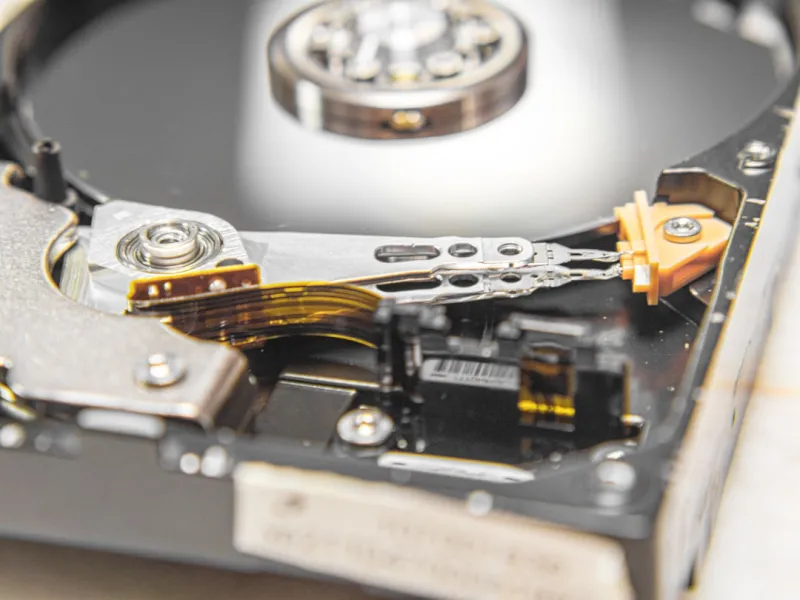
When I first tore apart a vintage tower back in the early 2020s, the hulking 3.5‑inch platter felt like the beating heart of any serious workstation. Fast‑forward to 2026, and you’ll hear the same reverent whispers among power‑users who refuse to let solid‑state drives hog the spotlight. The raw capacity, predictable cost per gigabyte, and the sheer durability of modern hard‑disk drives (HDDs) make them the undisputed secret weapon for anyone juggling terabytes of video, scientific datasets, or massive game libraries. While NVMe SSDs dominate boot times and latency‑critical applications, a well‑engineered HDD can still out‑perform them in sustained sequential reads and writes, especially when the budget stretches thin. In my daily grind, I lean on a hybrid architecture: a lightning‑quick NVMe for the OS, a mid‑range SSD for active projects, and a fleet of high‑density HDDs for everything else. This layered approach isn’t just a cost‑saving hack; it’s a strategic play that lets me stay ahead of data‑intensive workloads without compromising on reliability or future growth.
The Technological Leap of Modern HDDs
Modern HDDs have shed their clunky reputation thanks to breakthroughs like heat‑assisted magnetic recording (HAMR) and shingled magnetic recording (SMR). In 2026, the industry standard for consumer‑grade drives now tops out at 20 TB, while enterprise‑class models push beyond 30 TB, all while maintaining a 7200 RPM spindle speed that keeps latency low enough for most bulk‑transfer tasks. The shift from perpendicular magnetic recording (PMR) to HAMR has unlocked areal densities previously thought impossible, allowing more data to sit on the same physical platter without sacrificing reliability. Additionally, built‑in cache sizes have ballooned to 256 MB, smoothing out the inevitable seek‑time spikes that once plagued hard‑drive performance. The result? An HDD that can sustain 250 MB/s sequential throughput—fast enough to keep up with 4K video editing pipelines and large‑scale backup operations. As a power‑user, I appreciate that these advances also bring smarter firmware algorithms that dynamically adjust write strategies, reducing wear on the magnetic surface and extending the drive’s useful life.
Cost‑Per‑Gigabyte: The Undeniable Advantage
When you crunch the numbers, the price differential between SSDs and HDDs is still staggering. In 2026, a 2 TB NVMe drive costs roughly $120, while a 12 TB 7200 RPM HDD sits at about $260. That translates to a cost‑per‑gigabyte of $0.01 for the HDD versus $0.06 for the SSD—a sixfold savings that can fund additional RAM, a better GPU, or even a secondary monitor. For power‑users who routinely archive raw footage, scientific simulations, or massive code repositories, this margin is the difference between a single external enclosure and a full‑blown NAS array. Moreover, the longevity of HDDs, especially those built for enterprise workloads, often outlasts consumer‑grade SSDs that are subjected to heavy write cycles. I’ve seen 5‑year‑old 10 TB drives still humming along with zero errors, while some high‑end SSDs begin to show wear‑leveling fatigue after just a couple of years of intensive use. The economics of storage, therefore, push me to allocate my SSD budget to latency‑sensitive workloads and reserve the bulk of my data for the ever‑reliable hard drive.
Choosing the Right RPM, Cache, and Interface
Not all HDDs are created equal, and the devil is in the details: spindle speed, cache size, and interface type can dramatically affect real‑world performance. A 7200 RPM drive with a 256 MB cache is the sweet spot for most power‑user scenarios, delivering a healthy blend of throughput and random‑access speed. If you need even faster sequential reads—say, for ingesting multi‑camera 8K streams—consider stepping up to a 10 K RPM enterprise model, though these tend to generate more heat and draw more power. The interface also matters: while SATA III (6 Gb/s) remains ubiquitous, SAS (12 Gb/s) offers lower latency and better error handling, making it the preferred choice for RAID‑5 or RAID‑6 arrays. In my own build, I paired a SAS‑enabled RAID controller with a pair of 16 TB SAS drives, creating a redundant pool that can survive a single‑disk failure without a hitch. Understanding these nuances helps you avoid the common pitfall of buying a “big” drive that bottlenecks your workflow because the interface can’t keep up.
Tiered Storage Strategies for Power Users
One of the most effective ways to extract maximum value from your storage budget is to adopt a tiered architecture. The principle is simple: place the most frequently accessed data on the fastest media, and relegate the rest to slower, cheaper disks. In practice, I maintain three distinct layers: a 1 TB NVMe boot drive for the operating system and core applications, a 2 TB NVMe scratch disk for active projects and compile‑time artifacts, and a bank of 12 TB 7200 RPM HDDs for raw assets, backups, and long‑term archives. This strategy not only accelerates day‑to‑day productivity but also extends the lifespan of each drive by reducing unnecessary write cycles. For those looking to formalize this approach, I highly recommend checking out Hard Drive Mastery: Building a Power‑User Storage Strategy for 2026, which walks you through the exact steps to calculate capacity needs, configure RAID levels, and automate tier migration using modern Windows storage spaces.
Data Integrity, SMART, and Redundancy
Reliability isn’t an afterthought; it’s baked into every decision you make about hard‑drive deployment. The Self‑Monitoring, Analysis, and Reporting Technology (SMART) suite provides real‑time health metrics—temperature, reallocated sector count, and read/write error rates—that can warn you of impending failure before data loss occurs. I set up automated scripts that query SMART data hourly and push alerts to my phone, allowing me to schedule a proactive drive swap. Beyond monitoring, redundancy is key: RAID‑5 offers a good balance between capacity and fault tolerance, while RAID‑6 adds an extra layer of protection at the cost of additional parity overhead. For truly mission‑critical archives, I employ a hybrid approach—mirrored RAID‑6 for hot data and an off‑site, cold‑storage solution using low‑power “green” HDDs that sit in a climate‑controlled garage. This multi‑pronged defense ensures that a single point of failure never becomes a catastrophic event.
Security: Encryption and Firmware Hardening
Security concerns have grown alongside storage capacities, and modern HDDs are no longer the weak link they once were. Self‑encrypting drives (SEDs) now implement AES‑256 encryption directly on the drive’s controller, meaning data at rest is protected without a performance penalty. When you enable SED on a power‑user workstation, the encryption keys are managed by the operating system’s BitLocker or similar tool, providing seamless integration. However, you must also stay vigilant about firmware vulnerabilities—recent research has shown that malicious actors can exploit firmware update mechanisms to inject code. To mitigate this risk, always verify the digital signatures of firmware updates and prefer drives from manufacturers that publish transparent security roadmaps. For a deeper dive into why hard drives remain indispensable, see Why Hard Drives Remain the Power‑User’s Secret Weapon, which outlines how encryption, reliability, and cost combine to keep HDDs at the core of a secure storage strategy.
The Future Landscape: 8 TB to 20 TB and Beyond
Looking ahead, the next wave of HDD innovation promises even larger platters and higher areal densities, thanks to refinements in HAMR and the emerging microwave‑assisted magnetic recording (MAMR) technologies. By the end of 2026, mainstream drives of 20 TB are already shipping, making them viable contenders for data‑lake constructions in AI and machine‑learning pipelines. The sheer volume of training data for large language models can be stored cost‑effectively on these behemoths, while the inference workloads continue to run on high‑speed SSDs and GPUs. Edge computing devices, too, are beginning to integrate high‑capacity HDDs as a backup tier, allowing them to operate offline for extended periods. As power‑users, we must plan our storage roadmaps to accommodate this scaling—future‑proofing our rigs by ensuring our chassis, power supplies, and cooling solutions can handle the additional heat and power draw of larger, denser drives.
Practical Buying Guide: Brands, Warranties, and Testing
When it comes time to purchase, the brand reputation and warranty terms can be just as important as the raw specs. Companies like Western Digital, Seagate, and Toshiba have built solid track records, but their enterprise lines—WD Gold, Seagate Exos, and Toshiba MG—offer longer warranties (up to five years) and higher MTBF ratings. I always run a burn‑in test on new drives using tools like CrystalDiskMark and HD Tune Pro, writing large files for several hours to flush out any early‑life defects. Don’t overlook the importance of firmware updates; manufacturers release patches that can improve performance or fix security holes, so keep your drives on the latest firmware version. Finally, consider the total cost of ownership: factor in power consumption (a typical 12 TB 7200 RPM drive draws around 6 W) and the potential need for additional cooling solutions. A small upfront investment in a high‑quality drive can save you from costly data recovery services down the line.
Wrapping Up: The Power‑User’s Hard‑Drive Playbook
In the age of ever‑faster flash storage, the humble hard drive remains a cornerstone of a balanced, cost‑effective, and secure data strategy. By understanding the nuances of modern HDD technology, selecting the right RPM and interface, building a tiered storage hierarchy, and staying on top of health monitoring and encryption, you can unlock a level of performance and reliability that rivals even the flashiest of SSDs—without breaking the bank. I encourage you to dive deeper into related power‑user topics, such as Beyond the Firewall: Power‑User Strategies to Outsmart Modern Threats, to round out your toolkit. Remember, the goal isn’t just to store data; it’s to make that data work for you, safely and efficiently, now and for years to come.