
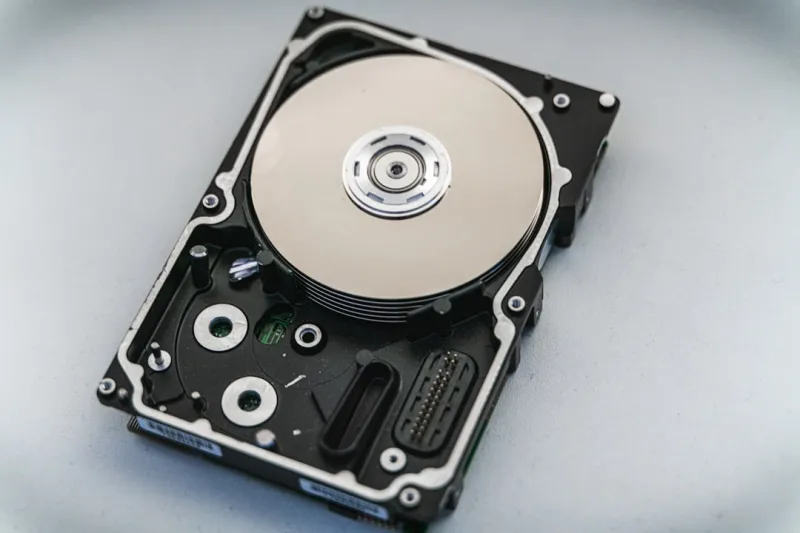
When I first laid hands on a 2 TB 7200 RPM platter in the early 2020s, I never imagined the whirlwind of change that would spin through the storage aisle by 2026. As a long‑time power‑user who swaps components like playlists, I’ve watched hard drives transition from the bulky, noisy workhorses of yesteryear to sleek, whisper‑quiet flash that can cram terabytes into a thumbnail‑sized card. Yet, despite the meteoric rise of SSDs, traditional spinning disks still hold a critical niche for bulk archival, cost‑effective capacity, and specific workflow demands. In this deep dive, I’ll walk you through the current hard‑drive ecosystem, why the “old school” HDD still matters, and how to future‑proof your storage strategy without sacrificing performance or budget. Buckle up, because the storage landscape is more layered than a multi‑tiered cake, and each slice—whether magnetic or solid‑state—has its own flavor of speed, durability, and price.
Understanding the Hard Drive Landscape in 2026
The first thing power‑users notice in 2026 is the blurring line between magnetic and flash technologies. Traditional 3.5‑inch HDDs now ship with areal densities surpassing 2 TB per platter, thanks to helium‑filled enclosures and advanced magnetic recording (HAMR) techniques that push the envelope of capacity without inflating power draw. Meanwhile, SSDs have become the default for operating systems and high‑frequency workloads, boasting read/write latencies in the sub‑microsecond range and endurance that rivals older HDDs. This dichotomy forces us to think in terms of tiers: a blazing NVMe SSD for the OS and apps, a SATA SSD for fast project files, and a high‑capacity HDD for long‑term archives. The sweet spot for many of us lies in leveraging the strengths of each—using the SSD’s speed for active work and the HDD’s economy for static data. Knowing where each storage type shines is the first step toward a balanced, future‑ready setup.
Why Capacity Still Rules the HDD Kingdom
Even as SSD prices drop, the cost‑per‑gigabyte of HDDs remains unbeatable for massive libraries of raw footage, scientific datasets, or virtual machine snapshots. In 2026, you can acquire a 20 TB enterprise‑grade HDD for a fraction of what a comparable SSD would cost, making it the go‑to solution for creators who ingest terabytes of 8K video daily. The trade‑off, of course, is latency; a typical HDD still spins at 5400–7200 RPM, delivering read speeds around 200 MB/s—nothing compared to the 7 GB/s of a PCIe 5.0 NVMe SSD. However, modern caching algorithms, especially those embedded in AI‑driven storage controllers, can mask much of that latency by intelligently pre‑fetching frequently accessed blocks to an onboard DRAM buffer. This hybrid approach means you can keep the bulk of your data on magnetic platters while still experiencing snappy access times for the files you actually need right now.
NVMe and PCIe 5.0: The New Speed Standards
NVMe drives have matured beyond the hype of the early 2020s, and PCIe 5.0 is now the baseline for high‑performance storage in 2026. These drives deliver sustained sequential reads beyond 12 GB/s and random IOPS in the millions, which translates to near‑instant project loading and real‑time editing of massive files. The challenge for power‑users is balancing heat and power consumption; a full‑size PCIe 5.0 SSD can draw up to 12 W under load, generating enough heat to warrant dedicated heatsinks or even active cooling in cramped builds. Moreover, the shift to 3‑digit “M.2” form factors forces us to consider motherboard lane allocation—every NVMe slot consumes PCIe lanes that might otherwise feed a GPU or network card. Understanding these trade‑offs is essential when you plan a system that needs both raw graphics horsepower and storage bandwidth, especially if you’re building a workstation for AI model training or real‑time ray tracing.
Strategic Storage Planning for Power Users
My own storage strategy starts with a clear hierarchy: the OS lives on a 1 TB PCIe 5.0 NVMe drive, my daily projects sit on a 2 TB SATA SSD, and archival assets reside on a pair of 16 TB 7200 RPM HDDs in a RAID‑1 configuration. This layout ensures that my most performance‑sensitive tasks get the fastest media, while redundancy protects against data loss on the larger, slower drives. Redundancy is especially crucial because HDDs, while robust, are more susceptible to mechanical failure over time. I also employ a regular snapshot schedule using ZFS, which provides checksumming and self‑healing capabilities—features that have become indispensable when dealing with petabytes of data. If you’re curious about how to weave these choices into a cohesive build, check out the Future‑Ready PC Building guide, which walks through the exact component selection and lane‑budgeting tactics that keep everything humming in sync.
AI‑Driven Storage Management and Caching
One of the most exciting developments this year is the integration of AI into storage controllers. Modern SSDs now ship with machine‑learning models that learn your usage patterns and dynamically allocate cache space where you need it most. For instance, if you routinely edit 4K video files, the drive will pre‑emptively load those segments into its DRAM cache, shaving seconds off each render. On the HDD side, firmware updates now include predictive error correction that can identify incipient bad sectors before they cause data loss, prompting a background reallocation. These intelligent features reduce the need for manual tuning, but they also demand that you keep your firmware up to date and monitor the health dashboards provided by tools like CrystalDiskInfo or the built‑in Windows Storage Spaces. The synergy between AI and storage not only boosts performance but also extends the lifespan of both flash and magnetic media.
Balancing RAM and Storage: A Holistic Approach
It’s easy to treat RAM and storage as separate silos, but in a high‑performance workflow they’re intimately linked. When your system runs low on RAM, it starts swapping to the page file, which—if placed on a slower HDD—can cripple responsiveness. Conversely, an over‑provisioned SSD without enough RAM can become a bottleneck as the system repeatedly writes and rewrites the same blocks, wearing out the NAND faster. My recommendation is to pair ample, high‑frequency RAM (32 GB or more for most 2026 workloads) with a fast NVMe drive for the page file, while keeping the OS and applications on a separate SSD to avoid contention. If you’re troubleshooting erratic performance, the Mastering RAM Troubleshooting playbook offers a step‑by‑step methodology to isolate whether the issue lies in memory, storage, or the interplay between them.
Looking Ahead: QLC, TLC, and Sustainable Storage
The next frontier in hard‑drive evolution is the convergence of QLC (quad‑level cell) NAND with high‑capacity HDDs, creating hybrid drives that blend flash speed with magnetic volume. Early 2026 prototypes show promise: a 4 TB hybrid drive that uses a 256 GB QLC cache can rival a modest SATA SSD for boot times while delivering the storage density of a traditional HDD. Sustainability is also becoming a priority; manufacturers are now using recycled aluminum enclosures and reducing the rare‑earth magnets in spindle motors, which lowers the carbon footprint of each unit. As we move toward greener computing, expect to see more emphasis on drive longevity, modular designs that allow easy replacement of the platters, and firmware that optimizes power draw based on workload. These trends mean that the “right” hard drive today might also be the most eco‑friendly choice tomorrow.
Actionable Checklist for Your 2026 Storage Build
To wrap up, here’s a quick checklist to ensure your storage stack is both high‑performing and future‑proof:
- Choose a PCIe 5.0 NVMe SSD for the OS and primary applications.
- Allocate a high‑capacity SATA SSD (2–4 TB) for active project files.
- Deploy 16 TB or larger 7200 RPM HDDs in RAID‑1 or RAID‑10 for archival data.
- Enable AI‑driven caching on both SSD and HDD if supported.
- Set the page file on the fastest NVMe drive, not on a spinning disk.
- Regularly update firmware on all drives to benefit from predictive error correction.
- Implement ZFS or a similar filesystem with snapshots for data integrity.
- Monitor drive health via SMART tools and schedule quarterly checks.
By following these steps, you’ll harness the best of both magnetic and flash technologies, ensuring that your workstation can handle the data‑intensive demands of 2026 and beyond while staying resilient against failures and ready for the next wave of storage innovation.




