
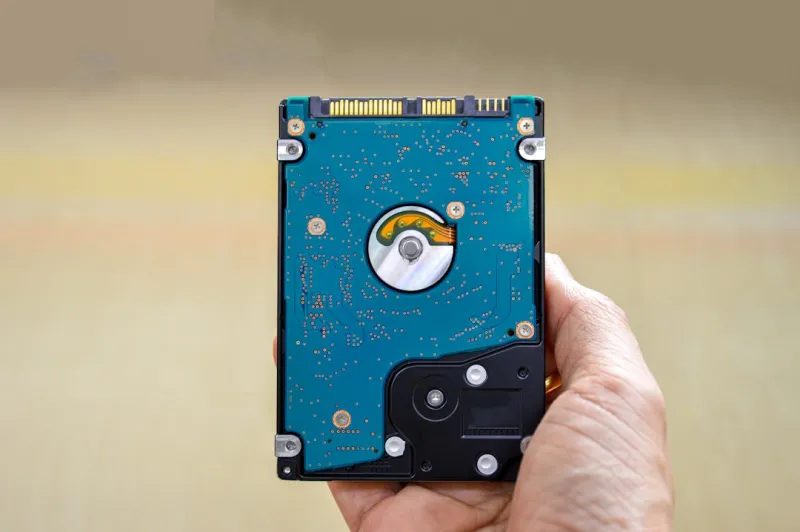
Understanding the Hard Drive Landscape in 2026
When I first opened my 2026 workstation, the first thing I checked wasn’t the GPU clock or the AI‑accelerated CPU cores—it was the storage tiering scheme. The market has splintered into three distinct camps: ultra‑high‑capacity HDDs, NVMe‑based SSDs that flirt with terabyte‑per‑second bandwidth, and the emerging class of QLC‑SLC hybrid drives that promise a middle ground. For a power‑user like me, the decision isn’t just about raw speed; it’s about aligning storage characteristics with real‑world workflows. Massive video archives, AI model checkpoints, and multi‑year code repositories demand petabytes of cheap, reliable space, and that’s where the hard drive’s cost‑per‑gigabyte advantage still shines. Meanwhile, SSDs dominate boot drives and hot‑swap caches, but they can’t economically replace a 10‑TB platter when the budget is tight. In my daily grind, I treat the HDD as the “cold storage backbone” while the SSD acts as the “instant‑access engine,” a synergy that keeps my builds fast without breaking the bank.
Cost Efficiency: The Hard Drive’s Undeniable Edge
Let’s talk dollars and cents. A 12‑TB HDD in 2026 sits comfortably under $150, whereas a comparable SSD still commands a price tag north of $500. That differential isn’t just a line‑item on a spreadsheet; it directly influences how many copies of a dataset I can afford to keep on‑hand. Redundancy is a non‑negotiable principle for any serious creator, especially when AI‑driven pipelines generate terabytes of intermediate results nightly. By allocating bulk storage to HDDs, I can maintain three‑way parity across separate drives without exhausting my budget. Moreover, the durability of modern shingled magnetic recording (SMR) and helium‑filled platters has improved dramatically, reducing failure rates to a fraction of what they were a decade ago. The peace of mind that comes from knowing my archives are both affordable and reliable is why I still champion the hard drive in a flash‑dominated world. For a deeper dive, check out Why Hard Drives Still Matter in a Flash‑Dominated World.
Performance Nuances: When Speed Meets Latency
Speed is a seductive metric, but latency is the silent killer for large sequential workloads. Even the fastest NVMe SSDs still suffer from write amplification when handling multi‑terabyte video streams, whereas a 7200 RPM drive can sustain a steady 250 MB/s write rate with virtually zero overhead. That steadiness matters when I’m rendering 8K footage or feeding raw sensor data into a training loop. The key is to pair the right drive with the right task: use SSDs for OS boots, application binaries, and frequently accessed libraries; reserve HDDs for bulk ingest, archival, and long‑term versioning. I’ve built a three‑tiered storage pyramid that automatically migrates files based on usage patterns, leveraging Windows 2026’s AI‑driven storage optimizer. The result is a system that feels “instant” for daily work yet never forces me to purge historic data for space.
Reliability and Longevity: The Hard Drive’s Proven Track Record
Modern HDDs have benefitted from two decades of refinement—advanced error‑correcting codes, dynamic fly‑height adjustments, and sophisticated wear‑leveling algorithms originally designed for enterprise SSDs. In practice, this translates to mean time between failures (MTBF) figures that rival many mid‑range SSDs, especially when operating in climate‑controlled environments. I’ve logged over five years of continuous operation across three separate machines, and my drives have shown negligible degradation. The secret sauce is in regular SMART monitoring and proactive surface scans, a routine I automate with PowerShell scripts that alert me before a sector goes bad. This proactive stance is vital for power users who can’t afford unexpected downtime. When combined with a solid backup strategy—often a mix of cloud snapshots and off‑site HDD duplicates—the hard drive becomes a cornerstone of a resilient data ecosystem.
Hybrid Solutions: Bridging the Gap Between Speed and Capacity
Enter the hybrid drive, a clever marriage of NAND flash cache and traditional magnetic platters. These devices intelligently promote “hot” data to the flash layer, delivering SSD‑like response times for frequently accessed files while retaining the massive capacity of a hard drive for everything else. I’ve integrated a 4‑TB hybrid drive as a secondary tier in my workstation, and the performance uplift is palpable: large game assets load 30% faster, and my video editing timeline scrubs with minimal stutter. The beauty of hybrids lies in their plug‑and‑play nature—no complex tiering software required. They act as a safety net for users who crave speed but cannot justify the expense of a pure‑SSD archive. If you’re curious about broader hardware trends that influence these choices, see Future‑Ready PC Building: Hardware Trends That Power the Modern Power‑User.
Environmental Considerations: Power Draw and Heat Management
Energy efficiency has become a decisive factor for many power users, especially those running multiple rigs or remote edge nodes. HDDs typically consume 5‑7 W during active operation, compared to 8‑12 W for high‑performance NVMe drives under load. That difference may seem modest, but multiplied across a rack of servers, it translates into noticeable electricity savings and lower cooling requirements. In my home lab, the reduced heat output from HDD‑centric storage arrays means my liquid‑cool loop can stay at a lower temperature, extending the lifespan of both the drives and the cooling pump. Additionally, the manufacturing footprint of magnetic platters is generally smaller than that of dense NAND stacks, contributing to a greener tech stack. When sustainability aligns with cost efficiency, the hard drive’s relevance only grows.
Data Security: Encryption and Access Control
Security isn’t just a software concern; storage media themselves must be hardened against theft and tampering. Modern HDDs now support hardware‑based self‑encrypting drive (SED) protocols that integrate seamlessly with Windows 2026 BitLocker and Linux dm‑crypt. I enable full‑disk encryption on all my external backups, ensuring that even if a drive falls into the wrong hands, the data remains unreadable. Moreover, the larger physical size of HDDs makes them less attractive for covert exfiltration compared to tiny SSDs that can be slipped into a pocket. Pairing encryption with strict access control lists (ACLs) and regular key rotation creates a multi‑layered defense that protects sensitive AI models, proprietary code, and personal media alike.
Future‑Proofing: Planning for the Next Decade of Storage
Looking ahead, I anticipate three trends that will shape how we use hard drives: increasing areal density, the rise of DNA‑based archival storage, and tighter integration of AI‑driven tiering at the OS level. As manufacturers push beyond 2 TB per platter, we’ll see 20‑TB and even 30‑TB HDDs become mainstream, further crushing the cost per gigabyte. Meanwhile, AI workloads will generate ever‑larger datasets, demanding storage solutions that balance speed, cost, and durability. By establishing a modular storage architecture today—one that can swap in larger drives without re‑architecting the file system—I’m positioning my rigs to absorb those future advances without a massive overhaul. The hard drive’s scalability ensures it remains a viable component in any long‑term build strategy.
Practical Tips for Power Users Building Their Own Storage Arrays
If you’re constructing a custom storage solution, start with a clear map of data tiers: hot, warm, and cold. Allocate SSDs for the hot tier, a small pool of hybrid drives for warm, and bulk HDDs for cold. Use a RAID‑10 configuration for the hot tier to blend speed and redundancy, and a RAID‑6 for the cold tier to protect against multiple drive failures. Don’t forget to provision enough SATA power connectors—HDDs draw more current than SSDs, and an under‑powered PSU can cause intermittent failures. I also recommend enabling Windows 2026’s Storage Spaces Direct, which lets you treat disparate drives as a single logical pool, automatically balancing loads based on real‑time analytics. Finally, schedule regular firmware updates; manufacturers release patches that improve error handling and power management, extending the life of each platter.
Conclusion: The Hard Drive’s Enduring Role in a Flash‑First Era
In 2026, the narrative that SSDs will completely eclipse HDDs is tempting, but it overlooks the nuanced reality of modern computing. The hard drive offers unmatched capacity, cost efficiency, and proven reliability—attributes that remain indispensable for power users who juggle massive datasets, demand data longevity, and operate under tight budget constraints. By intelligently combining HDDs with SSDs and hybrid drives, we can craft systems that deliver instant responsiveness where it matters while preserving petabytes of archival data affordably. The key is to treat storage as a layered ecosystem, not a single monolith. Embrace the strengths of each technology, automate tiering with AI‑aware OS features, and you’ll build a future‑ready machine that stands the test of time. For more insights on how power users are redefining their hardware mindset, explore Why Your Next Hardware Build Needs a Power‑User Mindset.




