
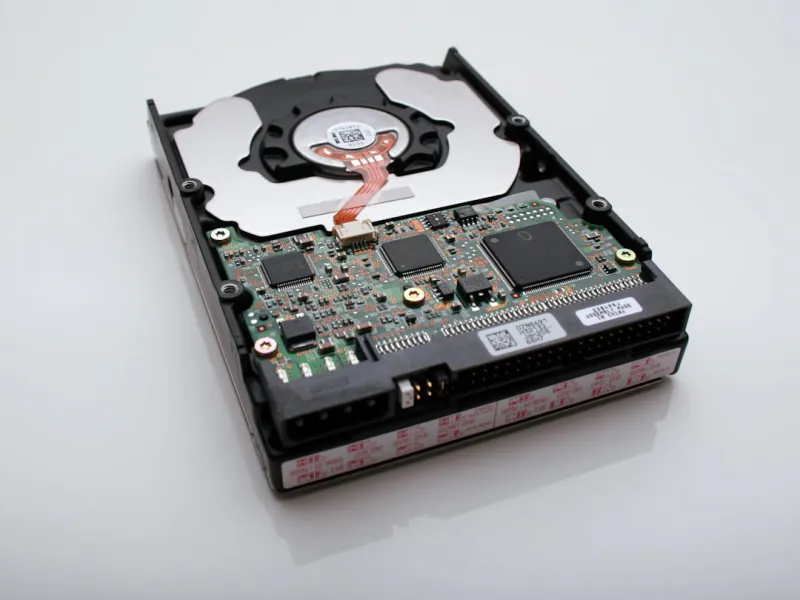
When I first tore into a 5‑TB 7200 RPM platter in 2020, I thought I’d seen the pinnacle of consumer storage. Fast forward to 2026, and the landscape has reshaped itself around a hybrid of blistering NVMe flash and surprisingly resilient hard‑disk technology. Power users like us don’t just store files; we store the lifeblood of our workflows—massive video renders, AI model checkpoints, and the ever‑growing trove of personal data. This shift forces a fresh look at why hard drives are still relevant, how they complement solid‑state drives, and what the next wave of capacity, speed, and durability means for a truly future‑proof rig. In this deep dive I’ll walk you through the trends shaping hard‑drive choices today, sprinkle in a few hard‑earned lessons from the trenches, and give you a roadmap that aligns with the high‑stakes demands of a power‑user in 2026.
The HDD vs. SSD Evolution: Why the Tape Still Spins
SSD adoption has been nothing short of meteoric, but hard drives retain a critical niche thanks to their cost‑per‑gigabyte advantage and sheer storage volume. In 2026 you can snag a 20‑TB SMR (Shingled Magnetic Recording) drive for under $400, a price point that would make a 4‑TB SSD blush. While SSDs dominate the OS and application tier for sub‑millisecond latency, HDDs excel at archiving raw footage, extensive backups, and any scenario where capacity outweighs speed. Modern drives also incorporate helium‑filled enclosures and multi‑actuator heads, pushing sustained sequential read/write rates past 300 MB/s—good enough for large, linear workloads like media ingest. The real sweet spot emerges when you pair a fast NVMe boot drive with a high‑capacity HDD array, creating a tiered storage architecture that lets you sprint on the SSD and cruise on the HDD without breaking the bank.
NVMe and PCIe 5.0: The Flash Frontier for Power Users
While hard drives hold the line on bulk storage, the flash side of the equation has exploded with PCIe 5.0 NVMe drives that tip the scales at 14 GB/s read speeds. For power users running AI‑driven development pipelines, that bandwidth translates to dramatically reduced model training times and near‑instantaneous dataset loading. The trick is not to let these flash beasts become a bottleneck—pair them with a robust storage controller and enough PCIe lanes to avoid throttling. In practice, I’ve seen a dual‑M.2 configuration on a 12‑lane motherboard deliver a seamless experience, whether I’m rendering 8K footage or compiling a monolithic codebase. The key takeaway? Deploy NVMe where latency matters most, but remember that raw capacity still lives on the platters. This hybrid approach is the cornerstone of the power‑user workflow I outline in Crafting a Power‑User Development Workflow for the AI‑Driven Era.
Reliability Metrics: MTBF, Error‑Correction, and Enterprise‑Grade Drives
When you’re dealing with terabytes of irreplaceable data, reliability isn’t a nice‑to‑have—it’s a non‑negotiable. Modern enterprise‑grade HDDs boast MTBF (Mean Time Between Failures) ratings north of 2 million hours, and they employ advanced error‑correction algorithms like LDPC (Low‑Density Parity‑Check) to sniff out bit‑level corruption before it becomes a problem. For the home power user, the distinction between a consumer and an enterprise model often comes down to vibration tolerance and sustained write endurance. I personally gravitate toward drives with dual‑actuator heads, as they reduce seek times and distribute wear more evenly across the platter. Don’t overlook the importance of SMART monitoring; a proactive alert system can save you from a catastrophic drive failure by giving you time to clone or replace the suspect unit before data loss strikes.
Encrypting Data at Rest: Safeguarding Your Massive Libraries
Security is the silent partner in any storage strategy. With data breaches making headlines daily, encrypting data at rest is no longer optional for a serious power user. Modern drives support hardware‑based AES‑256 encryption, which offloads the cryptographic workload from your CPU and delivers near‑native performance. Pairing this with full‑disk encryption tools ensures that even if a drive is physically stolen, the contents remain indecipherable. In my own setup, I enable Opal‑compatible self‑encrypting drives (SEDs) and lock them behind a TPM‑secured key, a method I dissect in detail in Encrypt Everything: A Power‑User’s Guide to Modern Data Security. The result is a seamless blend of speed and security that protects everything from client files to personal media archives without noticeable latency.
Backup Strategies for the 2026 Power User: The 3‑2‑1 Rule Reimagined
Backup isn’t a one‑size‑fits‑all proposition, especially when your data footprint eclipses 30 TB. The classic 3‑2‑1 rule—three copies, two different media, one off‑site—still holds, but the implementation evolves. I keep a primary RAID‑10 array of 8 TB enterprise HDDs for real‑time redundancy, a secondary offline clone on a set of rugged 20‑TB NAS drives, and a cloud bucket for the most critical snapshots. The offline clone is rotated monthly, ensuring that a single point of failure (like a power surge) won’t wipe everything. For the cloud tier, I use a provider offering immutable object storage, which prevents even administrators from tampering with archived backups. This layered approach not only satisfies disaster recovery compliance but also keeps my workflow humming even after an unexpected hardware hiccup.
Future‑Proofing Your Storage: Modular Rigs and Emerging Technologies
Looking ahead, the next big shift will be in modular storage ecosystems that let you swap out drives without rebooting or re‑imaging. Technologies like U.2 and emerging PCIe‑based SAS adapters promise hot‑swap capability at enterprise speeds, meaning you can replace a failing 20‑TB platter on the fly. Moreover, the rise of DNA‑based archival storage, though still in its infancy, hints at petabyte‑scale solutions for long‑term preservation. While that may sound like sci‑fi, the practical takeaway is to build a chassis that supports both current standards (M.2, U.2) and leaves room for future form factors. My current build leverages the insights from Future‑Proof Computer Hardware for Power Users, featuring a 12‑bay hot‑swap bay that can host both SATA HDDs and upcoming NVMe‑over‑PCIe modules, ensuring the storage layer remains adaptable for years to come.
Buying Guide: Balancing Price, Performance, and Longevity
When it comes time to add a new drive to your arsenal, start by defining the role it will play. For archival storage, prioritize capacity and durability—look for drives with SMR or CMR technology, a high MTBF, and a warranty of at least five years. If you need a workhorse for active projects, choose a CMR (Conventional Magnetic Recording) drive with a high sustained write rating and consider a dual‑actuator model for faster random access. Pricing in 2026 has stabilized, with 10‑TB drives hovering around $250 and 20‑TB units just under $500, making it easier to allocate budget across tiers. Don’t forget to factor in the cost of a robust UPS and a reliable monitoring suite; a power outage or unnoticed temperature spike can turn a bargain purchase into a data nightmare. By aligning each drive’s specs with its intended workload, you’ll achieve a harmonious storage ecosystem that fuels productivity, safeguards data, and stays ready for the next wave of hardware innovations.




