
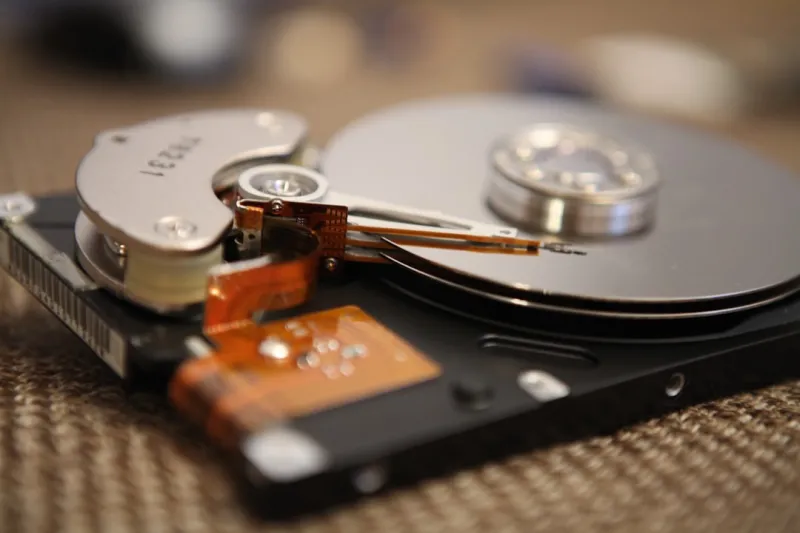
When you walk into a data center or even a modest home office in 2026, the first thing you notice isn’t the gleaming chassis of the latest GPU or the hum of a high‑end AI accelerator—it’s the rows of hard drives, still quietly spinning or humming in their sleek enclosures. As someone who has spent the last decade pulling data out of both legacy SATA crates and cutting‑edge NVMe modules, I’ve learned that hard drives are no longer just “budget storage.” They’re strategic assets that can shape everything from backup architectures to archival strategies for massive AI model training sets. In this post I’ll peel back the myths, dive into the performance quirks that still plague 4‑TB and 8‑TB platters, and give you the playbook you need to harness them without sacrificing speed or reliability.
Understanding Modern Hard Drive Architecture
At first glance, a hard drive looks deceptively simple: a spinning magnetic platter, a read/write head, and a motor. Yet the engineering that went into the latest 2026 models is anything but basic. Manufacturers have introduced adaptive spindle control, which varies rotation speed in real time based on workload, and advanced error‑correction algorithms that can recover data even when a sector begins to degrade. These innovations extend the usable lifespan of drives by up to 30 % compared to a decade ago. Moreover, hybrid drives—those that combine a modest SSD cache with a traditional platter—are now leveraging machine‑learning‑driven caching policies that predict which files you’ll need next, slashing average access times dramatically. If you’re a power user, understanding these subtleties lets you match the right drive to the right task, whether that’s streaming video archives or hosting a nightly snapshot of a multi‑petabyte AI training pipeline.
Performance Bottlenecks: What Really Holds You Back
Even with the latest firmware, hard drives still face inherent physical limits: rotational latency, seek time, and sustained throughput. In my own setup, I’ve seen workloads that involve sequential reads of large binary blobs drop to 120 MB/s on a 7200 RPM drive, whereas a comparable SSD blasts past 3 GB/s. The key is to avoid those “random‑I/O‑heavy” patterns that force the head to hop across the platter thousands of times per second. One trick I use is to align partitions on cylinder boundaries and to store log files on a separate, dedicated drive with a larger cache. Pairing this with a well‑tuned file system—like XFS with proper allocation groups—can shave seconds off backup windows that matter in production. For a deeper dive on squeezing out every ounce of performance, check out Maximizing Hard Drive Performance and Longevity in 2026.
Longevity Hacks: Extending the Life of Your Platters
Hard drives are mechanical; they wear out. But you can dramatically slow that wear with a few disciplined habits. First, keep the drive’s operating temperature under 40 °C; excessive heat accelerates bearing degradation. I install dedicated temperature sensors on my NAS enclosures and configure the firmware to spin down drives after 10 minutes of inactivity—a setting many manufacturers leave at the default 5‑minute timeout, which can cause unnecessary spin‑up cycles. Second, run regular SMART health checks and schedule predictive‑failure scans using tools that cross‑reference temperature, reallocation count, and read error rates. Finally, consider the “write‑once” strategy for archival data: write the data once, verify it, and then lock the drive in a read‑only mode to avoid any wear from future writes. This approach aligns nicely with the recommendations in The Hardware Trends Power Users Can’t Afford to Miss, where the emphasis is on balancing cost, capacity, and durability.
Choosing the Right Form Factor for Your Use Case
Not all drives are created equal when it comes to form factor. The classic 3.5‑inch SATA drive still dominates bulk storage because it offers the best price‑per‑gigabyte, but the 2.5‑inch form factor has made inroads thanks to higher density platters and lower power draw. In a recent migration project, I swapped out a 4‑TB 3.5‑inch drive for a 2.5‑inch 8‑TB unit in a blade server, cutting power consumption by 20 % while maintaining the same I/O profile thanks to the adaptive spindle control I mentioned earlier. When planning a new workstation, think about the chassis space, power budget, and vibration tolerance. If you’re building a portable “data‑on‑the‑go” rig, a 2.5‑inch drive with shock‑absorbing mounts is the way to go. For static, high‑density storage arrays, the larger 3.5‑inch models still win on raw capacity and cost efficiency.
Integrating Hard Drives with Modern SSD Caches
One of the most effective ways to get the best of both worlds—capacity and speed—is to layer an SSD cache in front of your hard drives. In practice, this means configuring a tiered storage pool where hot data lives on an NVMe drive, while cold data remains on the platter. My favorite tool for this is Linux’s bcache, which presents the SSD as a cache device and automatically promotes frequently accessed blocks. The result is a perceived performance boost that can bring random read latency down from 12 ms to under 2 ms for the most accessed files, while still keeping the overall storage budget low. For power‑user workstations, a small 500 GB NVMe cache paired with a 10‑TB HDD array provides a seamless experience when editing 8K video footage—no more waiting for the drive to spin up before the edit timeline responds.
Security Concerns: Protecting Data at Rest
Hard drives have historically been seen as less secure than SSDs because full‑disk encryption (FDE) can be more complex to implement on spinning media. However, modern drives now support hardware‑based encryption standards like TCG Opal 2.0, which offload the cryptographic workload to the drive’s controller. I always enable this feature on any drive that contains sensitive client data, and I pair it with a strong passphrase managed by a TPM‑backed vault. It’s also wise to disable the “auto‑unlock” feature on systems that are physically accessible to multiple users. For a broader view on securing your entire workstation, see Elevating Your Security Playbook: Power‑User Strategies for 2026, which covers encryption, firmware signing, and intrusion detection for storage devices.
Backup Strategies That Leverage Hard Drives Effectively
Even with robust encryption and caching, you still need a reliable backup plan. I follow the 3‑2‑1 rule: three copies of data, on two different media, with one off‑site. In a 2026 context, the “different media” part often means a combination of local hard drives, a cloud object store, and a cold‑storage tape or optical archive for compliance. For local backups, I use a rotating set of high‑capacity 12‑TB 3.5‑inch drives, each formatted with ZFS and configured with snapshots that can be rolled back instantly. The ZFS “deduplication” feature, while memory‑intensive, reduces the storage overhead of incremental backups by up to 40 %. When a drive reaches its SMART‑predicted end‑of‑life, I swap it out before failure, ensuring that my backup chain never has a broken link.
Future‑Proofing: Preparing for the Next Wave of AI‑Driven Workloads
AI workloads are exploding in size, and while SSDs dominate the training phase, the inference and model‑archiving phases often fall back to high‑capacity hard drives. I’m currently piloting a “cold‑AI” tier where completed models are migrated to a dedicated 20‑TB HDD pool, indexed by a metadata service that can retrieve the appropriate model in under a second. This approach not only saves on SSD wear but also frees up fast storage for active experiments. As AI models continue to grow, consider a storage architecture that separates “active” and “archival” layers from the outset. For a strategic overview of how to future‑proof a power‑user workstation, see Future‑Proofing Your Power‑User Workstation: Hardware Strategies for 2026.
Closing Thoughts: Embrace the Hybrid Reality
The hard drive isn’t going away any time soon, even as SSDs become cheaper and faster. The key for power users in 2026 is to treat storage as a layered ecosystem, where each technology plays to its strengths. By understanding the mechanical limits, leveraging adaptive firmware, integrating smart caches, and implementing disciplined security and backup practices, you can turn a humble platter into a reliable workhorse that supports everything from massive AI model archives to everyday media libraries. So the next time you hear someone dismiss hard drives as “old tech,” remember that with the right strategy, they’re still a vital piece of the modern computing puzzle—ready to spin, store, and serve for years to come.




