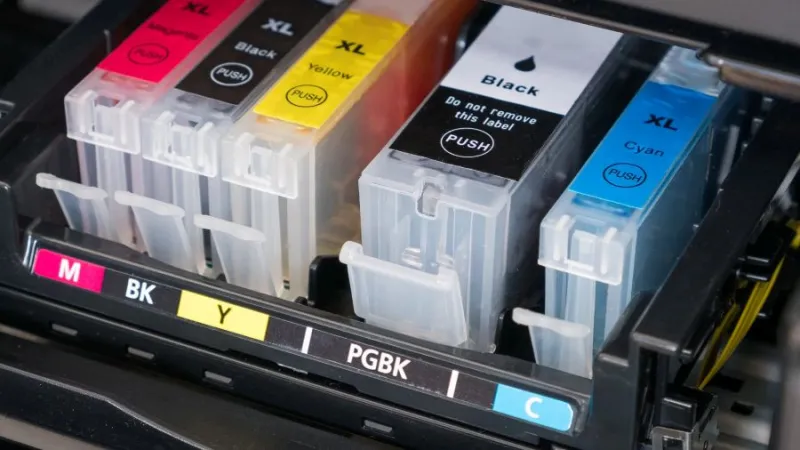
When your printer needs a new ink cartridge, you will usually see two choices: an OEM cartridge made by the printer manufacturer or a compatible cartridge made by a third-party company.
Compatible cartridges can be less expensive, but the lowest price does not necessarily make them the best choice for your printer.
For many home and business users, OEM ink is worth considering because it is specifically designed for the printer it is intended to work with.
This can provide more predictable results and reduce some of the uncertainty associated with third-party cartridges.
What Is OEM Ink?
OEM stands for Original Equipment Manufacturer.
An OEM ink cartridge is made for the printer by the printer manufacturer or sold under the manufacturer's brand. It is designed to work with that printer's printhead, ink delivery system and cartridge recognition system.
When you purchase a printer, the manufacturer's recommended ink is the cartridge designed for that particular machine.
Why Choose OEM Ink?
Consistent Print Quality
OEM ink is formulated for the printer it is designed to work with. This can be especially important when printing photographs, colour documents, presentations, labels or other materials where consistent colour and appearance matter.
Compatibility
Modern printer cartridges may contain electronic chips that communicate with the printer.
A compatible cartridge may work without any problems, but third-party cartridges can sometimes result in recognition errors, warning messages or other compatibility issues.
Using the manufacturer's cartridge removes much of that uncertainty.
Reliability
A defective or poor-quality cartridge can potentially cause:
• Clogged print nozzles
• Streaking or missing colours
• Poor print quality
• Leaking ink
• Cartridge recognition problems
• Repeated cleaning cycles
• Wasted paper and ink
For someone who depends on their printer, avoiding these potential problems may be worth paying more for the manufacturer's cartridge.
What About Compatible Ink?
Compatible ink cartridges are manufactured by companies other than the printer manufacturer.
Their biggest advantage is usually price.
They can cost considerably less than OEM cartridges, particularly for people who print frequently.
The trade-off is that quality can vary between manufacturers and even between different compatible cartridges.
One third-party cartridge may perform well, while another may produce poor-quality prints or create compatibility problems.
An advertised compatibility claim also does not necessarily mean the cartridge will provide exactly the same performance as the manufacturer's cartridge.
If you decide to use compatible ink, choose a reputable supplier with a clear return policy and warranty.
Can Non-OEM Ink Affect Your Printer Warranty?
This is an important consideration.
You may have heard that using a third-party cartridge automatically voids your printer warranty.
That is too broad a statement.
Using compatible ink does not automatically cancel every warranty protection. However, a manufacturer may deny coverage for a particular problem if it determines that the third-party cartridge or ink caused the damage.
For example, if a compatible cartridge leaks and damages the printhead or internal components, the manufacturer may not be responsible for repairing that ink-related damage.
What the Manufacturer Can Deny
A manufacturer may be able to refuse warranty coverage for damage caused by a non-OEM cartridge, such as:
• Ink leaking into the printer
• Damage to internal components caused by leaking ink
• Printhead damage associated with the cartridge
• Problems caused by a defective cartridge
• Other failures that can be directly linked to the third-party ink or cartridge
In that situation, you could be responsible for the repair.
Before using third-party ink in a new printer, read the warranty terms for your specific model.
Is the Cheapest Cartridge Really the Cheapest?
It can be tempting to compare only the price on the package.
However, the overall cost of printing can also depend on:
• Cartridge page yield
• Print quality
• Ink usage
• Wasted paper
• Cleaning cycles
• Cartridge reliability
• Potential repair costs
A cartridge that costs less does not necessarily provide better value if it produces poor results or contributes to printer problems.
When Does OEM Ink Make the Most Sense?
OEM ink is particularly worth considering when:
• Your printer is still under warranty
• You recently purchased the printer
• You print important documents
• You print photographs
• Colour accuracy matters
• You use your printer for business
• You rely on your printer regularly
• You want to use the manufacturer's recommended supplies
For an inexpensive older printer used occasionally for basic documents, some people may decide the savings offered by compatible ink are worth the trade-off.
For a newer or more expensive printer, however, using the manufacturer's recommended cartridges can be a sensible way to reduce compatibility and ink-related concerns.
What Does Comp Doc Computers Recommend?
At Comp Doc Computers, we generally recommend OEM ink when reliability and consistent print quality are priorities.
Compatible cartridges can reduce the cost of printing, but quality varies between manufacturers.
If you choose a third-party cartridge, make sure it is specifically listed as compatible with your exact printer model and comes from a reputable supplier.
The Bottom Line
OEM and compatible cartridges both have advantages, but they serve different priorities.
OEM ink costs more but offers the benefit of being specifically designed for your printer. Compatible ink can reduce your cartridge costs, but there can be greater variation in quality and compatibility.
If you have a newer printer, rely on it for work or important documents, or simply want to minimize potential cartridge-related problems, OEM ink may be worth the extra expense.
When in doubt, use the ink recommended by your printer manufacturer.
A Note From Comp Doc Computers
If your printer is giving you problems after installing a new cartridge, don't automatically assume that the printer itself has failed. A cartridge, printhead, software issue, clogged nozzle or printer setting could be responsible.
Before you replace the printer, let Comp Doc Computers take a look. We can troubleshoot the problem, determine whether the cartridge or printer is at fault, and help you understand your repair or replacement options.
Having printer problems?
Contact Comp Doc Computers for a free phone consultation and get advice on what to do next.