
The Hard Drive Landscape in 2026
When I first started building rigs in the early 2010s, a 1 TB hard disk seemed like a luxury. Fast‑forward to 2026, and we’re routinely seeing 20 TB and beyond on the same form factor, all while the price per gigabyte continues to slide. As a power‑user who lives on the bleeding edge of video production, machine‑learning workloads, and massive game‑library management, I’ve learned that the hard drive market is no longer a simple binary of “SSD vs. HDD.” It’s a nuanced ecosystem where each storage tier plays a strategic role in a balanced workflow. In this post I’ll peel back the hype, dig into the specs that actually matter, and give you a roadmap for selecting drives that won’t become obsolete before you finish your next big project. Trust me—understanding the subtle differences between a 7,200 RPM SATA platter and a 12‑Gb/s NVMe flash module can save you time, money, and countless headaches down the line.
Core Technologies Still Driving the HDD Market
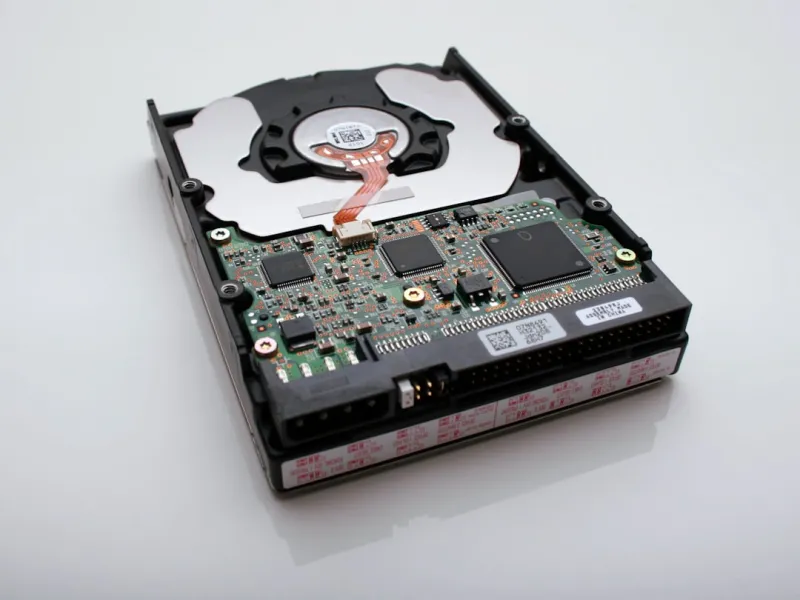
The heart of every traditional hard drive is still the magnetic spindle, but the engineering refinements over the past decade are impressive. Modern 3.5‑inch drives now spin at 7,200 RPM or 10,000 RPM, delivering sequential read speeds that hover around 250 MB/s for the former and 320 MB/s for the latter. While those numbers lag behind NVMe SSDs, they are more than adequate for bulk data ingestion—think 4 K video streams or raw sensor feeds that demand sustained throughput without the expense of terabyte‑scale flash. Additionally, manufacturers have introduced larger cache buffers (up to 256 MB) and advanced error‑correction algorithms that boost reliability during heavy multitasking. For power users, the key takeaway is that a well‑chosen HDD still offers a cost‑effective way to store massive archives while freeing up SSD real estate for OS and application partitions where latency matters most.
Performance Metrics That Matter to Power Users
It’s tempting to chase headline figures like “3 TB/s” on a spec sheet, but real‑world performance hinges on three core metrics: rotational speed, areal density, and interface bandwidth. Rotational speed (RPM) directly influences latency—the time it takes for the read/write head to locate data. A 10,000 RPM drive can shave milliseconds off random access times, which is noticeable when loading large project files in a DAW or pulling textures into a game engine. Areal density, measured in gigabits per square inch, determines how much data fits on each platter; higher densities mean fewer platters, lower power draw, and reduced vibration. Finally, the SATA III (6 Gb/s) and emerging NVMe‑over‑PCIe bridge interfaces dictate the ceiling for data transfer. While SATA still dominates consumer HDDs, some enterprise models now ship with SAS (12 Gb/s) connectors that can be leveraged in high‑end workstations for faster backup streams. Understanding these nuances helps you match the right drive to the right task without overpaying for unnecessary speed.
Why Hard Drives Still Matter for Power Users
If you’ve been following my deep dive on HDD relevance, you know I’m not just nostalgic about spinning disks. The reality is that massive media libraries, archival footage, and AI training datasets often exceed the sweet spot of SSD capacity and cost. A 12 TB 7,200 RPM drive can store a full year’s worth of 8K video recordings for a broadcast studio at a fraction of the price of an equivalent SSD array. Moreover, HDDs excel in sequential write scenarios—think continuous sensor logging or massive database imports—where the write amplification penalty of flash becomes a bottleneck. By pairing a high‑capacity HDD with a fast NVMe boot drive, you create a tiered storage system that delivers both speed and space, a strategy that aligns perfectly with the 3‑2‑1 backup rule and keeps your workflow lean.
Future‑Proofing with Hybrid and Emerging HDD Tech
Looking ahead, the industry is betting on hybrid solutions and next‑generation magnetic technologies to extend HDD relevance. SSHDs (Solid State Hybrid Drives) combine a modest NAND cache with a traditional platter, automatically promoting frequently accessed files to flash for near‑SSD performance. For workloads that involve repetitive editing of the same footage, an SSHD can feel like a pure SSD without the price tag. On the research front, technologies like Shingled Magnetic Recording (SMR) and Heat‑Assisted Magnetic Recording (HAMR) are pushing areal densities beyond 2 Tb/in², promising 20 TB+ consumer drives in the next couple of years. My Future‑Proof PC Upgrades guide recommends keeping an eye on these trends: a HAMR‑based drive will likely offer better longevity and lower power consumption, making it an ideal candidate for long‑term archival storage in power‑user rigs.
External Storage Solutions for the Mobile Power User
In 2026, the line between internal and external storage has blurred thanks to USB 4.0 and Thunderbolt 4, both delivering up to 40 Gb/s—fast enough to saturate even the fastest external SSDs. However, when you need to transport terabytes of raw footage or backup a multi‑drive RAID array on the road, a rugged 10‑TB external HDD with USB 4.0 connectivity offers a sweet spot of durability, capacity, and price. Many manufacturers now incorporate built-in hardware encryption chips, making it easier to secure data without sacrificing transfer speeds. Pairing an external HDD with a laptop that runs Windows 12’s new “DirectStorage” feature can dramatically reduce load times for large game assets, turning a once‑clunky external drive into a viable extension of your primary workflow.
Encrypting Your Data Without Sacrificing Speed
Security is non‑negotiable for any power user, especially when you’re moving sensitive client files across multiple devices. Modern hard drives often support self‑encrypting drive (SED) standards such as Opal 2.0, which handle AES‑256 encryption in hardware, eliminating the performance hit associated with software‑based solutions. In my recent Encryption Essentials guide, I stress the importance of enabling drive‑level encryption before you ever write data to the platter. Not only does this protect against physical theft, but it also integrates seamlessly with Windows 12’s BitLocker enhancements, allowing for instant unlock via TPM 2.0. When combined with a high‑capacity HDD, you get the best of both worlds: massive storage capacity and enterprise‑grade security without a noticeable slowdown during large file transfers.
Backup Strategies That Leverage HDD Strengths
The classic 3‑2‑1 backup rule still holds true: three copies of your data, on two different media, with one off‑site. Hard drives excel at fulfilling the “two different media” component because they provide a reliable, low‑cost storage tier that can sit alongside cloud services. I recommend a two‑stage local backup: a fast NVMe drive for daily snapshots, and a larger 14 TB HDD for weekly full backups. Automated tools like Windows 12’s “File History” now support direct write to SED‑enabled HDDs, ensuring that each backup is encrypted at rest. For the off‑site copy, you can ship an external HDD to a trusted colleague or use a secure, encrypted cloud bucket. The key is to keep the HDD in a controlled environment—cool, vibration‑free, and with regular spin‑up cycles—to avoid the dreaded “stiction” that can afflict idle drives over long periods.
Integrating HDDs with Windows 12’s Performance Features
Windows 12 isn’t just about flashy UI upgrades; it introduces intelligent storage management that can actually make HDDs feel faster. The OS now includes a “Hybrid Cache” system that automatically offloads frequently accessed files from slower HDDs to an NVMe cache, similar to how a hybrid drive works but on a system‑wide level. This means that large video projects stored on a 12 TB platter can be streamed with minimal latency, as the OS predicts and pre‑fetches the next blocks of data. Additionally, the new “DirectStorage” API, originally built for gaming, now supports non‑volatile memory express (NVMe) and even high‑throughput SATA devices, allowing developers to write applications that can stream assets directly from HDDs without CPU bottlenecks. For power users, enabling these features in the Settings panel can translate into smoother multitasking and faster load times across the board.
Choosing the Right Drive for Your 2026 Power‑User Build
After dissecting performance, security, and future trends, the final decision boils down to three questions: How much data do you need to store? How quickly must you access it? And how much are you willing to invest? For most power‑user builds, a balanced approach works best: a 2 TB NVMe SSD as your OS and primary applications, a 4 TB SATA SSD for active project files, and a 12‑14 TB 7,200 RPM HDD for long‑term archives. If your budget allows, consider an SSHD for the middle tier, giving you a “best‑of‑both‑worlds” performance boost on frequently used assets. Don’t forget to factor in power consumption—modern HDDs draw as little as 4 W at idle, making them friendly for silent‑room builds. By aligning your storage hierarchy with the specific demands of video editing, AI training, or massive game libraries, you’ll future‑proof your workflow for the years to come, keeping you productive and ahead of the competition.




