Why the Blue Screen Still Shows Up in 2026
Even after a decade of “stability” promises from every major OEM, the infamous Blue Screen of Death (BSOD) still pops up like an unwanted guest at a power‑user’s party. I’ve spent countless nights in 2026 wrestling with cryptic stop codes while my AI‑driven workloads grind to a halt, and I’ve learned that the blue screen isn’t just a relic—it’s a symptom of a complex ecosystem where hardware, drivers, and software intersect. As someone who lives on the bleeding edge of development, I treat each crash as a diagnostic puzzle rather than a fatal error. The key is to shift from panic to methodical analysis, recognizing that the BSOD is actually trying to tell you something useful. In this post I’ll walk you through the modern causes of the blue screen, the tools you need to diagnose it, and the preventative habits that keep it at bay, all from my seasoned perspective as a power user who’s been there, rebooted that.
The Anatomy of a Modern BSOD
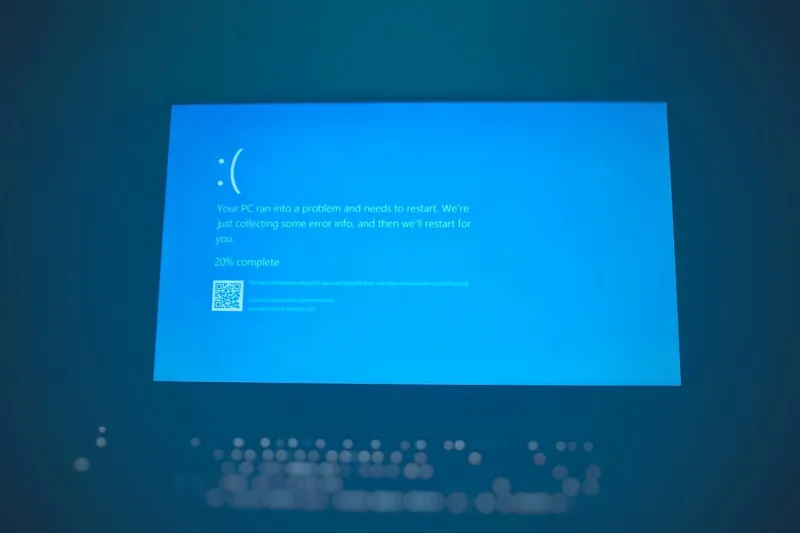
In 2026 the BSOD has evolved beyond the simple “stop code” of the early 2000s. Today it’s a richly formatted dialog that includes a QR code linking directly to Microsoft’s online diagnostics, a hexadecimal error string, and often a list of recent driver updates. While the visual flair may have improved, the underlying mechanisms remain rooted in kernel‑level exceptions: illegal memory accesses, driver misbehaviors, and hardware faults. For power users, the most common culprits are now high‑performance GPUs pushing the limits of PCIe 5.0, AI accelerators that demand low‑latency memory, and firmware that can’t keep up with rapid firmware‑driven feature updates. When you see that signature blue background, remember that Windows is shielding you from a deeper systemic issue—one you can actually fix if you understand the stack trace. The first step is to capture the error details before the system reboots; tools like WinDbg and the built‑in Event Viewer are indispensable for this, and they’ll become your best friends as we move forward.
Common Triggers That Power Users Overlook
Power users tend to focus on the flashy parts of a build—latest CPUs, RTX 5090‑class GPUs, and AI co‑processors—while neglecting the quieter, yet equally critical, components. Driver conflicts are still the #1 cause of BSODs, especially when you have a mix of legacy peripherals and cutting‑edge hardware. In 2026, many manufacturers ship drivers that are optimized for their own hardware but not for the diverse ecosystems power users assemble. Memory mismatches, such as mixing RAM sticks of different timings, can cause subtle timing errors that only surface under heavy load. Additionally, aggressive power‑management settings in the BIOS can cause voltage droops when a GPU spikes, leading to a “PAGE_FAULT_IN_NONPAGED_AREA” crash. Lastly, modern malware that targets kernel space—often masquerading as legitimate drivers—can inject code that triggers a BSOD as a side effect of its own instability. Recognizing these hidden triggers helps you pre‑emptively address them before they become catastrophic.
Building a Diagnostic Toolkit for the Blue Screen
The best defense against the BSOD is a well‑stocked diagnostic toolkit. Start with WinDbg Preview, which now integrates directly with Microsoft’s cloud symbol server, allowing you to resolve most crash dumps without manual symbol configuration. Pair it with WhoCrashed for a quick visual summary of recurring faults, and don’t forget the built‑in Windows Reliability Monitor for a timeline view of events leading up to a crash. For deeper analysis, enable Driver Verifier on suspect drivers; it will stress‑test them and surface hidden bugs that only appear under extreme conditions. If you need a refresher on how to interpret these dumps, check out Mastering the Blue Screen: A Power‑User’s Guide to Diagnosing and Preventing Crashes. This resource walks you through setting up symbol paths, reading stack traces, and isolating the offending module, turning a cryptic hex dump into actionable insight.
Preventive Maintenance: Updates, Firmware, and the Critical 2026 Patch Cycle
Staying ahead of the BSOD curve in 2026 means treating updates as a non‑negotiable habit rather than an optional afterthought. Microsoft’s “Critical 2026 Updates” often contain kernel patches that address obscure race conditions introduced by new hardware features. Skipping these can leave your system vulnerable to crashes that appear random but are actually documented bugs. Likewise, firmware updates for SSDs, motherboards, and GPU BIOSes are essential; they resolve timing issues that can cause memory corruption under sustained AI workloads. I recommend a quarterly “maintenance window” where you systematically apply all pending Windows updates, verify driver versions against the manufacturers’ release notes, and run a full system health check using Windows Memory Diagnostic. For a deeper dive into which updates matter most, see Critical 2026 Updates Every Power User Must Act On. Treating updates as a ritual rather than a chore dramatically reduces the frequency of those dreaded blue screens.
When the Hardware Itself Becomes the Villain
Even the most meticulously maintained software stack can be undone by a faulty piece of hardware. In my experience, the most common hardware‑related BSODs stem from RAM errors, failing NVMe drives, and power delivery hiccups on the motherboard. Modern high‑capacity DDR5 kits run at tight timings that can expose subtle timing mismatches, especially when overclocked. A quick MemTest86+ run can reveal bad sticks before they cause a system crash. Likewise, SSDs that operate near their endurance limits may return corrupted data, triggering “CRITICAL_PROCESS_DIED” errors. Don’t overlook the power delivery subsystem; a sagging VRM on a mid‑range motherboard can’t sustain the draw of a 2026 GPU under AI inference, leading to instantaneous blue screens. If you’re still debating the merits of hard drives in an SSD‑only world, my earlier piece Why Hard Drives Remain Essential for Power Users in 2026 explains why a dedicated HDD for logs and swap can actually improve overall system stability.
Software Safeguards: Sandboxing, Malware, and AI‑Driven Threats
Software‑level defenses are just as crucial as hardware diligence. Modern malware often masquerades as legitimate drivers, inserting themselves into the kernel and causing intermittent BSODs that are difficult to trace. Using Windows Sandbox for testing any newly downloaded driver or utility provides an isolated environment that prevents kernel contamination. Additionally, employing a reputable endpoint protection platform with “kernel‑mode” monitoring can flag suspicious driver behavior before it crashes your system. For AI developers, containerization with tools like Docker or WSL 2 ensures that experimental code runs in a segregated space, limiting the impact of memory leaks or unhandled exceptions. Remember to keep your anti‑malware definitions up to date; the same “critical 2026 updates” that protect the OS also shore up defenses against kernel‑level exploits that could otherwise manifest as blue screens.
Designing a Resilient Power‑User Machine for 2026
Putting it all together, a truly resilient power‑user rig balances raw performance with stability. Choose a motherboard that offers robust VRM cooling, dual BIOS, and a proven track record for firmware updates—something you’ll find detailed in Choosing the Perfect Motherboard for Power Users in 2026. Pair it with a high‑capacity DDR5 kit that runs at stock timings for everyday use, reserving overclocked profiles for isolated benchmarking sessions. Incorporate an NVMe SSD for the OS and development environments, but keep a 2‑TB HDD for logs, swap files, and as a safety net for data that doesn’t need the speed of flash. Finally, implement a layered software strategy: regular driver verification, sandboxed testing, and a disciplined update schedule. When you treat each layer—hardware, firmware, OS, and software—as a collaborative system rather than isolated silos, the blue screen becomes a rare footnote rather than a daily headline.
Final Thoughts: Turning Blue Screens Into Learning Opportunities
At the end of the day, the Blue Screen of Death is not an enemy to be feared but a diagnostic beacon that points you toward system weaknesses. By adopting a proactive mindset—regular maintenance, thorough diagnostics, and strategic hardware choices—you can dramatically reduce the incidence of BSODs in your 2026 workflow. I’ve turned countless crashes into valuable lessons that sharpened my troubleshooting instincts, and I encourage you to do the same. Share your own blue‑screen stories in the comments, subscribe for more deep‑dive power‑user content, and remember: every crash is a chance to refine your rig, reinforce your processes, and emerge stronger on the other side.