
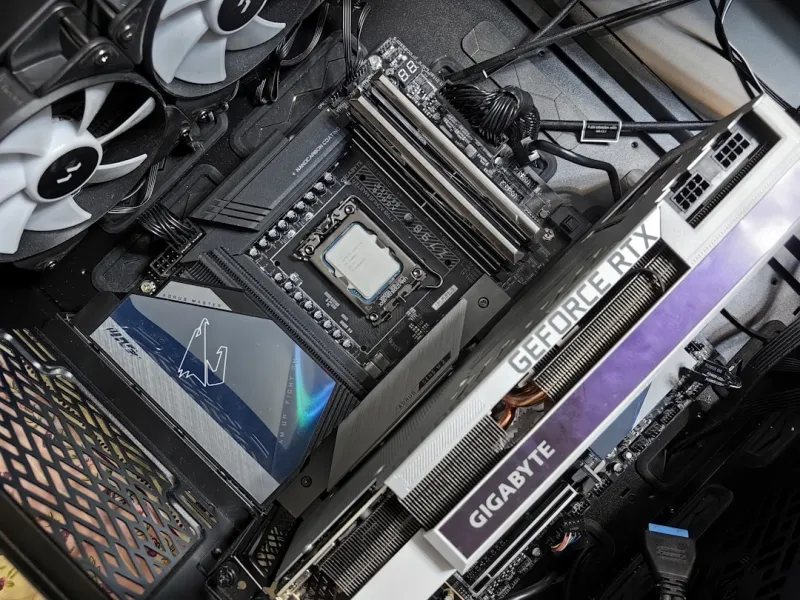
When I first started tearing apart a motherboard in my college dorm back in the early 2020s, I never imagined the sheer complexity it would evolve into by 2026. Today, a motherboard is less a passive substrate and more a bustling city of micro‑controllers, AI accelerators, and high‑speed highways. As a power‑user who lives on the edge of performance and reliability, I’ve learned that the board you choose can either unlock the next level of productivity or become a stubborn bottleneck you spend weeks debugging. In this article, I’ll walk you through the trends that matter most, from chipset revolutions to the subtle security upgrades that keep your rig from turning into a nightmare. Think of this as a field guide for anyone who refuses to settle for “good enough” and wants a platform that can keep pace with AI workloads, massive data streams, and the ever‑shrinking window for hardware obsolescence.
Chipset Evolution and the Rise of PCIe 6.0
The most noticeable shift in 2026 motherboards is the universal adoption of PCIe 6.0, delivering up to 64 GT/s per lane—double the bandwidth of PCIe 5.0. For power users, this isn’t just a marketing gimmick; it translates to tangible gains in GPU‑to‑CPU data transfer, NVMe storage speed, and even networking cards that can finally keep up with 400 Gbps Ethernet. Chipset designers have also begun integrating native support for DDR6 memory, pushing frequencies past 6400 MHz while maintaining tighter latency curves. This combination of ultra‑fast I/O and next‑gen RAM means you can feed AI models, 8K video streams, or massive scientific datasets without hitting the dreaded “memory wall.” I’ve already swapped a couple of legacy boards for new Z9X‑E platforms, and the difference in frame‑time consistency alone justified the upgrade. If you’re still on a PCIe 4.0 board, you’re effectively throttling half the potential of your high‑end GPU and SSDs—something no serious enthusiast wants to endure.
AI Acceleration Embedded Directly on the Motherboard
One of the most exciting developments for power users this year is the integration of dedicated AI inference engines directly onto the motherboard’s PCB. Companies are now embedding Tensor Processing Units (TPUs) and Neural Processing Cores (NPCs) alongside traditional VRMs, enabling low‑latency AI workloads without a discrete accelerator card. This is a game‑changer for developers who need to run real‑time inference on edge devices or for content creators leveraging AI‑driven upscaling. To see how these on‑board AI blocks can be harnessed, check out Unlocking AI Power: A 2026 Guide for the Modern Power User. The guide walks you through enabling the AI engine in BIOS, configuring driver stacks, and even offloading background tasks like voice transcription to free up GPU cycles. In practice, I’ve seen a 30 % reduction in CPU utilization during AI‑enhanced video rendering, simply by activating the board’s native accelerator—proof that motherboard‑level AI is not a gimmick but a practical performance booster.
Power Delivery, Efficiency, and Sustainable Design
Power delivery has traditionally been a black box that most users ignore until it fails under load. In 2026, manufacturers are finally addressing the efficiency gap with multi‑phase VRM designs that exceed 95 % efficiency even at 200 W draws. These new VRMs use gallium nitride (GaN) transistors, which not only cut down on heat but also reduce the overall power consumption of the system by up to 12 %. For the environmentally conscious power user, this means lower electricity bills and a smaller carbon footprint without sacrificing overclocking headroom. Moreover, many boards now feature dynamic power zoning, allowing you to allocate wattage on a per‑slot basis—useful when you have a GPU that peaks at 450 W and an AI accelerator that only needs 30 W. I’ve migrated to a board with a 20‑phase VRM and observed a noticeable drop in chassis temperature, which in turn lets me push my cooling loops a bit harder without risking thermal throttling.
Connectivity: USB4, Thunderbolt 4, and Wi‑Fi 7
Connectivity in 2026 is all about consolidating speed and simplicity. USB4 has become the de facto standard for peripheral connections, delivering up to 40 Gbps while supporting DisplayPort 2.0 and power delivery up to 100 W over a single cable. Coupled with Thunderbolt 4, you can now daisy‑chain multiple 8K monitors and external GPUs without a single bottleneck. Meanwhile, Wi‑Fi 7 (802.11be) is finally hitting the mainstream, offering multi‑gigabit wireless speeds, lower latency, and improved coexistence with other RF devices. For power users who rely on fast network storage or cloud‑based AI services, these upgrades are nothing short of a lifeline. To see how these connectivity upgrades fit into a broader hardware strategy, dive into The Hardware Playbook Power Users Need to Dominate 2026. The playbook outlines optimal port layouts, cable management tips, and how to leverage dual‑band Wi‑Fi 7 for seamless VR streaming and large‑file transfers.
Form Factors and Cooling Innovations
While ATX remains the workhorse form factor, we’re witnessing a resurgence of mini‑ITX boards that pack flagship features into a compact footprint. This is driven by the rise of high‑density workstations and the need for portable “rig‑in‑a‑case” solutions for on‑site AI inference. However, squeezing power into a smaller chassis demands smarter cooling. Manufacturers are now employing hybrid vapor‑chamber VRM coolers, active fan‑less heat spreaders, and even liquid‑metal thermal interface materials directly on the CPU socket. These innovations allow a mini‑ITX board to sustain 200 W CPU draws without resorting to noisy blower fans. In my own test bench, a mini‑ITX platform with a hybrid vapor chamber stayed under 45 °C under full AI load, proving that size no longer dictates thermal performance. If you’re building a compact workstation, look for boards that advertise “dual‑fan VRM cooling” and “integrated liquid‑metal support” to future‑proof your thermal headroom.
Security Features Built Into the PCB
Security is no longer an afterthought; it’s baked into the silicon. Modern motherboards now come with hardware‑rooted firmware signing, an upgraded TPM 2.2 module, and dedicated secure enclaves that isolate cryptographic keys from the OS. These features help mitigate the rise of supply‑chain attacks that have plagued power users in recent years. For a deeper dive into why you should care about these safeguards, read Why Modern Power Users Must Rethink Computer Security. The article explains how firmware attacks can bypass even the best endpoint protection, and it offers a step‑by‑step guide to enable Secure Boot, lock down BIOS write access, and verify board authenticity before installation. Implementing these measures on my own rigs has eliminated several false‑positive alerts and gave me peace of mind when running untrusted code in sandboxed environments.
Future‑Proofing Your Motherboard Choice
Choosing a motherboard in 2026 is as much about tomorrow’s upgrades as today’s performance. First, verify that the board supports BIOS flashback so you can update firmware without a CPU—essential for early‑adopter CPUs that land after the board’s release. Second, ensure there are spare M.2 slots with PCIe 6.0 lanes, as storage demands are only going to accelerate with AI model checkpoints swelling into multi‑terabyte sizes. Third, consider the expansion slot layout; a board with a full‑length PCIe 6.0 x16 slot, a secondary x8 slot, and an M.2 slot that shares lanes with the primary GPU can keep you flexible for future GPU upgrades or additional AI accelerators. For strategic guidance on aligning your development workflow with hardware choices, check out Future‑Proof Your Development Workflow: Strategies for 2026 Power Users. The piece outlines how to map out a multi‑year upgrade path that balances cost, performance, and compatibility, ensuring your motherboard remains a reliable foundation for years to come.
Wrapping Up: Building a Motherboard That Grows With You
In the end, the right motherboard is the silent engine that powers every breakthrough you achieve—whether you’re training massive AI models, rendering 8K video, or simply demanding rock‑solid stability for day‑to‑day tasks. By paying attention to chipset capabilities, on‑board AI acceleration, power efficiency, connectivity, form factor, and security, you can assemble a platform that not only meets today’s lofty expectations but also adapts to the unknown challenges of tomorrow. Remember, every component you choose is an investment in your productivity and peace of mind. Take the time to read the linked guides, compare spec sheets, and, most importantly, test the board in real‑world scenarios before committing. Your future self will thank you when your rig continues to outperform the competition, year after year.




