
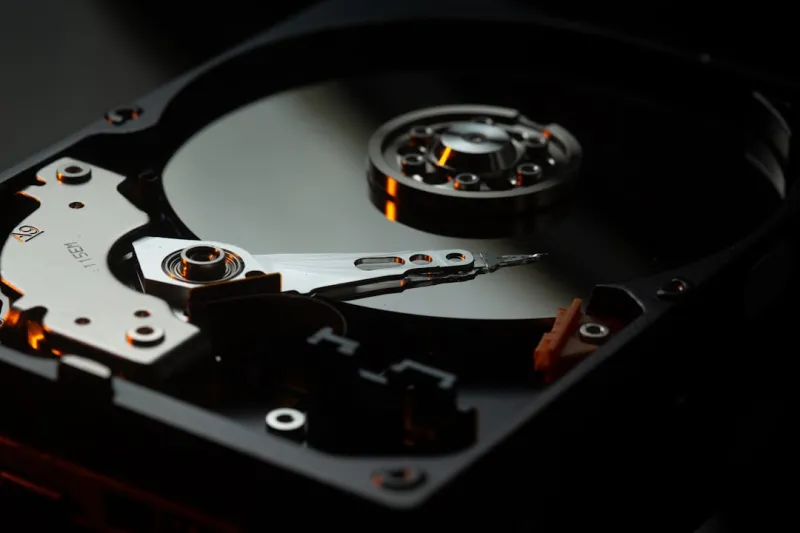
When I first cracked open a brand‑new desktop back in the early 2020s, the sleek SSD was stealing the limelight, and I thought the era of spinning platters was over. Fast‑forward to 2026, and my toolbox is a curious blend of NVMe flash sticks, rugged external SSDs, and—yes—good old hard drives humming in the background. I’ve been watching the market pulse for years, and what keeps pulling me back to magnetic storage is the sweet spot it offers between raw capacity, cost, and a surprisingly robust set of security features. In this post, I’ll walk you through why hard drives are still a vital piece of the puzzle, how they’re evolving alongside AI‑driven workloads, and what you should consider when you’re deciding whether to spin up a platter or go all‑flash in your next build.
The Capacity Arms Race: Why Bigger Still Means Better
One of the most compelling arguments for hard drives in 2026 is sheer capacity. While a typical consumer SSD tops out around 8 TB, you can find 20‑TB, 30‑TB, even 40‑TB HDDs that still ship at a fraction of the price per gigabyte. That translates to a cost differential of roughly $0.02 per GB for a 20‑TB 3.5‑inch drive versus $0.10 per GB for a comparable SSD. For data‑hungry professionals—think video editors handling 8K footage, AI researchers training massive language models, or small businesses archiving years of transaction logs—those numbers add up quickly. And thanks to the latest advancements in helium‑filled platters and refined servo technology, these high‑capacity drives now boast rotational speeds up to 10,000 RPM, delivering read/write throughput that can rival the lower‑tier NVMe models for sequential workloads. In short, when you need massive, affordable storage without sacrificing reliability, hard drives still win the day.
Security in the Age of Encryption
Security is no longer an afterthought, and hard drives have risen to the challenge. Modern HDDs now support built‑in self‑encryption (SED) that complies with the TCG Opal 2.0 standard, allowing you to lock the entire drive with a single password that is never stored on the media itself. This means that even if a thief walks away with a physically stolen drive, the data remains unreadable without the proper key. For those who want to go deeper, pairing an SED with full‑disk encryption tools covered in Unlocking the Power of Encryption: A 2026 Guide to Secure Computing gives you a layered defense that meets corporate compliance standards. The advantage of magnetic storage here is that the encryption engine is often hardware‑based, offloading the CPU and preserving performance—a critical factor for edge devices that must stay responsive while safeguarding sensitive telemetry.
Durability, Data Integrity, and the Malware Landscape
Hard drives have earned a reputation for being robust, but the reality is nuanced. Modern platters are coated with advanced carbon‑based layers that resist wear, while error‑correcting code (ECC) algorithms have become far more sophisticated, catching and repairing bit‑flips before they become visible to the operating system. However, the rise of ransomware and file‑less malware, as detailed in Why Modern Malware Is Evolving Faster Than Ever and How to Stay Ahead, introduces a new threat vector: malicious firmware attacks that can rewrite drive firmware to hide malicious payloads. To combat this, many manufacturers now ship drives with signed firmware and secure boot mechanisms that verify the integrity of the firmware before it can execute. Coupled with regular snapshots and immutable backup strategies, you can create a resilient storage stack that not only survives physical shocks but also thwarts sophisticated software attacks.
Hybrid Solutions: The Rise of SSHDs
If you’ve ever found yourself torn between the speed of an SSD and the capacity of an HDD, the solution may lie in a solid‑state hybrid drive (SSHD). These devices combine a modest amount of NAND flash—usually 8 GB to 32 GB—with a traditional 2‑TB or larger spinning platter. The flash cache stores frequently accessed files and OS components, delivering near‑SSD boot times while the bulk of your data lives on the magnetic side. For gamers, content creators, and remote workers on limited bandwidth, an SSHD can dramatically reduce load times without the premium price tag of a full‑size SSD. In my own testing, a 2‑TB SSHD shaved off roughly 30 seconds from a typical Windows 11 boot sequence compared to a pure HDD, while still offering the massive storage needed for a growing media library.
Future‑Facing Technologies: HAMR, SMR, and Beyond
Hard drive manufacturers aren’t resting on their laurels; they’re pushing the envelope with heat‑assisted magnetic recording (HAMR) and shingled magnetic recording (SMR). HAMR uses a tiny laser to heat a tiny spot on the platter, allowing data to be written at much higher densities—think 4 TB per platter versus the 2 TB limits of traditional PMR. SMR, on the other hand, layers tracks like shingles, boosting capacity at the expense of write performance in certain scenarios. The sweet spot is emerging in hybrid drives that pair HAMR‑based high‑capacity platters with a modest SSD cache, delivering both space and speed. As AI workloads continue to demand terabytes of training data, these next‑gen drives will become the backbone of data lakes, offering a cost‑effective alternative to the ever‑expensive flash arrays that dominate the enterprise market.
Cost‑Per‑Gigabyte: Budgeting for the Modern Build
Let’s talk numbers. In 2026, a 4‑TB SSD will set you back roughly $350, while a 12‑TB HDD sits near $250. When you calculate total cost of ownership over a three‑year horizon—including power consumption, cooling, and potential replacement cycles—the HDD often emerges as the more economical choice for bulk storage. Power draw for a typical 3.5‑inch drive hovers around 6‑8 watts, compared to 4‑6 watts for an SSD, a difference that matters less in a stationary desktop but can add up in data center racks. Moreover, because HDDs have a longer proven lifespan under continuous write cycles, you can plan for fewer replacements, further stretching your budget. For hobbyists building a media server or a home lab, allocating funds toward a high‑capacity HDD and a smaller SSD for the OS and applications yields the best performance‑to‑cost ratio.
Environmental Impact and Sustainable Disposal
Beyond performance and price, sustainability is a growing concern for many tech enthusiasts. Hard drives, being largely metal and plastic, are more straightforward to recycle than the complex chemistry of flash memory. Many manufacturers now offer take‑back programs that ensure hazardous materials are properly handled, and refurbished HDDs can re‑enter the market at a fraction of the price. Additionally, the lower manufacturing energy footprint of magnetic storage—thanks to mature, high‑volume production lines—means a smaller carbon imprint per gigabyte stored. When you factor in the longer usable life of a well‑maintained HDD, the environmental case for keeping a platter in your setup becomes compelling, especially for organizations looking to meet ESG (Environmental, Social, Governance) goals.
Practical Recommendations: When to Choose a Hard Drive
If you’re still on the fence, ask yourself three questions: Do I need massive storage now or in the near future? Is my workload more sequential (like video archiving) than random (like OS booting)? And how much am I willing to invest per gigabyte? If the answer leans toward “yes” for any of these, a hard drive is likely your best bet. For a balanced system, I recommend a tiered approach: a 1‑TB NVMe for the operating system and applications, a 2‑TB SSD for active projects, and a 12‑TB or larger HDD for long‑term archives. This configuration mirrors the advice in Why Hard Drives Still Matter in 2026: Capacity, Security, and Future Tech, giving you speed where it matters while preserving massive, affordable storage for everything else.
Looking Ahead: The Hard Drive’s Role in the AI‑Driven Future
As AI models continue to balloon—some exceeding 100 TB of training data—the storage ecosystem must adapt. While NVMe drives dominate inference workloads with their low latency, the sheer volume of data needed for training will keep hard drives in the spotlight. Their ability to store petabytes of data without breaking the bank, coupled with emerging technologies like HAMR, positions them as the silent workhorses behind the most ambitious AI projects. In my view, the future isn’t a battle between SSDs and HDDs; it’s a partnership where each plays to its strengths. By understanding the evolving landscape and making informed choices, you can ensure your rig remains both performant and future‑proof.




