
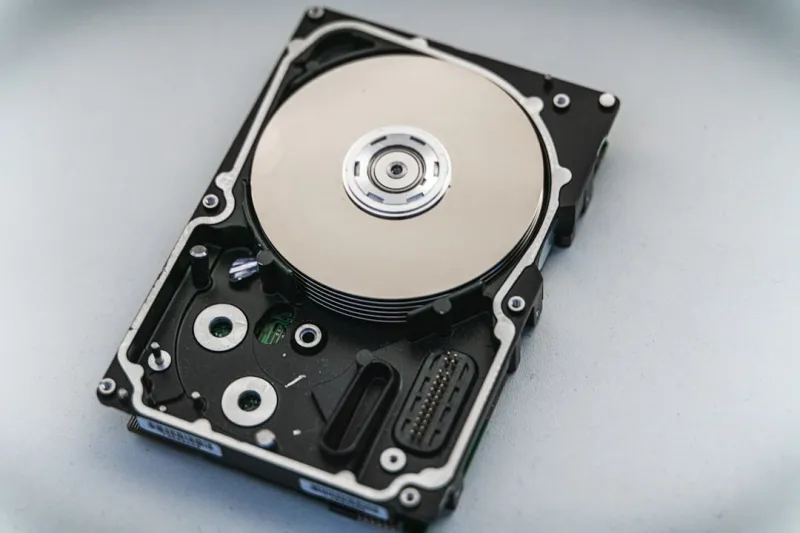
When I first cracked open my 2010 500 GB platter drive, the whir of the spindle felt like a tiny engine humming under my desk. Fast‑forward to 2026, and that same nostalgic buzz is now sharing space with whisper‑quiet NVMe flash that can read a full‑HD movie in a fraction of a second. Yet, despite the meteoric rise of solid‑state technology, hard disk drives (HDDs) remain the unsung workhorses of the storage world, especially for anyone who needs massive capacity without breaking the bank. In this deep‑dive, I’ll walk you through why the humble HDD is still relevant, how its technology has morphed to meet modern demands, and what you should look for when you’re hunting for that perfect drive—whether you’re building a high‑performance rig, stocking a data center, or simply safeguarding a lifetime of memories.
Let’s start with the core distinction that still drives the market: spinning magnetic platters versus solid‑state silicon. SSDs dominate the premium segment because they deliver lightning‑fast random‑access speeds, low latency, and near‑silent operation. However, they come at a premium per gigabyte, which becomes a limiting factor when you’re staring at a 30‑TB video library or a multi‑petabyte backup vault. HDDs, on the other hand, have continued to push the envelope on areal density, offering a sweet spot of cost‑per‑gigabyte that no flash solution can match today. In 2026, a 20‑TB 7200 RPM drive can sit comfortably under $300, while an equivalent SSD would easily eclipse the $1,500 mark. For gamers, content creators, and small‑business owners, this price differential often determines whether you can afford the storage you truly need.
Capacity isn’t the only metric that’s seen a dramatic upgrade. The industry’s relentless pursuit of higher areal densities has birthed drives that cram more data onto each square inch of magnetic media than ever before. Thanks to technologies like shingled magnetic recording (SMR) and the newer heat‑assisted magnetic recording (HAMR), manufacturers are now rolling out 30‑TB and even 40‑TB drives for mainstream use. These behemoths are not just for data centers; they’re becoming viable options for prosumer workstations that handle 8K video editing or massive scientific datasets. The key takeaway? When you shop for a high‑capacity HDD in 2026, you’re no longer limited to the old “10‑TB ceiling” you might have heard about a few years ago. Instead, you can plan your storage architecture around future growth, knowing that the next upgrade could be a seamless addition rather than a costly overhaul.
Performance, however, remains a nuanced conversation. While a 7200 RPM drive still tops the 5400 RPM models in sequential read/write speeds, the real game‑changer has been the integration of larger onboard caches and hybrid architectures. Modern HDDs now sport up to 256 MB of DRAM or NAND cache, acting as a rapid buffer that smooths out random‑access workloads—something that used to be the sole domain of SSDs. This cache, combined with sophisticated firmware algorithms, can dramatically reduce latency for everyday tasks like loading operating systems or launching large applications. Moreover, the introduction of SATA III and emerging NVMe‑over‑SAS interfaces means that HDDs can now feed data to CPUs at rates that feel respectable even in AI‑heavy workloads, bridging the gap between pure capacity and usable speed.
Reliability is where HDDs have historically shone, and 2026 is no different. Manufacturers now publish mean time between failures (MTBF) figures that climb into the millions of hours, supported by advanced SMART monitoring and predictive failure analytics. The latest drives come equipped with multi‑zone error correction, dynamic spin‑down for energy savings, and vibration‑tolerant designs that make them ideal for densely packed server racks. As a DIY enthusiast, I always keep an eye on the drive’s health via tools like CrystalDiskInfo, checking parameters such as reallocated sector count and power‑on hours. Proactively swapping out a drive that’s showing early signs of wear can save you from catastrophic data loss—especially crucial when your backups are stored on the same physical media.
Security concerns have reshaped the HDD landscape as well. With ransomware attacks becoming more sophisticated, simply relying on offline backups is no longer enough. Modern self‑encrypting drives (SEDs) implement hardware‑based AES‑256 encryption, ensuring that data at rest is unreadable without proper authentication. If you want to dive deeper into why encryption is essential in today’s hyper‑connected world, check out our piece on why modern encryption is the key to staying safe. Pairing an SED with strong BIOS passwords and TPM integration creates a layered defense that protects both personal archives and mission‑critical business data. For enterprises, managing encryption keys through a centralized key management system (KMS) adds an extra safeguard, allowing you to rotate keys without taking the drive offline—a critical feature when uptime is non‑negotiable.
From a data‑center perspective, the role of HDDs is evolving from a one‑size‑fits‑all solution to a strategic component in tiered storage architectures. Hot data—think active databases and frequently accessed files—still lives on NVMe or high‑end SSDs, while warm and cold data find their sweet spot on high‑capacity, low‑cost HDDs. This approach maximizes performance while minimizing total cost of ownership. If you’re curious about how to balance these components in a future‑ready build, our guide on building a balanced, future‑ready PC walks you through the decision matrix, factoring in workload patterns, budget constraints, and long‑term scalability. By aligning storage tiers with specific workload demands, you can achieve the speed of flash where it matters most and the capacity of magnetic media where latency is less critical.
For the hobbyist building a custom rig, selecting the right HDD is less about raw specs and more about use‑case alignment. A gamer who values quick level loads might opt for a 2‑TB 7200 RPM drive with a hefty cache, pairing it with a fast NVMe boot drive to handle the OS and core applications. Conversely, a photographer or video editor will gravitate toward a 16‑TB or 20‑TB drive, prioritizing capacity and reliability over top‑end speed, especially when archiving RAW footage. Don’t overlook form factor either—while 3.5‑inch drives dominate desktops, 2.5‑inch models are making a comeback in compact builds, offering the same capacities in a slimmer profile thanks to advances in platter technology.
Looking ahead, the next frontier for magnetic storage is the widespread adoption of HAMR and its sibling, microwave‑assisted magnetic recording (MAMR). These technologies use localized heating or microwave energy to temporarily reduce the coercivity of the magnetic medium, allowing bits to be written at densities previously thought impossible. Early 2026 prototypes have already demonstrated 60‑TB platter capacities, and commercial roll‑outs are expected within the next two years. While the initial cost premium will be noticeable, the long‑term payoff lies in the sheer volume of data you can store on a single drive, reducing physical footprint and power consumption for massive archives. Keep an eye on manufacturer roadmaps if you’re planning a large‑scale deployment that needs to stay ahead of the curve.
Before you click “add to cart,” there are a few practical steps to ensure you get the most out of your new HDD. First, always verify that the drive’s firmware is up to date—manufacturers frequently release patches that improve power management and error handling. Second, enable write caching in your OS settings, but pair it with a reliable UPS to guard against sudden power loss, which can corrupt the cache. Third, schedule regular SMART health checks and perform full surface scans during low‑usage windows; this proactive maintenance can catch bad sectors before they cascade into larger failures. Finally, consider the environment: HDDs thrive in cool, vibration‑free settings, so proper mounting and airflow are essential for longevity. By treating your magnetic drive with the same respect you give your SSD, you’ll extend its usable life well beyond the warranty period.
In summary, the hard drive is far from a relic; it’s a dynamic, evolving component that continues to adapt to the demands of 2026’s data‑intensive world. Whether you’re a budget‑conscious creator, an enterprise architect balancing cost and performance, or a security‑focused professional safeguarding sensitive information, there’s a modern HDD that fits your needs. Embrace the advancements—higher capacities, smarter caches, built‑in encryption, and emerging recording technologies—and you’ll find that the spinning platter still has plenty of spin left in it. Happy building, and may your data always find a safe home on the magnetic side of the spectrum.




