
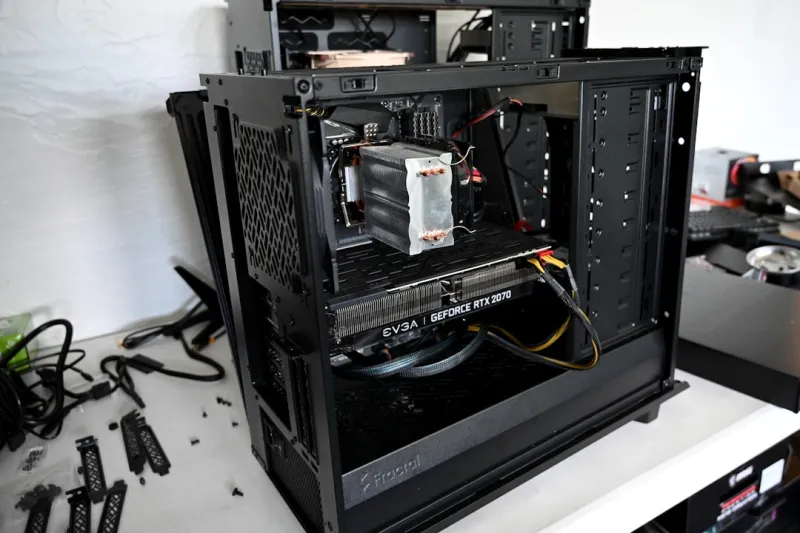
If you’ve been following my “tinkerer‑first” chronicles, you know I treat every upgrade like a small experiment in future‑proofing. In 2026 the PC market is exploding with options that make the decision tree look more like a neural net than a simple checklist. From silicon that can crunch AI workloads on the edge to storage that talks PCIe 5.0 at blistering speeds, the power‑user’s upgrade path has never been more exhilarating—or more daunting. My goal in this post is to cut through the hype and give you a pragmatic, step‑by‑step roadmap that aligns with the real‑world demands of development, content creation, and high‑fidelity gaming. Think of it as a living document you’ll revisit each time a new generation of components lands on the shelves. And because no workstation lives in a vacuum, I’ll weave in relevant insights from our deeper dives, such as Building a Future‑Ready Power‑User Workstation in 2026, to ensure every choice you make is part of an integrated ecosystem rather than an isolated upgrade.
Choosing the Right CPU for a 2026 Power‑User Build
When it comes to the heart of your rig, the CPU landscape in 2026 is dominated by a duopoly of high‑core‑count silicon that blurs the line between consumer and workstation. The latest Intel “Meteor” series pushes up to 48 efficient cores with a hybrid architecture that separates performance cores from efficiency cores, while AMD’s “Zen 5 Extreme” chips boast up to 64 cores with a massive cache hierarchy optimized for parallel compilation and AI inference. The key decision factor isn’t just core count; it’s how those cores translate into real‑world throughput for your primary workloads—whether that’s compiling massive codebases, rendering 8K video, or training lightweight neural nets. Look for high single‑thread performance if your toolchain still leans on legacy processes, but prioritize multi‑threaded scaling for modern development pipelines. Pairing these CPUs with a motherboard that offers ample PCIe 5.0 lanes ensures you won’t bottleneck future GPU or storage expansions. For a deeper dive into leveraging AI accelerators alongside your CPU, check out our guide on AI Computing Mastery.
Graphics Card Upgrades: From Ray Tracing to Real‑Time AI Upscaling
The GPU arena in 2026 is a battlefield of ray tracing mastery and AI‑driven upscaling, with the latest RTX 5090 and Radeon RX 9900 XT cards delivering over 100 TFLOPs of raw rasterization power and dedicated Tensor cores that handle DLSS 3.5‑style frame generation. If you’re a game developer, the ability to prototype with hardware‑accelerated ray tracing at 4K resolution can shave weeks off your iteration cycle. For content creators, the boost in CUDA and OpenCL cores translates to faster video encodes and real‑time color grading. However, don’t overlook thermal and power considerations; these beasts can draw upwards of 500 W under load, demanding a robust power delivery and effective cooling solution. Moreover, compatibility with your chosen motherboard’s PCIe 5.0 slot ensures you’ll tap the full bandwidth ceiling, reducing latency in high‑resolution texture streaming. If you ever encounter flickering, artifacting, or driver quirks, our troubleshooting checklist in Diagnosing and Fixing Common Video Card Problems in 2026 will save you hours of head‑scratching.
Memory Matters: DDR5, DDR6, and the Quest for Bandwidth
Memory upgrades are often the silent catalyst behind smoother multitasking and faster compile times. In 2026, DDR5 has become the baseline, but the early adopters are already experimenting with DDR6 modules that push data rates beyond 7,200 MT/s and feature on‑die ECC for added reliability. For power users who spin up dozens of VMs or run large in‑memory databases, the difference between 32 GB and 128 GB can be the line between a fluid workflow and constant swapping. Latency has also improved; CL‑30 timings are now common on high‑speed kits, reducing the time it takes for the CPU to fetch data. When selecting RAM, prioritize kits with a balanced frequency‑to‑latency ratio and ensure your motherboard’s BIOS supports the higher voltage profiles required by DDR6. Don’t forget to enable XMP profiles to let the system auto‑configure optimal timings. As we’ll explore in the upcoming motherboard section, a board with a robust memory controller is essential to fully exploit these speeds without sacrificing stability.
Storage Strategies: PCIe 5.0 NVMe, Optane, and Tiered Architectures
Storage in 2026 is no longer a single‑drive decision; it’s a tiered architecture that blends blistering NVMe performance with high‑capacity bulk storage. PCIe 5.0 NVMe SSDs now regularly achieve sequential reads above 14 GB/s, making them ideal for hot‑swap project files, massive game libraries, and AI model datasets. Yet, raw speed isn’t the only metric—endurance and latency matter for developers who constantly write and rewrite large binaries. That’s where Intel’s Optane PMEM modules shine, offering near‑RAM latency with persistent storage, perfect for caching compilation intermediates. For archival needs, a 4‑TB SATA‑based HDD remains cost‑effective, especially when paired with a smart caching algorithm that migrates frequently accessed data to the NVMe tier. Our comprehensive overview in Hard Drive Strategies Power Users Need to Stay Ahead outlines how to balance cost, capacity, and speed without over‑complicating your storage layout.
Power Supply Considerations: Efficiency, Modularity, and Future Growth
A reliable power supply is the unsung hero of any upgrade project. With CPUs and GPUs now pushing 500 W+ combined, a quality 80 PLUS Platinum unit delivering 1000 W or more is no longer optional—it’s a safety net against voltage droops that can corrupt data or shorten component lifespan. Look for modular designs to keep cable management tidy, especially if you’re integrating custom liquid loops or multiple GPU setups. Modern PSUs also feature digital monitoring via SMBus, allowing software to track real‑time wattage, temperature, and fan curves, which can be crucial for troubleshooting power‑related instability. Keep an eye on the “headroom” metric: a PSU rated at 30‑40 % above your calculated load ensures you won’t need to replace it with the next GPU generation. Investing in a high‑efficiency unit also reduces heat output and electricity costs—an environmental win that aligns with the sustainable computing mindset many of us champion.
Cooling Evolution: From AIOs to Custom Loops and the Quiet Revolution
Effective cooling has become an art form as component power densities climb. While a 360 mm AIO liquid cooler still provides ample thermal headroom for most CPUs, the new generation of low‑noise pumps and PWM‑controlled radiators let you push performance without the whine that used to accompany high‑RPM fans. For enthusiasts seeking sub‑50 °C idle temps on a 48‑core monster, a custom loop with a 140 mm dual‑radiator configuration and high‑flow EK‑style fittings can shave several degrees off load temperatures, extending the lifespan of both the CPU and GPU. Don’t overlook case airflow; a well‑ventilated chassis with a positive pressure design helps expel hot air generated by high‑speed VRM fans. Additionally, many modern motherboards now feature VRM heatsinks with integrated heat pipes, further reducing the thermal load on the cooling system. When planning your cooling solution, factor in future upgrades—leave space for an additional radiator or larger fans to keep the system adaptable.
Motherboard Mastery: PCIe Lanes, Connectivity, and Expansion Flexibility
The motherboard you choose sets the boundaries for every upgrade you’ll attempt in the coming years. In 2026, flagship boards now ship with up to 64 PCIe 5.0 lanes, allowing you to run multiple GPUs, high‑speed NVMe drives, and dedicated accelerator cards without bandwidth contention. Look for a robust VRM design—12+ power phases with digital PWM control ensure stable power delivery under extreme overclocking or sustained AI workloads. Connectivity has also leaped forward: USB4/Thunderbolt 4 ports provide 40 Gbps data transfer, while 10 GbE Ethernet becomes a standard feature for those who need low‑latency networking on large file transfers. Integrated Wi‑Fi 7 modules deliver multi‑gigabit wireless speeds, complementing the wired options for a flexible setup. For those who value future‑proofing, a board that supports both DDR5 and DDR6 memory, along with an M.2 slot that can accommodate both 2280 and 22110 form factors, will keep you ahead of the curve. For a deep dive into selecting the perfect board, see our detailed guide on Mastering Motherboard Selection for Power‑User Workstations.
Integrating Upgrades: Security, Software, and the Power‑User Mindset
All the hardware upgrades in the world won’t protect you if the software layer remains vulnerable. After you’ve refreshed your CPU, GPU, memory, and storage, the next critical step is to lock down the system with the latest firmware, BIOS, and driver updates—these are your secret weapons in 2026. A clean OS install, paired with a hardened Windows configuration, can shave milliseconds off boot times and guard against emerging threats that specifically target high‑performance workstations. Our recent article on Fortifying Your Power‑User Setup: Essential Security Moves for 2026 outlines the exact steps to harden your environment, from enabling Secure Boot to configuring Windows Defender Application Control. Once the foundation is secure, you’ll notice the tangible benefits of your upgrades: faster builds, smoother streaming, and a quieter, cooler machine that feels like an extension of your own workflow. Remember, the ultimate upgrade is the one that turns your rig into a reliable, future‑ready partner for every creative and technical challenge you’ll face.




