
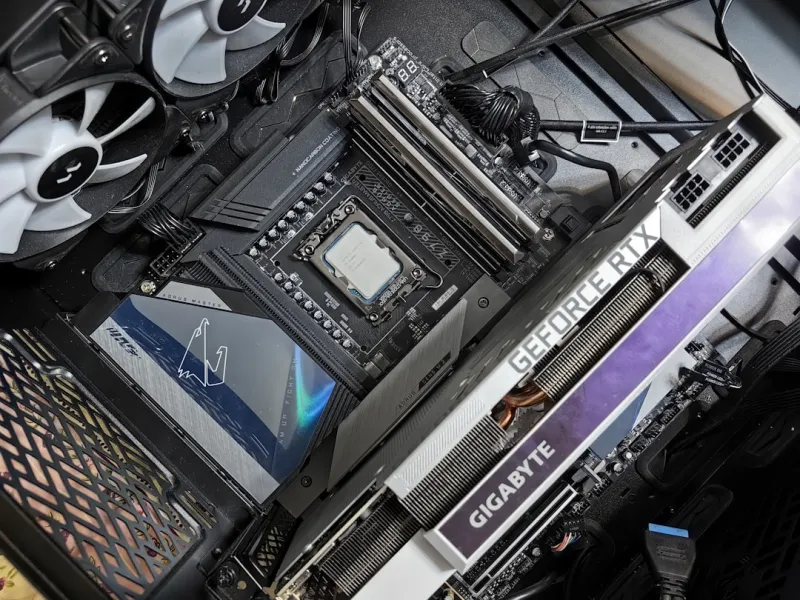
When you stare at a blank motherboard, most people see a collection of copper traces and a handful of slots. I see the backbone of every power‑user’s digital empire, especially in 2026 where AI workloads, high‑resolution content creation, and ultra‑fast storage demand a platform that can keep up without breaking a sweat. The motherboard isn’t just a passive board; it orchestrates data flow, power delivery, and communication between CPU, memory, GPU, and peripherals. A well‑chosen board can unlock hidden performance reserves, while a cheap, outdated one will throttle your ambitions before you even boot Windows. As someone who builds and troubleshoots workstations daily, I’ve learned that the right motherboard can be the difference between a seamless workflow and a constant battle with bottlenecks. In this article I’ll walk you through the key decisions, from chipset selection to future‑proofing for AI‑centric tasks, so you can craft a system that feels as fast tomorrow as it does today.
Why Motherboards Matter More Than Ever in 2026
In the era of 12‑core CPUs and PCIe 6.0 graphics, the motherboard’s role has expanded beyond simple connectivity. Modern chipsets now integrate advanced power‑management algorithms, on‑board AI accelerators, and sophisticated networking stacks that offload work from the CPU. This means your board can directly influence latency-sensitive applications like real‑time video editing or large‑scale machine‑learning inference. Latency, bandwidth, and power efficiency are now design pillars, and a motherboard that neglects any of these will hold back even the most premium components. For power users who demand consistent performance across 24‑hour sessions, the board’s VRM (voltage regulator module) design, thermal solution, and BIOS flexibility become non‑negotiable. The market today offers boards with 20‑plus phases, active cooling, and even firmware‑level AI tuning—features that were unheard of just a few years ago. Understanding these developments lets you match the board’s capabilities to your workload, ensuring you’re not throttling the rest of your investment.
Choosing the Right Chipset for Power‑User Workflows
The chipset is the silent conductor that determines what peripherals you can attach and how efficiently they operate. In 2026, Intel’s 700‑series and AMD’s X800 chipsets dominate the high‑end space, each with distinct strengths. Intel’s chipset shines with native Thunderbolt 4 support and a robust set of PCIe lanes, ideal for users who juggle multiple GPUs and high‑speed NVMe arrays. AMD’s offering, on the other hand, often provides more PCIe 5.0 lanes and a slightly better price‑to‑performance ratio for memory‑intensive tasks. When I’m building a workstation that will run both AI workloads and 8K video rendering, I prioritize a chipset that offers at least 12 PCIe 5.0 lanes directly from the CPU and additional lanes from the chipset for storage expansion. Remember to check for support of DDR5‑6000+ memory, as the bandwidth gains translate directly into faster data crunching for large datasets. The right chipset not only future‑proofs your system but also ensures you can leverage the latest peripherals without costly adapters.
PCIe 5.0 vs PCIe 6.0: What the Future Holds
PCIe 6.0 is finally entering the consumer market, promising double the bandwidth of PCIe 5.0 and a new PAM‑4 signaling scheme. While many flagship GPUs still run on PCIe 5.0, the next generation of AI accelerators and NVMe drives are already leveraging the 64 GT/s data rate. As a power user, you should ask: “Will my workload benefit from the extra bandwidth now, or is it a safety net for future upgrades?” If you plan to run multiple GPUs or adopt emerging storage solutions like 32 TB NVMe U.2 drives, a PCIe 6.0‑ready motherboard offers headroom that can extend the lifespan of your rig for years. However, PCIe 6.0 boards tend to be pricier and may have slightly higher power consumption. Balance your immediate needs with long‑term aspirations—sometimes a well‑optimized PCIe 5.0 system with superior VRMs and cooling can outperform a nascent PCIe 6.0 board that’s still ironing out firmware bugs.
Memory Compatibility and Overclocking Headroom
Memory is the lifeblood of any compute‑heavy workstation, and today’s motherboards support DDR5 speeds well beyond 6400 MHz. The key is not just the rated speed but the board’s ability to maintain stability when you push the limits. Look for motherboards that advertise “memory overclocking profiles” and have robust BIOS options for tweaking timings, voltage, and training algorithms. In my own builds, I’ve found that boards with dual‑channel DIMM slots spaced evenly and equipped with dedicated memory trace shielding reduce signal degradation, allowing me to achieve 7200 MHz on a 32‑GB kit without crashes. Additionally, ensure the board supports XMP 3.0, which simplifies applying high‑performance memory profiles. If you’re handling large datasets for AI training, the extra bandwidth can shave minutes off each epoch—a tangible productivity boost. Pairing high‑speed RAM with a chipset that offers ample memory channels (four or more) will maximize throughput and keep your CPU from waiting on data.
Power Delivery and Efficiency: The New Balance
Modern CPUs can draw upwards of 250 W under load, and high‑end GPUs can demand another 350 W each. This makes the VRM design a critical factor. Look for motherboards that feature high‑quality power phases—ideally 12 + 8 phases with low‑ESR capacitors and gallium nitride (GaN) MOSFETs for improved efficiency. Efficient VRMs not only keep your system stable under sustained loads but also reduce heat output, which translates to quieter cooling solutions. Many boards now include onboard VRM temperature sensors that feed data back to the BIOS, allowing dynamic frequency scaling to protect components. I personally favor boards that provide a “fine‑tune” mode for voltage curve optimization, because it lets me dial in the exact voltage needed for my overclocked CPU, shaving off wasted watts. A well‑designed power delivery system also contributes to a longer lifespan for your components, especially when you’re running 24‑hour workloads that push the hardware to its limits.
Integrated Networking and Security Features
While a dedicated NIC can be a nice addition, the built‑in networking suite on modern motherboards is often more than sufficient for power‑user environments. Look for boards that ship with 2.5 GbE Ethernet as a baseline, and consider those that offer 5 GbE or even 10 GbE for ultra‑fast file transfers and low‑latency cloud access. Some high‑end models also include Wi‑Fi 7 with WPA3 and MU‑MIMO support, which can be a game‑changer for wireless workstations. Security is another arena where motherboards have stepped up: features like TPM 2.0, secure boot, and hardware‑based encryption accelerators are now standard. For a deep dive into protecting your workstation, check out my guide on Secure Your Power‑User Workstation: A 2026 Playbook for Unbreakable Defense. Leveraging these built‑in tools reduces reliance on third‑party software, streamlines management, and helps you stay compliant with enterprise‑grade security standards.
Form Factor Trends: ATX, Micro‑ATX, and Beyond
The classic ATX layout still dominates the high‑performance market because it offers the most expansion slots and robust power delivery pathways. However, 2026 has seen a resurgence of compact form factors like mini‑ITX and the emerging “Flex‑ATX” that combine space‑saving designs with premium features. When choosing a form factor, consider your workspace, cooling strategy, and future upgrade path. An ATX board provides ample room for multiple GPUs, extensive storage bays, and advanced VRM cooling, which is essential for heavy multi‑GPU AI rigs. Conversely, a well‑designed mini‑ITX board can still host a single high‑end GPU and a handful of NVMe drives while fitting into a modest desk footprint—perfect for creators who need mobility without sacrificing performance. Remember to verify that the case you select supports the board’s I/O shield and that airflow isn’t compromised by a cramped interior. The right form factor balances ergonomics with expandability, ensuring your system remains adaptable as your workload evolves.
Future‑Proofing with AI‑Accelerated Motherboards
AI workloads are no longer niche; they’re integral to video rendering, data analysis, and even everyday automation. Some motherboard manufacturers now embed dedicated AI inference engines directly onto the board, offloading repetitive tensor operations from the CPU and GPU. These accelerators use low‑power neural processing units (NPUs) that can handle tasks like real‑time object detection or audio transcription with minimal latency. If your daily routine involves running models locally, a board with an integrated NPU can dramatically reduce power draw compared to firing up a full GPU. To explore how AI computing fits into a power‑user workflow, read my in‑depth piece on AI Computing Mastery: A Power‑User’s Guide to 2026 Performance. Pairing an AI‑ready motherboard with a CPU that supports AVX‑512 and a high‑speed DDR5 kit creates a synergistic platform where each component amplifies the other’s strengths.
Practical Checklist Before You Click “Buy”
Before you add a motherboard to your cart, run through this quick checklist: (1) Verify CPU compatibility—socket type, BIOS version, and power requirements. (2) Confirm the number and type of PCIe slots align with your GPU and storage plans. (3) Assess VRM phase count and cooling solutions for your overclocking goals. (4) Ensure the board supports the memory speed and capacity you need, with room for future expansion. (5) Check integrated networking options against your bandwidth requirements, and note any additional security features. (6) Match the form factor to your case and cooling setup. (7) Look for firmware update policies—regular BIOS updates can add support for newer CPUs or fix stability issues. For a broader perspective on building a system that can handle any task, see my guide on Building a Future‑Ready Power‑User Workstation in 2026. A systematic approach prevents costly mismatches and ensures you get the most out of every component.
Putting It All Together: My Build Philosophy
My philosophy revolves around three pillars: performance, scalability, and resilience. I start by selecting a chipset that aligns with my current workload but leaves room for emerging technologies—usually a board that supports both PCIe 5.0 and PCIe 6.0. Next, I prioritize a robust VRM design and high‑speed DDR5 memory, because stability under load translates directly into productivity. I then layer in integrated networking and security features, reducing the need for add‑on cards that can clutter the build. Finally, I choose a form factor that fits my workspace while allowing for future upgrades, such as adding a second GPU or expanding storage. By treating the motherboard as the central nervous system rather than a passive platform, I create systems that stay fast, secure, and adaptable for years. This mindset has saved me countless hours of troubleshooting and upgrade headaches, letting me focus on the work that truly matters—whether it’s rendering, coding, or training the next breakthrough AI model.




