When I first started tinkering with rigs back in the early 2020s, upgrades felt like a luxury reserved for the elite. Fast‑forward to 2026, and the landscape has shifted dramatically—hardware cycles are shorter, software demands are hotter, and the line between “good enough” and “future‑ready” is razor thin. I’ve learned the hard way that a well‑timed upgrade can turn a sluggish workstation into a powerhouse that handles AI‑enhanced workflows, 8K gaming, and massive multi‑tasking without breaking a sweat. In this post, I’m peeling back the layers of my own upgrade playbook, sharing the moments when a simple swap saved me from a performance cliff, and giving you a roadmap that respects both budget constraints and the hunger for speed. Whether you’re a creator chasing lower render times, a gamer chasing that extra frame, or a power user who just can’t tolerate lag, the principles here will keep your PC humming at peak efficiency for years to come.
Diagnose Before You Dive In
Before you splurge on the newest GPU or a monster‑core CPU, take a moment to diagnose what’s truly holding you back. I always start with a systematic audit: monitor CPU usage, GPU load, RAM consumption, and storage throughput during your most demanding tasks. Tools like Windows Performance Monitor and third‑party apps give you a clear picture of bottlenecks. In my experience, many users chase a flashy graphics card when the real culprit is memory bandwidth or an aging SSD that can’t keep up with modern NVMe demands. A quick benchmark can reveal if your CPU is consistently pegged at 100 % while the GPU idles, or if your system is constantly swapping to disk. This data‑driven approach prevents unnecessary spending and ensures each upgrade delivers measurable gains. Remember, an upgrade is only as good as the problem it solves, so let the numbers guide your next move.
GPU: The Heartbeat of Modern Performance
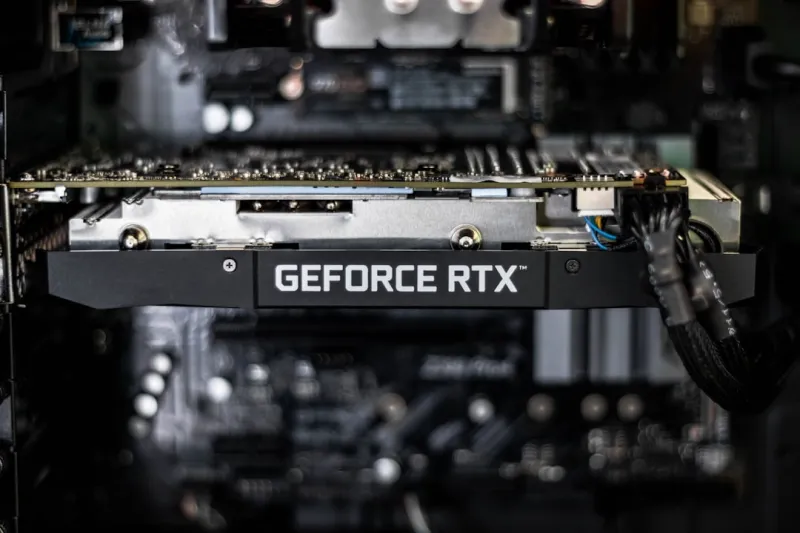
The graphics card remains the most visible upgrade, and for good reason—visual fidelity and frame rates have become non‑negotiable in 2026. With ray tracing, DLSS‑style AI upscaling, and increasingly complex shaders, a mid‑range GPU from just two years ago can feel like a relic. When I swapped my last‑generation card for a newer model, I saw a 45 % jump in average FPS across several AAA titles and a massive reduction in power draw thanks to improved efficiency. However, a powerful GPU is only useful if your system can feed it data quickly enough. Pairing it with a high‑speed PCIe 5.0 SSD and ensuring your CPU isn’t bottlenecking the pipeline is crucial. If you ever encounter black screens or visual artifacts, check out our GPU troubleshooting guide for quick fixes before you decide to replace the card.
CPU: Choosing the Right Engine
CPU upgrades are less about flash and more about sustained performance, especially as software leans heavily into multi‑threaded workloads. The latest 12‑core and 16‑core processors deliver impressive gains in rendering, video encoding, and AI inference tasks, but they also demand compatible motherboards and robust cooling solutions. In my recent build, I moved from an 8‑core to a 14‑core chip, which shaved 30 % off my Photoshop batch processing times and eliminated the dreaded “CPU maxed out” warnings during large game mod compilations. When selecting a CPU, consider the core count versus clock speed balance that matches your primary use case: gamers often benefit from higher single‑core clocks, while creators and developers thrive on more cores. Don’t forget to verify BIOS compatibility and power delivery—upgrading the processor without addressing VRM quality can lead to instability or throttling.
Memory: More Than Just Capacity
RAM is the unsung hero that can make or break multitasking fluidity. While many users think “more is better,” the truth lies in matching capacity, speed, and latency to your workload. I once upgraded from 16 GB of DDR4‑2666 to 32 GB of DDR5‑5600, and the difference was night and day when running multiple VMs and large datasets simultaneously. The higher frequency reduced latency and improved bandwidth, translating into smoother Photoshop timelines and faster game level loading. If you’re experiencing random crashes or “out of memory” alerts, our RAM crash guide dives deep into common culprits like mismatched timings or faulty modules. In most modern builds, 32 GB is a sweet spot, but if you’re deep into AI model training or heavy 3D rendering, pushing to 64 GB can future‑proof your system for the next few years.
Storage: Speed vs. Capacity Trade‑offs
When it comes to storage, the debate isn’t just SSD versus HDD; it’s about tiered solutions that balance speed and capacity. A fast NVMe drive serves as the primary boot and application drive, delivering sub‑second load times and rapid file access, while a larger SATA SSD or a traditional hard drive can house bulk media libraries or archived projects. In my own workstation, I paired a 2 TB PCIe 5.0 SSD with a 4 TB 7200 RPM HDD, and the hybrid approach kept my daily workflow lightning‑quick without breaking the bank. Despite the rise of high‑capacity SSDs, hard drives remain a cost‑effective backbone for massive data sets, as explained in our hard drive essentials article. Keep an eye on endurance ratings (TBW) for SSDs, especially if you write large files frequently, and consider using a dedicated cache partition to extend drive life.
Power, Cooling, and the Silent Backbone
Any upgrade that boosts performance inevitably increases power draw and heat output, so your power supply unit (PSU) and cooling system must keep pace. I’ve learned the hard way that under‑spec PSUs can cause random shutdowns, especially under sustained GPU load. Aim for an 80 + Gold rated PSU with at least a 20 % headroom above your total system wattage—this not only ensures stability but also improves efficiency. On the cooling front, a quality AIO liquid cooler or a high‑performance air cooler can keep CPU temperatures in the low‑70s °F even during heavy rendering tasks. Don’t neglect case airflow; strategically placed intake and exhaust fans create a positive pressure environment that reduces dust accumulation and maintains consistent thermal performance. Investing in reliable power and cooling now pays dividends in component longevity and consistent performance.
Smart Upgrade Strategies for Power Users
One of my favorite principles is “upgrade in layers,” a concept I explored in depth in our smart PC upgrade strategies guide. Instead of overhauling everything at once, identify the component that yields the highest performance per dollar and upgrade it first. For most users, that’s often the storage tier or GPU. After the initial win, reassess the system’s new bottlenecks and plan the next step—whether it’s a CPU swap or additional RAM. This phased approach spreads out costs, minimizes downtime, and lets you validate each upgrade’s impact before moving on. I also recommend maintaining a “compatibility checklist” that includes motherboard socket type, BIOS version, and power connector requirements. By staying organized and methodical, you avoid the dreaded situation where a brand‑new GPU sits idle because the PSU can’t handle its peak draw.
The AI Computing Revolution and Its Impact on Upgrades
The AI boom of the early 2020s has matured into a mainstream demand by 2026, and it’s reshaping how we think about upgrades. Modern applications—from AI‑assisted video editing to real‑time language translation—leverage hardware‑accelerated inference engines found in both GPUs and specialized AI accelerators. When I incorporated an AI‑optimized GPU into my rig, I saw a 60 % reduction in rendering times for AI‑upscaled footage. If you’re eyeing similar gains, it’s worth exploring motherboards that support PCIe 5.0 and have additional M.2 slots for dedicated AI accelerators. Our article on AI computing for power users breaks down which chips offer the best price‑to‑performance ratio for everyday creators. Remember, an AI‑focused upgrade isn’t just about raw horsepower; it also requires sufficient memory bandwidth and fast storage to feed data to the accelerator without bottlenecks.
Future‑Proofing: Building a System That Grows With You
Future‑proofing isn’t about buying the most expensive parts today; it’s about designing a platform that can adapt to tomorrow’s workloads. Choose a motherboard with ample PCIe lanes, multiple M.2 slots, and robust VRM phases—this gives you room to add new GPUs, AI cards, or faster storage as they become affordable. Opt for a modular power supply that can handle higher wattage upgrades without a full replacement. Keep your BIOS updated, as manufacturers regularly release firmware that improves compatibility with newer components. Finally, document your build: keep a spreadsheet of component specs, firmware versions, and upgrade dates. This habit not only simplifies troubleshooting but also provides a clear roadmap for the next upgrade cycle. With a solid foundation and a strategic, data‑driven upgrade plan, you’ll enjoy a PC that feels fresh and capable for years, no matter how rapidly technology evolves.