
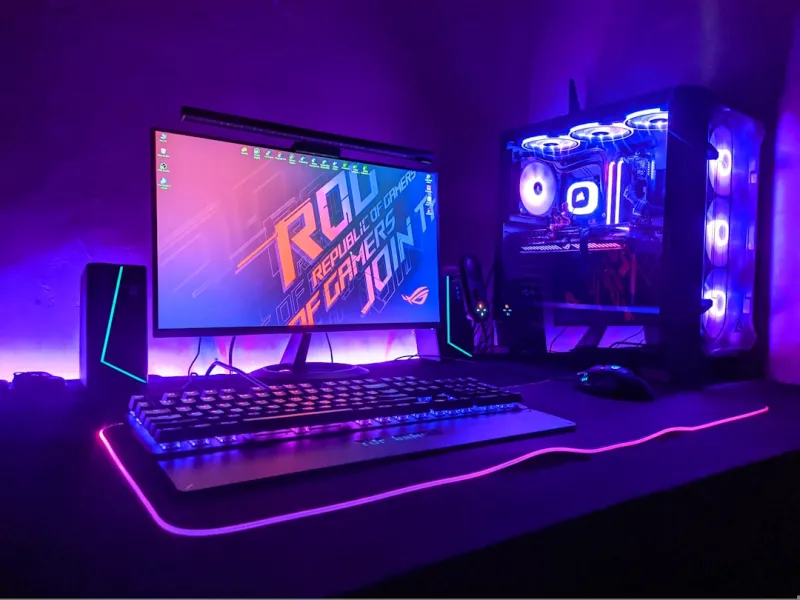
When I first built my rig back in the early 2020s, I thought a solid CPU and a decent GPU would keep me happy for years. Fast‑forward to 2026, and that optimism feels quaint. The software ecosystem has exploded with AI‑driven tools, real‑time ray tracing is now baseline, and even everyday web browsing leans on hardware‑level acceleration. That shift means the classic “upgrade when you can’t run the game” mindset no longer cuts it. Every power user now needs a proactive upgrade plan—one that anticipates not just the next graphics benchmark but the demands of AI inference, encrypted workloads, and ultra‑fast storage pipelines. In this article, I’m pulling back the curtain on the components that will define your PC’s relevance for the next few years, and I’ll sprinkle in some hard‑won lessons from my own build‑lab experiments.
Why Upgrading Your PC in 2026 Is No Longer Optional
The market’s pivot toward AI‑centric workloads has redefined “performance.” It’s no longer about raw FLOPS; it’s about how many tensor operations your system can execute per second, and whether your GPU can handle both DLSS‑style upscaling and on‑device inference without choking. Meanwhile, operating systems are embedding AI assistants directly into the kernel, demanding hardware that can off‑load tasks securely. This convergence forces us to think beyond the traditional “CPU‑GPU‑RAM” triangle. A balanced upgrade strategy now means aligning your graphics card’s AI cores, your memory’s bandwidth, and your storage’s latency. Ignoring any one of these pillars creates bottlenecks that software can’t magically smooth over. I’ve watched colleagues stare at 4K video editors stutter because their RAM couldn’t keep up, even with a top‑tier RTX 4090. The takeaway? Treat each upgrade as a piece of an ecosystem, not a solo performance boost.
The GPU Landscape: From Ray Tracing to AI Acceleration
GPU manufacturers are in a fierce arms race, not just for more CUDA cores or ray‑tracing units, but for dedicated AI tensor cores that can handle everything from real‑time upscaling to natural‑language processing on the desktop. In 2026, the leading cards now ship with integrated DPUs (Data Processing Units) that offload encryption and compression tasks, freeing the GPU to focus on graphics and AI. If you’re still on a generation‑4 card, you’re likely missing out on up to a 60% performance uplift in AI‑enhanced applications. The sweet spot for most power users sits at the high‑mid tier: cards that balance price, power draw, and AI capability. Look for models with at least 40 TFLOPs of AI throughput, PCIe 5.0 support, and a robust driver ecosystem that plays well with the latest operating‑system AI hooks. Pairing such a GPU with a motherboard that offers PCIe 5.0 x16 lanes ensures you’re not throttling your own hardware.
Memory Matters: DDR5 vs DDR6 and the RAM Reliability Crisis
DDR5 has finally matured, offering up to 6400 MT/s, but the next wave—DDR6—is already making its debut with clock speeds nudging 10 GHz. While the headline numbers look tempting, real‑world performance gains for most workloads plateau around 5600 MT/s due to diminishing returns in latency. However, the bigger story in 2026 is reliability. RAM modules are now prone to subtle errors as we push densities higher, especially on budget kits. That’s why I always keep a RAM troubleshooting guide handy. When selecting memory, prioritize chips with built‑in ECC (error‑correcting code) if your motherboard supports it, and consider heatsinks that manage the extra thermal load. Dual‑channel configurations remain essential, but moving to quad‑channel can shave off milliseconds in AI model inference—an often‑overlooked win for power users who run local LLMs. Finally, don’t underestimate the importance of timing profiles; a well‑tuned XMP profile can unlock hidden bandwidth without a hardware swap.
Storage Evolution: NVMe, PCIe 5.0, and the Surprising Role of HDDs
Solid‑state storage has become the default expectation, yet the conversation often ignores a niche where traditional hard drives still shine. With PCIe 5.0 NVMe SSDs now delivering up to 14 GB/s sequential reads, you might think HDDs are obsolete. In practice, massive video archives, long‑term AI model checkpoints, and bulk data sets benefit from the cost‑per‑gigabyte advantage of 3.5″ drives. That’s why I maintain a hard drive storage strategy that pairs a blazing NVMe boot drive with several high‑capacity HDDs in a RAID‑0 configuration for throughput‑critical tasks. The key is to ensure your motherboard supports multiple M.2 slots with heatsinks and offers enough SATA ports for the HDDs. Additionally, consider a PCIe‑based NVMe add‑on card if you need more than two native slots. Remember, endurance ratings matter; opt for drives rated for at least 2 PBW (petabytes written) if you’ll be writing large AI datasets daily.
Power Supply and Efficiency: Going Green While Getting More Juice
Power consumption has surged alongside performance. A top‑tier GPU paired with a high‑core‑count CPU can easily push a system past 600 W under load. In 2026, the industry standard for efficiency has moved to 95%+ 80 PLUS Platinum certifications, and many manufacturers now tout “Zero‑Idle” designs that drop to under 30 W when the system is idle. When I’m sizing a PSU, I start with the TDP of each component, add a 30% headroom for future upgrades, and then select a unit with a semi‑modular cable set to reduce clutter and improve airflow. Don’t overlook the power delivery to the GPU; some high‑performance cards require up to 12 V rails that can strain lower‑quality units. Investing in a high‑efficiency PSU not only reduces your electric bill but also stabilizes voltage rails, which can prolong the life of sensitive components like RAM and SSDs. Finally, consider a UPS with sine‑wave output to protect against power spikes, especially if you’re running AI workloads that can’t afford sudden interruptions.
Motherboard Features You Can’t Ignore in 2026
The motherboard is the unsung hero of any upgrade path. In 2026, we’re seeing a motherboard revolution that goes beyond just more PCIe lanes. Modern boards now integrate dedicated AI accelerators, on‑board Bluetooth 5.3, and advanced thermal sensors that feed real‑time data to the OS for dynamic fan curves. If you’re planning a high‑performance build, look for a chipset that supports PCIe 5.0 across both GPU and storage slots, as well as dual‑channel DDR6. I highly recommend reading the motherboard revolution article for a deep dive into feature sets. Also, make sure the board offers at least six M.2 slots with proper heat dissipation; this future‑proofs you for additional NVMe drives as storage needs explode. Lastly, verify that the BIOS includes robust security features—Secure Boot, TPM 2.0, and firmware TPM—since a compromised firmware layer can undo all the hardware upgrades you painstakingly assembled.
Cooling Solutions: From AIOs to Liquid‑Metal Mastery
Thermal management has become a science as much as an art. Traditional air coolers still hold their ground for mid‑range builds, but when you’re pushing a GPU past 350 W and a CPU into the 200 W+ range, an all‑in‑one (AIO) liquid cooler is practically mandatory. The latest 360 mm radiators now incorporate micro‑fin technology that improves heat exchange by up to 15% over older designs. For those chasing the ultimate overclock, I’ve experimented with liquid‑metal thermal interface materials on my CPU die—yes, the same compound that once terrified DIYers. While it offers unrivaled conductivity, it demands meticulous application and a compatible cooler to prevent short‑circuits. If you’re not comfortable with that, high‑quality thermal paste paired with a dual‑fan AIO will keep temperatures well under 70 °C under full load. Remember to monitor pump RPMs and coolant levels; a silent pump failure can cause thermal runaway faster than you think.
AI‑Ready Upgrades: Enabling On‑Device Machine Learning
One of the most exciting trends this year is the move toward on‑device AI, meaning your PC can run inference models locally without sending data to the cloud. This shift offers privacy, lower latency, and reduced bandwidth usage. To make your rig AI‑ready, start with a GPU that supports Tensor Cores optimized for FP16 and INT8 operations, and ensure your motherboard’s BIOS can allocate VRAM for compute workloads separate from graphics. Additionally, installing a dedicated AI accelerator card—like the latest PCIe 5.0 neural compute sticks—can offload tasks from the main GPU, freeing it for rendering. Pair these with high‑speed DDR6 memory to feed the models quickly, and you’ll see dramatic speedups in tasks like real‑time video upscaling or speech‑to‑text transcription. For a more strategic view, check out unlocking AI computing, which outlines how to balance hardware choices for maximum AI throughput without breaking the bank.
Future‑Proofing Your Build: Modular Upgrades and the Subscription Model
We’re entering an era where modularity isn’t just a convenience—it’s a necessity. Companies are rolling out subscription‑based upgrade kits that let you swap out GPU modules, storage bays, or even AI accelerator cards on a yearly basis. While the model is still nascent, early adopters report a 30% reduction in e‑waste and a smoother upgrade curve. When planning your build, prioritize components with standardized connectors—PCIe 5.0, M.2 2280, and DDR6 DIMM slots—so you can plug in new modules without a full system teardown. Think of it like a smartphone: you keep the chassis, OS, and peripherals, but the heart and memory can be refreshed. This approach also aligns with the emerging “right‑to‑repair” legislation, which encourages manufacturers to provide firmware updates and spare parts for at least five years. By embracing modularity now, you’ll avoid the dreaded “obsolescence cliff” and keep your rig competitive well into the next decade.
My Personal Upgrade Checklist – What I’m Doing Right Now
Every power user needs a living checklist that evolves with the market. Here’s what I’m currently prioritizing: 1) Swap my old RTX 4090 for the new RTX 5090, which adds a 45% AI core boost and supports PCIe 5.0 x16. 2) Upgrade to 64 GB of DDR6‑5600 RAM with built‑in ECC, after consulting the RAM troubleshooting guide to ensure stability. 3) Add a 4 TB PCIe 5.0 NVMe drive for my primary workstation, while retaining a 10 TB 7200 RPM HDD array for archival AI model storage, as outlined in hard drive storage strategy. 4) Replace my 750 W PSU with a 1000 W 80 PLUS Platinum unit to accommodate the higher power draw. 5) Install a 360 mm AIO cooler with a copper‑core block and liquid‑metal on the CPU for sub‑70 °C operation under sustained AI loads. 6) Update the BIOS on my motherboard to the latest firmware, unlocking new AI acceleration features. By following this roadmap, I keep my rig fast, secure, and ready for the next wave of software innovation.




