
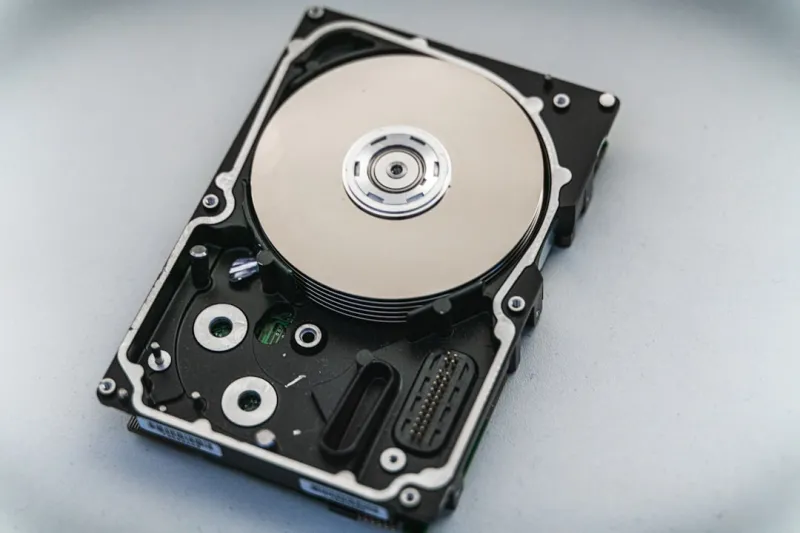
When I first cracked open a dusty 2‑terabyte hard drive back in the early 2010s, I thought I’d seen the pinnacle of storage. Fast‑forward to 2026, and the landscape has reshaped itself so dramatically that the very notion of a “hard drive” feels like a nostalgic footnote in a story dominated by flash, AI‑driven analytics, and a relentless quest for ever‑greater density. In my years of tinkering, consulting, and writing for Comp Doc Computers, I’ve watched the hard‑drive market pivot from spinning platters to ultra‑fast NVMe modules, and now to hybrid solutions that blend the reliability of traditional magnetic media with the speed of solid‑state storage. This article unpacks the current trends, the technology that’s steering the next wave, and how you can make savvy choices that keep your data safe, accessible, and future‑proof in a world where AI and zero‑trust security are becoming the norm.
The Evolution of the Hard Drive: From Magnetic Spin to Silicon Speed
Let’s start at the beginning, because understanding the lineage helps you appreciate why modern drives matter. The classic 3.5‑inch HDD relied on magnetic heads sweeping over spinning disks—a mechanical marvel that delivered gigabytes of storage at a cost that made personal computing affordable. Over the years, manufacturers pushed the limits of areal density, squeezing more bits onto each inch of platter. By 2024, 20‑TB HDDs were commonplace in data centers, but the performance ceiling remained tethered to rotational latency and seek times. Enter solid‑state drives (SSDs), which eliminated moving parts entirely, offering sub‑millisecond access and dramatically lower power draw. The breakthrough came with the PCIe 4.0 interface, and now PCIe 5.0 and early‑stage PCIe 6.0 devices are delivering multi‑gigabyte per second throughput—speeds that make traditional HDDs feel glacial by comparison. Yet the story isn’t a simple “SSD replaces HDD” narrative; many enterprises still value the cost‑per‑gigabyte advantage of magnetic storage, especially for cold archives, while leveraging SSDs for hot data and latency‑sensitive workloads.
Capacity Arms Race: Why Terabytes Are No Longer Enough
In 2026, the average consumer is comfortably storing 4‑to‑8 TB of media, games, and work files, but the real pressure comes from AI‑generated content, 8K video, and high‑resolution datasets for machine‑learning projects. The industry response has been a push toward ever‑larger platters and denser NAND flash. Companies like Seagate and Western Digital have unveiled 30‑TB HDDs that use shingled magnetic recording (SMR) coupled with heat‑assisted magnetic recording (HAMR) to overcome physical limits. Meanwhile, SSD manufacturers are leveraging 176‑layer TLC and even 200‑layer QLC NAND to push capacities beyond 8 TB in a single M.2 form factor. But higher capacity brings new challenges: power consumption spikes, heat dissipation becomes a design concern, and data integrity must be maintained across more cells that are prone to wear. For users planning to store massive AI model checkpoints or 3D render farms, the decision matrix now includes factors like endurance ratings (TBW), power‑efficiency metrics, and the ability of the drive firmware to handle error‑correction at scale.
Performance Bottlenecks: When Speed Meets Storage Architecture
It’s not enough to have a fast drive if the rest of your system can’t keep up. In my recent builds, I’ve seen CPUs with 12‑core Zen 4 processors and GPUs capable of 30 TFLOPs still hamstrung by storage latency when the drive is a legacy SATA HDD. The solution lies in aligning the storage interface with the rest of the platform. PCIe 5.0 NVMe SSDs can saturate the bandwidth of the newest motherboards, especially when paired with a high‑performance controller like the Samsung Pascal or the Phison E26. However, you’ll also need a motherboard that supports dual‑M.2 slots with proper lane distribution—something I discussed in depth in The Motherboard Revolution. Additionally, OS-level optimizations matter: Windows 11’s storage tiering and Linux’s btrfs with SSD‑aware caching can dramatically reduce perceived lag. For gamers and creative professionals, configuring a tiered storage solution—fast NVMe for active projects and a high‑capacity HDD for archives—delivers the best of both worlds without breaking the bank.
Data Security in the Age of Zero‑Trust and AI
Security isn’t just about firewalls and passwords anymore; it’s baked into the storage stack. With zero‑trust architectures becoming the default for enterprises, every block of data must be authenticated and encrypted, whether it lives on an SSD or a spinning disk. Modern drives now ship with self‑encrypting drive (SED) capabilities that use hardware‑based AES‑256 encryption, which is transparent to the OS but provides a strong line of defense against physical theft. But encryption alone isn’t sufficient. In 2026, AI‑driven anomaly detection monitors drive health in real time, flagging unusual read/write patterns that could indicate ransomware activity or firmware tampering. I recently explored this in Why Zero‑Trust and AI Are the New Cornerstones of Computer Security, where I highlighted how storage controllers now integrate machine‑learning models that predict imminent failures and proactively migrate data to safe zones. For the privacy‑concerned, combining hardware encryption with secure erase commands that overwrite all blocks ensures that decommissioned drives leave no recoverable traces.
AI‑Driven Health Monitoring: The Smart Drive Era
One of the most exciting developments is the emergence of “smart” drives that constantly assess their own health. These devices run lightweight AI algorithms directly on the drive’s firmware, analyzing metrics like read‑error rates, temperature fluctuations, and wear‑level indicators. When thresholds are crossed, the drive can trigger preemptive alerts to the host OS or even initiate autonomous data relocation to healthier sectors. This reduces the dreaded “sudden death” scenario that plagued early SSDs. Moreover, manufacturers are offering cloud‑based dashboards where you can monitor drive telemetry across dozens of machines—a boon for IT admins managing large fleets. As part of my own workflow, I integrate these dashboards with the broader monitoring stack using tools like Prometheus and Grafana, feeding drive health metrics into a centralized alert system. The result is a proactive stance: replace a drive before it fails, preserve data integrity, and avoid costly downtime.
Future‑Proofing Your Storage: Lessons from the 2026 Upgrade Playbook
When planning a PC upgrade this year, I always start with the question, “Will this storage solution still be relevant in five years?” The answer hinges on a few key variables: interface scalability, firmware updatability, and the ability to repurpose the drive across different form factors. Drives that support NVMe over PCIe 5.0 are positioned to handle the bandwidth demands of next‑generation GPUs and AI accelerators. Likewise, choosing a drive with an updatable firmware policy ensures you receive security patches and performance optimizations long after purchase—something I outlined in How to Future‑Proof Your PC Upgrade in 2026. Another tip: consider modular storage solutions, such as external NVMe enclosures that connect via Thunderbolt 4. These give you the flexibility to migrate your high‑speed data store between laptops, desktops, or even workstations without having to replace the drive itself. Finally, keep an eye on emerging standards like Compute Express Link (CXL), which promises tighter CPU‑memory‑storage integration—a potential game‑changer for ultra‑low‑latency workloads.
Choosing the Right Drive for Your Use Case: A Practical Checklist
Not every user needs a 30‑TB HAMR HDD or a 4‑TB PCIe 5.0 SSD. Start by defining the primary workload: are you a creator dealing with 8K video, a gamer with massive libraries, or a professional running AI inference on the edge? For creatives, look for drives with high sequential write speeds (≥3000 MB/s) and large cache buffers to handle sustained data streams. Gamers benefit from low random read latency ( 3 PB) and robust power‑loss protection. Next, factor in budget: magnetic drives still win on a per‑gigabyte basis for archival storage, while SSDs dominate in performance. Lastly, verify compatibility—ensure your motherboard’s BIOS supports the drive’s NVMe version and that you have the appropriate thermal solution; many high‑performance SSDs require dedicated heatsinks or active cooling to maintain optimal temperatures under heavy workloads.
The Environmental Angle: Green Computing Meets Storage
As we chase ever‑greater capacities, the environmental impact of storage cannot be ignored. Manufacturing a 20‑TB HDD consumes significantly more raw materials and energy than a 4‑TB SSD, but the latter’s production involves complex semiconductor processes that generate their own carbon footprint. In 2026, manufacturers are responding with greener designs: recycled aluminum enclosures, low‑power standby modes, and dynamic power scaling that throttles drive performance when idle. Some data centers are adopting “data tiering” strategies that store infrequently accessed data on high‑density, low‑energy magnetic drives, reserving SSDs for hot workloads. From a consumer standpoint, extending the lifespan of your drives through proper cooling, regular firmware updates, and AI‑driven health monitoring reduces e‑waste. The industry’s push toward circular economy initiatives—like take‑back programs and refurbished drive markets—means you can responsibly upgrade without contributing to landfill waste.
Wrapping Up: Storage Is No Longer a Passive Afterthought
The hard‑drive landscape in 2026 is a vibrant tapestry of magnetic innovation, flash performance, and intelligent management. As I’ve seen through countless builds and client projects, the right storage strategy can be the difference between a system that feels snappy and one that drags under load. By embracing the latest interfaces, leveraging AI‑powered health monitoring, and aligning your storage choices with a zero‑trust security mindset, you set yourself up for a resilient, high‑performance computing experience that will serve you for years to come. Whether you’re archiving family photos, training the next breakthrough AI model, or just looking to shave seconds off game load times, the principles outlined here will guide you toward a storage solution that’s both future‑ready and responsibly built.




