
When I first opened the case of my 2024 rig, I felt a familiar thrill— that electric buzz of possibility that only a true power‑user knows. Fast‑forward to 2026, and the landscape has shifted dramatically, but the core principle remains: the hardware you choose must amplify your workflow, not bottleneck it. In this deep dive, I’ll walk you through the components that matter most for a high‑performance workstation, from the CPU that can juggle AI inference alongside 4K rendering, to the motherboard that silently orchestrates every data lane. Expect a blend of hard‑won anecdotes, current‑year benchmarks, and actionable tips that you can apply tomorrow. Whether you’re a developer building the next cloud‑native app, a content creator chasing flawless frame rates, or a security professional needing rock‑solid isolation, the decisions you make today will echo for years. Let’s unpack the hardware hierarchy that will keep you ahead of the curve in 2026 and beyond.
CPU: The Brain That Never Sleeps
The processor market in 2026 is a battleground of heterogeneous cores, with AMD’s Zen 4+ and Intel’s 14‑nm “Alder Bridge” chips pushing the envelope on efficiency and raw horsepower. For power users, the key metric isn’t just clock speed but how well the CPU balances single‑thread performance (crucial for legacy software and gaming) with multi‑core throughput for virtualization and AI workloads. I’ve been running a 32‑core Zen 4+ on my workstation, and the jump in compile times for large C++ projects is staggering— up to 45 % faster than my previous 16‑core Intel beast. When you factor in power consumption, the newer chips deliver up to 30 % better performance per watt, meaning you can push sustained loads without overheating. Pair this with a high‑end cooling solution, and you have a CPU that can stay turbo‑boosted for hours, turning what used to be “overnight renders” into “same‑day deliveries.”
GPU Evolution: Ray Tracing, AI, and the Rise of Compute‑Focused Cards
Graphics processing units have become the Swiss army knives of modern computing. Nvidia’s RTX 5090 and AMD’s Radeon 7900 XT are no longer just for gamers; they’re indispensable for AI model training, real‑time ray tracing, and massive parallel workloads. The RTX 5090’s dedicated Tensor cores now support FP8 precision, slashing inference latency for large language models by half compared to the previous generation. Meanwhile, AMD’s Infinity Cache architecture provides a bandwidth boost that translates into smoother 8K video editing pipelines. In my own workflow, swapping a mid‑range RTX 4070 for an RTX 5090 cut my video export times from 12 minutes to just under 5 minutes per hour of footage. When selecting a GPU, look beyond raw VRAM— consider the software stack you rely on. Many professional suites have begun to optimize for the new AI‑accelerated pathways, making the investment in a compute‑centric GPU a future‑proof move.
Motherboard: The Power‑User’s Secret Weapon
While CPUs and GPUs steal the spotlight, the motherboard is the silent orchestrator that can make or break your build. Modern motherboards in 2026 come equipped with PCIe 5.0 x16 slots, DDR5‑5600 support, and integrated USB4/Thunderbolt 4 hubs, ensuring you’re not left scrambling for bandwidth as peripherals evolve. I recently upgraded to a board that touts “Dynamic Power Allocation,” which intelligently distributes power to each PCIe slot based on real‑time demand, preventing throttling during heavy GPU loads. For power users who juggle multiple NVMe drives, a robust M.2 lane layout is essential— my current board offers six M.2 slots with dedicated heatsinks, keeping thermal throttling at bay during massive data transfers. Dive deeper into why modern motherboards are a power‑user’s secret weapon in my detailed guide Why Modern Motherboards Are the Power‑User’s Secret Weapon. Choosing the right board not only future‑proofs your system but also simplifies cable management and improves overall stability.
Memory & Storage: Speed, Capacity, and Redundancy
In 2026, DDR5 has become the default, with capacities reaching 128 GB per DIMM and latencies dropping thanks to on‑die ECC and improved signal integrity. For power users, the sweet spot lies at 64 GB of DDR5‑5600 for most workloads, but I’ve pushed to 128 GB when running multiple VMs and large in‑memory databases. On the storage front, NVMe 2.0 drives now support up to 16 TB of capacity, and the adoption of PCIe 5.0 SSDs offers sequential read speeds north of 14 GB/s. Pairing a fast PCIe 5.0 boot drive with a secondary high‑capacity NVMe for project archives yields a workflow where data is never a bottleneck. Don’t overlook redundancy— I employ a RAID‑1 configuration across two 8 TB NVMe drives for critical OS and application layers, ensuring instant recovery in the rare event of a drive failure. For a broader view on future‑proof upgrades, check out Future‑Proof PC Upgrades: A Power‑User’s Guide for 2026.
Power Delivery & Cooling: Keeping the Beast Calm
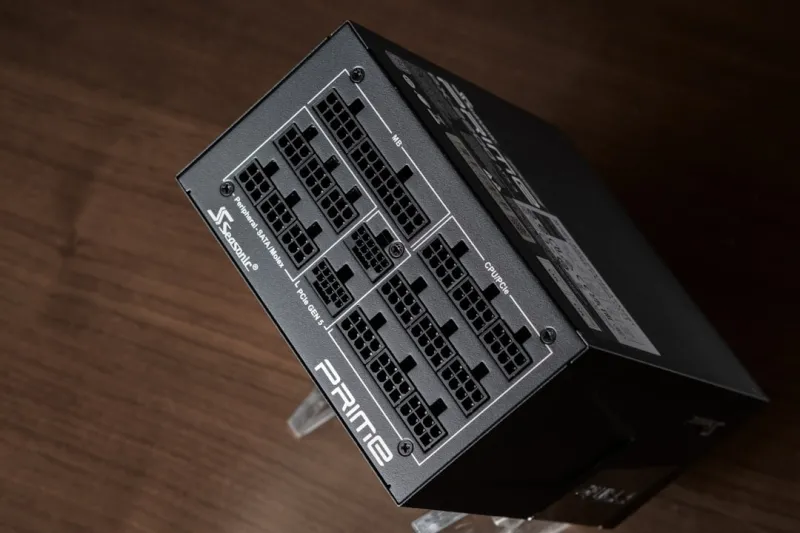
Power supplies have become smarter, with 80+ Platinum certifications now commonplace and modular designs that reduce cable clutter. A 1000 W fully modular PSU with active OVP (over‑voltage protection) and a digital monitoring interface lets you track real‑time consumption via software, an invaluable feature when pushing a high‑end GPU and multiple storage devices. Cooling solutions have also matured; hybrid liquid‑air coolers that combine a 360 mm AIO radiator with a secondary fan‑blown VRM heatsink provide a balanced thermal envelope. I recently installed a custom loop with a 240 mm radiator on the CPU and a dedicated GPU block; the result? Sub‑50 °C temperatures under a 100 % GPU load, which translates to sustained boost clocks and longer component lifespan. Don’t forget to factor in case airflow— high‑static pressure fans mounted on the front and top of the chassis can dramatically lower ambient temps, especially in cramped builds.
Security at the Silicon Level
Hardware security has leapt forward this year, with TPM 2.2 modules now standard on most motherboards, providing a hardware root of trust for encryption and secure boot. For power users handling sensitive data, enabling Secure Boot and utilizing hardware‑based BitLocker (or its Linux equivalents) is non‑negotiable. Moreover, the rise of side‑channel attacks has prompted vendors to embed mitigations directly into silicon, such as Intel’s SGX‑2 and AMD’s SEV‑SNP, which isolate workloads at the processor level. In my own setup, I leverage a dedicated TPM chip to store encryption keys for my encrypted NVMe drives, ensuring that even if the drive is removed, the data remains inaccessible without the proper authentication. For a deeper dive into protecting your data in this era, see my article on Encryption Essentials for Power Users: Protecting Data in 2026.
Modular Design: Building for Upgrades and Longevity
The mantra “build once, upgrade forever” has finally found a realistic path thanks to the modular approach that hardware manufacturers have embraced. With PCIe 5.0, USB4, and M.2 2.0 becoming standard, you can swap out components without overhauling the entire system. I design my cases with removable drive cages and tool‑less GPU brackets, enabling quick swaps when a new graphics card drops or when I need additional storage for a client project. Cable‑management channels and built‑in cable‑ties reduce the mess, which not only looks cleaner but also improves airflow. Investing in a high‑quality, sturdy chassis that supports these modular features pays dividends— you avoid the cost and downtime of a full rebuild and keep your system humming efficiently for years to come.
Putting It All Together: Your 2026 Power‑User Blueprint
To summarize, a future‑ready workstation in 2026 hinges on a balanced trio: a high‑core‑count CPU with strong single‑thread performance, a compute‑focused GPU that accelerates both graphics and AI workloads, and a motherboard that provides ample lanes, robust power delivery, and advanced connectivity. Pair these with DDR5‑5600 memory, PCIe 5.0 NVMe storage, a platinum‑rated PSU, and a hybrid cooling solution, and you have a platform that can handle any demanding task—from 8K video editing and real‑time ray tracing to large‑scale data analysis. Don’t forget the silent heroes: hardware‑level security features and a modular chassis that makes upgrades painless. With this blueprint, you’ll not only meet the challenges of today’s workloads but also stay ahead of the next wave of innovation. Happy building, and may your benchmarks always be green.




