
When I first set up a dedicated workstation in my loft back in the early 2020s, my network was a single‑cable, gigabit Ethernet link that I trusted to never miss a beat. Fast forward to 2026, and the same setup feels like trying to stream a 4K video over dial‑up. The sheer volume of data that modern power‑users generate—multiple 8K monitors, AI‑enhanced workloads, real‑time collaborative coding sessions—has forced me to rethink every layer of my home networking stack. No longer can we rely on “good enough” Wi‑Fi; we need a fabric that anticipates congestion before it happens, dynamically reallocates bandwidth, and safeguards traffic with zero‑trust principles. In this article, I’ll walk you through the most impactful trends reshaping home networking today, from Wi‑Fi 7’s ultra‑low latency to AI‑driven traffic shaping, and explain how to future‑proof your setup without breaking the bank.
Wi‑Fi 7 and the Rise of Ultra‑Low Latency Wireless
Wi‑Fi 7 (IEEE 802.11be) finally hit the consumer market this year, promising multi‑gigabit speeds, sub‑millisecond latency, and a staggering 320 MHz channel width. For a power‑user juggling multiple high‑resolution displays, a 4K‑to‑8K streaming pipeline, and a local AI inference server, that kind of performance is a game‑changer. Unlike the older Wi‑Fi 6E gear that relied on a single 6 GHz band, Wi‑Fi 7 spreads traffic across three bands simultaneously, using Multi‑Link Operation (MLO) to stitch together a seamless pipe. In practice, this means you can run a 144 Hz gaming session on one device, a 10 Gbps file transfer on another, and a live‑coding stream on a third—without the dreaded “buffering” warnings. To truly harness this, invest in a mesh system that supports MLO and ensure each node is placed strategically to minimize wall attenuation. Pairing this with a 10 Gbps Ethernet backbone keeps the wired backbone from becoming the bottleneck, letting Wi‑Fi 7 shine where you need it most.
AI‑Powered Network Orchestration
One of the most exciting developments in 2026 is the integration of on‑device AI into routers and access points. Modern firmware can analyze traffic patterns in real time, predict congestion, and automatically re‑route packets to underutilized bands or frequencies. Think of it as a traffic cop that never sleeps and learns from every vehicle that passes. I’ve started using a router that leverages a dedicated neural engine to prioritize latency‑sensitive packets—like my remote GPU render jobs—over bulk data transfers. The result is a noticeable drop in jitter during video calls and a smoother experience when I’m compiling large codebases on a remote server. This AI layer also extends to security, flagging anomalous devices that try to exfiltrate data and sandboxing them before they can cause damage. If you’re still on a static QoS setup, you’re missing out on a self‑optimizing network that adapts to your workflow without manual tweaks.
Zero‑Trust Segmentation for the Home Office
Zero‑trust networking used to be an enterprise buzzword, but in 2026 it’s become essential for any power‑user with a hybrid work setup. The principle is simple: never trust any device by default, even if it’s on your local LAN. By implementing micro‑segmentation—using VLANs or software‑defined networking (SD‑WAN) solutions—you can isolate your development environment, streaming rig, and IoT devices into separate logical zones. I’ve split my network into three segments: a high‑performance “Compute” VLAN for my workstations, a “Media” VLAN for NAS and streaming boxes, and an “IoT” VLAN that houses smart lights and security cameras. Each segment has its own firewall policies, and inter‑segment communication is mediated by a central controller that enforces strict authentication. This approach dramatically reduces the attack surface and ensures that a compromised smart speaker can’t pivot into your critical development machines. For those looking to dive deeper, the article on secure your power‑user workstation offers a step‑by‑step guide to building a zero‑trust home network.
IPv6 Adoption: Future‑Proofing Your Address Space
While many homes still rely on IPv4 with NAT tricks, 2026 is the year to make the switch to IPv6. The exhaustion of IPv4 addresses forced ISPs to allocate larger, often shared, subnets, leading to unpredictable routing and occasional outages. IPv6, on the other hand, provides a virtually limitless address pool, allowing each device—including future‑generation wearables—to have a globally routable address. This is especially valuable for power‑users who run self‑hosted services like personal cloud storage or remote development environments. By enabling IPv6 on your router and ensuring your devices support it, you eliminate the need for complex port‑forwarding rules and improve end‑to‑end connectivity. Moreover, many modern security appliances and AI‑driven monitoring tools are optimized for IPv6 traffic, giving you richer visibility into network flows. If you’re unsure where to start, most contemporary mesh routers include a one‑click enable for IPv6, and your ISP’s configuration portal will guide you through the necessary steps.
Mesh Networking vs. Traditional Extenders
In the past, I tried a series of Wi‑Fi extenders to blanket my two‑story home, only to end up with multiple SSIDs that confused my devices and caused frequent handoff failures. Mesh networking has matured to a point where a single SSID can intelligently manage client roaming across nodes, leveraging algorithms that predict which node offers the best signal based on device location and current load. Modern mesh systems now incorporate Wi‑Fi 7 radios, tri‑band backhaul, and built‑in AI for load balancing—features that were once exclusive to enterprise solutions. When selecting a mesh, look for features like automatic band steering, support for MLO, and the ability to integrate with your existing wired backbone via 2.5 Gbps or 10 Gbps Ethernet ports. The right mesh not only eliminates dead zones but also provides a unified management interface where you can apply security policies, firmware updates, and traffic analytics—all from a single dashboard.
Cloud‑Managed Networking for the Home Power‑User
Another paradigm shift this year is the rise of cloud‑managed home networking platforms. These services, traditionally reserved for corporate IT, now offer affordable plans that let you control every aspect of your home network from a web console or mobile app. The benefits are twofold: centralized visibility across all your nodes, and the ability to push updates or configuration changes without stepping foot on each device. I migrated my network to a cloud‑managed solution that automatically rolls out firmware patches, applies security hardening rules, and provides real‑time alerts when an unknown device attempts to join. This level of automation frees up mental bandwidth, allowing me to focus on development rather than network maintenance. If you’re curious about how AI can further enhance this, check out the guide on AI computing mastery, which dives into using AI not just for workloads but also for network optimization.
Power over Ethernet (PoE) and the Rise of Smart Infrastructure
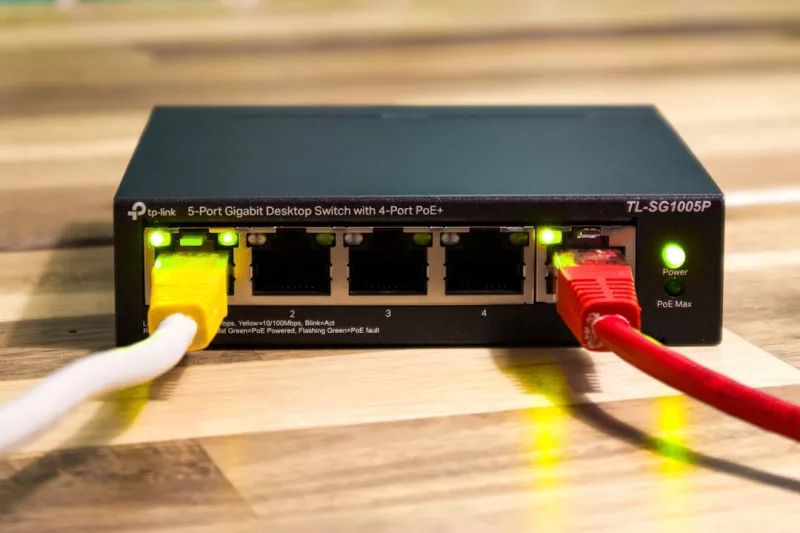
Power over Ethernet has moved beyond simple IP cameras and VoIP phones; today’s PoE standards can deliver up to 90 W per port, sufficient to power high‑performance access points, mini‑PCs, and even compact AI inference boxes. By consolidating power and data into a single cable, you reduce clutter and improve reliability—critical for a power‑user’s tidy workspace. I rewired my home office with Cat6a cable and a PoE‑enabled switch, allowing me to mount Wi‑Fi 7 access points directly on the ceiling without worrying about additional power outlets. This also opens the door to future‑proofing: as new devices emerge that require more power, your existing PoE infrastructure can accommodate them without a major overhaul. When planning your PoE deployment, make sure your switch supports the latest IEEE 802.3bt standard and that you have adequate cooling for sustained high‑power operation.
Secure Guest Networks and Device Hygiene
One overlooked security vector is the guest network. Many power‑users treat the guest SSID as an afterthought, but in 2026, a compromised guest device can become a launchpad for lateral movement into your primary network. The solution is to create a separate VLAN for guests, enforce strict bandwidth caps, and enable captive‑portal authentication. Additionally, leverage WPA3‑Enterprise where possible, as it provides stronger encryption and forward secrecy compared to WPA2. I also enable automatic quarantine for devices that exhibit suspicious behavior—such as excessive port scans or attempts to access restricted services. Pair this with regular network scans using tools integrated into my router’s firmware, and you’ll have a robust line of defense that doesn’t require constant manual oversight.
Preparing for the Next Wave: 10 Gbps Ethernet and Beyond
While Wi‑Fi 7 delivers impressive wireless speeds, the ultimate bottleneck for many power‑users remains the wired backbone. With the proliferation of 10 Gbps network cards in consumer motherboards, it’s time to upgrade your home cabling to at least Cat6a or Cat7 to support those speeds over longer distances. I replaced my old Cat5e runs with Cat7, which not only handles 10 Gbps but also provides better shielding against electromagnetic interference—crucial when you have multiple high‑frequency devices operating nearby. Looking ahead, 25 Gbps and 40 Gbps Ethernet standards are already entering the market, and having a modular, high‑capacity switch will make the transition smoother. Plan your network topology with scalability in mind: allocate spare ports, use modular power supplies for your switches, and keep a spare pool of high‑quality cables. By building a network that can scale beyond today’s demands, you’ll ensure that your setup remains a competitive edge, not a limiting factor, as new technologies emerge.




