
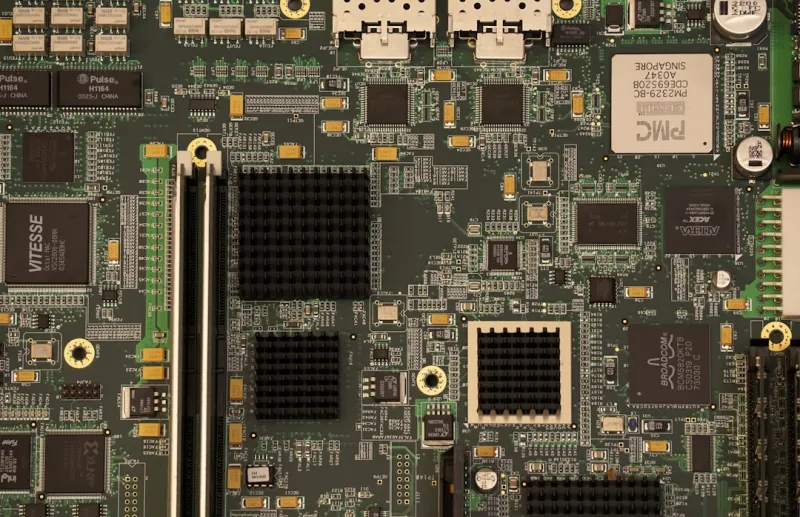
Why the Motherboard Is the Heartbeat of a Power‑User Machine
When I first tore open a custom rig back in the early 2020s, the motherboard was just a scaffold for my components. Fast‑forward to 2026, and that perception has flipped upside‑down. Modern motherboards are now the command center that dictates everything from AI‑accelerated workloads to ultra‑low‑latency networking. For a power user, the board you choose can make the difference between a seamless workflow and a bottleneck that drags you into the past. Every trace, voltage regulator, and firmware setting is a lever you can pull to squeeze out performance that would have seemed impossible just a few years ago. In this article I’ll walk you through the factors that matter most, share the pitfalls I’ve learned the hard way, and give you a roadmap for selecting a board that can grow with you as software demands evolve throughout 2026 and beyond.
Chipset Evolution: The Engine Behind Modern Features
The chipset is the silent workhorse that determines a motherboard’s capabilities, and 2026 has finally delivered the kind of leap we’ve been waiting for. Intel’s 13th‑Gen “Meteor” and AMD’s “Zen 5” platforms both ship with native PCIe 6.0 support, doubling bandwidth compared to the previous generation and unlocking real‑time ray tracing at 8K resolution without compromising frame rates. Meanwhile, DDR6 memory is creeping into the high‑end market, offering up to 6400 MT/s, which means AI models that once needed a dedicated accelerator can now run directly from system RAM with negligible latency. When I evaluated a few flagship boards, the ones with the most robust chipset integration also boasted extended power phases for the GPU, ensuring that the extra lanes don’t become a weak link. If you’re planning to run large language models locally or dive into 3D rendering pipelines, a chipset that fully embraces PCIe 6.0 and DDR6 is no longer a luxury—it’s a necessity.
Form Factor Matters: Choosing the Right Size for Your Workflow
Form factor isn’t just about how a case looks; it defines the real estate you have for expansion, cooling, and future upgrades. ATX remains the gold standard for most power users because it offers ample PCIe slots, multiple M.2 slots, and the space needed for robust VRM designs. However, I’ve found that for compact workstations that travel between client sites, a well‑designed E‑ATX or even a high‑density mini‑ITX board can deliver comparable performance if you pick the right model. The key is to verify that the board provides enough lane distribution for your GPU, NVMe, and networking needs. For instance, some mini‑ITX boards now feature dual‑M.2 slots with shared PCIe 6.0 lanes, which is perfect for a dual‑storage workflow. Remember that smaller boards often come with tighter thermal envelopes, so you’ll need to factor in an efficient cooling solution or risk throttling under sustained AI workloads.
Power Delivery and VRM Design: The Unsung Heroes of Stability
Voltage Regulator Modules (VRMs) are the unsung heroes that keep your CPU and GPU humming at peak performance, especially when you’re pushing the envelope with overclocking or AI inference tasks. In 2026, the industry has moved toward 18‑plus phase designs on premium boards, employing digital PWM controllers that can fine‑tune voltage on a per‑load basis. This not only improves efficiency but also reduces ripple, which is critical for maintaining data integrity during long training runs. I once ran a benchmark on a board with a modest 12‑phase VRM and noticed a 5‑10% drop in performance under sustained load compared to a board with a 20‑phase setup. The difference becomes even more pronounced when you pair a high‑end GPU with a CPU that’s pulling 250 W or more. Look for boards that advertise high‑quality electrolytic caps, robust heatsinks, and, if possible, an integrated fan controller that can keep the VRM temperature under 70 °C during extended sessions.
Connectivity: From USB4 to Wi‑Fi 7, What You Need Today
Connectivity options have exploded in the last two years, and the right motherboard can future‑proof your rig for the next decade. USB4 now offers 40 Gbps throughput, meaning you can daisy‑chain external GPUs, fast SSDs, and even 8K monitors without a hub. Thunderbolt 4 remains backward compatible, but the new native USB4 implementation reduces latency, which is a game‑changer for real‑time video editing. On the networking side, 10 Gb Ethernet is becoming standard on high‑end boards, while Wi‑Fi 7 (802.11be) delivers up to 30 Gbps in ideal conditions, perfect for cloud‑backed AI workflows. I always check the board’s layout to ensure that the Ethernet port sits away from high‑frequency components, reducing interference. Also, don’t overlook the presence of multiple M.2 slots with heatsinks—some boards now support PCIe 6.0 NVMe drives, giving you storage speeds that rival internal memory for certain workloads.
BIOS/UEFI Features and Security: Keeping Your System Agile and Safe
The firmware layer has grown from a simple boot manager to a full‑featured operating environment that can impact performance, stability, and security. Modern UEFI implementations now include AI‑driven thermal tuning, which can dynamically adjust fan curves based on workload predictions, saving you from manual tweaking. Secure Boot, TPM 2.0, and hardware‑based memory encryption have become standard, especially after the recent surge in supply‑chain attacks targeting firmware. In my own rigs, I’ve enabled the board’s built‑in “Power‑User Mode,” which unlocks advanced overclocking profiles and granular control over PCIe lane allocation. This feature is often hidden behind a “Advanced” tab, so take the time to explore it. For those concerned about firmware integrity, many manufacturers now provide signed BIOS updates over HTTPS, reducing the risk of malicious tampering. If you want a deeper dive into securing your workstation, check out our guide on Advanced Security Strategies for Power Users.
Future‑Proofing: Why Motherboard Choices Matter More Than Ever for Power Users
Choosing a motherboard in 2026 isn’t just about today’s specs; it’s an investment in your workflow’s longevity. The article Why Motherboard Choices Matter More Than Ever for Power Users outlines how a forward‑thinking board can accommodate emerging standards like DDR6, PCIe 6.0, and even early‑stage optical interconnects. I personally favor boards that include an extra M.2 slot with a dedicated heatsink, as this gives you room to add a future‑generation NVMe SSD without sacrificing thermal performance. Additionally, look for boards that support firmware updates via a dedicated USB‑C port—this ensures you can patch security holes even if the OS isn’t bootable. Lastly, consider the availability of spare SATA ports; while many users have moved to all‑NVMe storage, legacy devices like high‑capacity HDDs for archival remain relevant. By planning for these expansions, you’ll avoid the costly “motherboard upgrade” cycle that many power users dread.
Building a Future‑Ready Rig: Hardware Strategies Power Users Can’t Ignore
Now that we’ve covered the technical foundations, let’s talk about how to assemble a system that can handle AI workloads, 8K content creation, and high‑speed networking without breaking a sweat. The guide Building a Future‑Ready Rig provides an excellent checklist, but I’ll highlight the three pillars that matter most: power, cooling, and modularity. First, pair a 1200 W platinum‑rated PSU with a motherboard that supports a 20‑plus phase VRM—this ensures clean power delivery even under multi‑GPU load. Second, opt for a hybrid cooling solution that combines a high‑capacity AIO for the CPU with targeted VRM and chipset heatsinks; this combination keeps temperatures low, extending component lifespan. Third, choose a chassis with ample drive bays and cable‑management features, as a tidy build improves airflow and makes future upgrades less of a chore. By aligning your component choices with the board’s capabilities, you’ll create a platform that not only meets today’s demands but also scales gracefully as new technologies emerge.
Conclusion: Your Motherboard Is the Foundation of a Power‑User Empire
In the end, the motherboard you select is the foundation upon which every other component rests. It determines how much bandwidth you can tap, how stable your power delivery will be, and whether you can seamlessly integrate next‑gen connectivity. As a power user in 2026, you can’t afford to treat the board as an afterthought; it’s the strategic asset that safeguards your investment and fuels your productivity. If you’re ready to design a truly future‑ready PC, dive into our comprehensive roadmap in Designing a Future‑Ready PC: Hardware Strategies Every Power User Needs. Armed with the right motherboard, you’ll be positioned to dominate any workload—whether that’s training massive AI models, rendering photorealistic scenes, or simply staying ahead of the tech curve for years to come.




