
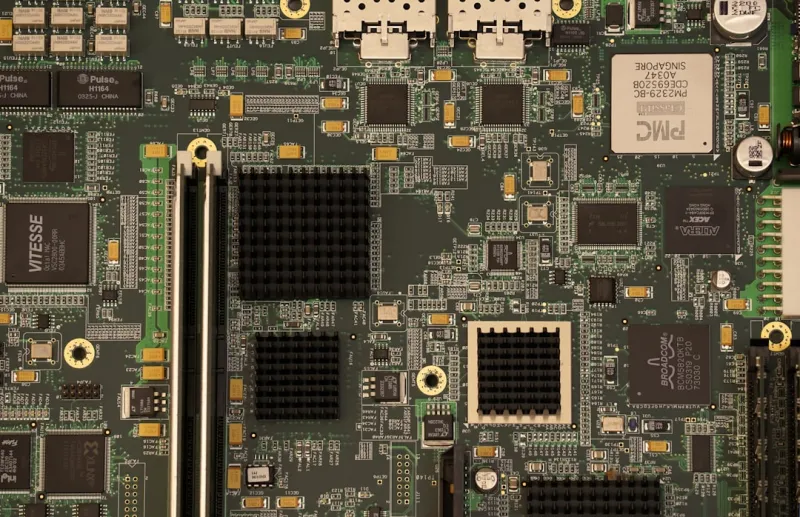
Why Motherboards Remain the Heartbeat of a Power‑User Rig
When I first started building PCs back in the early 2010s, the motherboard was often the silent hero that most hobbyists barely noticed. Fast‑forward to 2026, and that silent hero has turned into a command center that dictates performance ceilings, stability, and even security posture for the modern power user. As someone who spends countless nights tweaking BIOS settings, hunting down rare hardware bugs, and optimizing every watt of power delivery, I can tell you there’s no substitute for a well‑chosen board. The right chipset can unlock PCIe 6.0 lanes for blazing‑fast storage, while a robust VRM design ensures your overclocked CPU stays cool under load. Moreover, the motherboard now integrates Wi‑Fi 7, USB4, and even AI‑accelerated coprocessors that were once relegated to niche add‑on cards. In this guide, I’ll walk you through the decision‑making process that I use before every build, highlighting the features that truly matter to a power‑user who refuses to settle for “good enough.”
Choosing the Right Chipset: The Foundation of Future‑Proofing
The chipset you select is essentially the roadmap for what your system can achieve today and tomorrow. In 2026, the dominant platforms are AMD’s X670E and Intel’s Z890, each offering a unique blend of lane counts, PCIe generations, and integrated features. If you’re chasing the highest possible storage speeds, the X670E’s native support for PCIe 6.0 M.2 slots gives you a clear edge, while Intel’s Z890 shines with its refined power management and advanced AI‑assist capabilities baked into the chipset. Don’t forget to cross‑reference your plans with the broader upgrade strategy—something I detail in The Smart Way to Upgrade Your PC in 2026: A Power‑User’s Playbook. That post walks through how a chipset choice can either smooth or complicate future GPU swaps, RAM expansions, and even multi‑GPU configurations. Ultimately, your chipset should align with your workload: content creators may favor the extra USB‑4 ports on Intel, while gamers and AI enthusiasts often gravitate toward AMD’s generous PCIe lane distribution.
Form Factor Matters: Balancing Size, Airflow, and Expandability
Form factor isn’t just about fitting a board into a case; it’s about engineering a thermal envelope that lets high‑end components breathe. The classic ATX layout still reigns supreme for most power users because it offers ample space for robust VRM heatsinks, multiple M.2 slots, and full‑size PCIe slots. However, the rise of high‑density mini‑ITX designs, especially those built around the new “Nano‑X” chipset, has opened doors for compact yet powerful builds—think portable workstation on a coffee table. When selecting a form factor, consider the number of expansion cards you need, your cooling strategy, and whether you plan to upgrade the GPU more than once. A full‑size ATX board often provides better airflow pathways, essential when you push a 7950X3D CPU to its limits. Conversely, a mini‑ITX board can be paired with a high‑performance AIO cooler that directs heat straight out of the case, preserving space without sacrificing cooling efficiency.
Power Delivery and VRM Quality: The Unsung Heroes of Stability
Overclocking enthusiasts know that a solid VRM (Voltage Regulator Module) is the difference between a rock‑solid overclock and a system that crashes into a blue screen at the slightest load spike. In 2026, we’re seeing VRM designs that push up to 18 phases with titanium‑grade chokes, delivering clean, stable power to CPUs that now have base TDPs well over 150 W. A high‑quality VRM not only supports higher boost clocks but also reduces heat generation, allowing for quieter fan curves. If you’re still experiencing sporadic BSODs after a fresh build, I recommend reading Why the Blue Screen Still Haunts Power Users—and How to Tame It to see how power delivery irregularities often play a hidden role. When shopping, prioritize boards with robust cooling solutions—heat pipes, large aluminum fins, or even integrated active cooling—especially if you intend to push the CPU beyond stock frequencies for extended periods.
BIOS/UEFI Features: The Gateway to Customization and Security
Modern motherboards come equipped with UEFI firmware that rivals a full‑blown operating system in terms of configurability. Features such as granular memory timing adjustments, CPU power limit sliders, and built-in overclock profiles give you unprecedented control. For power users focused on security, the latest UEFI versions now support hardware‑rooted secure boot, TPM 2.0 integration, and firmware‑level ransomware protection. These features become especially critical when you consider the rise of supply‑chain attacks that target firmware. Updating the BIOS regularly not only unlocks new performance tweaks but also patches vulnerabilities that could otherwise compromise your entire setup. I always schedule a quarterly BIOS check, syncing it with Windows Update cycles to keep both the OS and firmware in lockstep.
Integrated Connectivity: From Wi‑Fi 7 to Thunderbolt 5
The days of relying on separate NIC or Bluetooth dongles are fading fast. Today’s high‑end boards ship with integrated Wi‑Fi 7 modules that deliver multi‑gigabit speeds, perfect for streaming 8K content or transferring massive data sets across a local network. Thunderbolt 5, now standard on many Z890 and X670E motherboards, provides up to 80 Gbps of bandwidth—enough for external GPU enclosures, ultra‑fast RAID arrays, or dual‑4K monitor setups without a single cable bottleneck. When evaluating connectivity, also look for multiple USB4 ports, a dedicated 2.5 GbE Ethernet port, and the newest Bluetooth 5.4 standard for low‑latency peripheral connections. These built‑in features reduce clutter, lower latency, and free up PCIe lanes for other critical components like high‑performance SSDs or AI accelerators.
Memory Support and Configuration: Maximizing Bandwidth and Capacity
DDR5 has matured into a reliable workhorse, and in 2026 it’s pushing beyond 7200 MT/s with tighter latency profiles. When choosing a motherboard, verify that it supports the highest memory speeds you plan to use, and that the board’s DIMM layout allows for dual‑ or quad‑channel configurations without sacrificing lane distribution for other components. ECC memory support is becoming more common on consumer‑grade boards, a boon for those who can’t afford a single‑bit error in scientific simulations or financial modeling. Additionally, many modern boards feature on‑board memory overclocking profiles—XMP 3.0 for DDR5—making it easier to squeeze out extra performance with a single BIOS toggle. Remember to check the QVL (Qualified Vendor List) provided by the manufacturer to avoid compatibility headaches down the line.
Troubleshooting Common Motherboard Issues: A Power‑User’s Checklist
Even the most meticulously assembled system can run into motherboard‑related hiccups. Below is a quick reference checklist I keep on my desk for rapid diagnostics:
- POST Beeps or Codes: Consult the motherboard manual’s beep chart; a single long beep often points to memory issues.
- Power Supply Compatibility: Verify that the PSU provides enough clean rails for the board’s VRM power draw.
- BIOS Version: An outdated BIOS can prevent newer CPUs from booting—always flash to the latest stable release.
- Thermal Sensors: Use hardware monitoring tools to ensure VRM temperatures stay below 85 °C under load.
- Secure Boot Failures: Check TPM settings and firmware signatures if Windows refuses to boot.
If you encounter persistent instability, I often reference Fortifying Your Power‑User Setup: Essential Security Moves for 2026 to verify that firmware and security configurations aren’t silently sabotaging your hardware. A systematic approach—starting from power delivery, moving through memory, and ending with peripheral compatibility—usually isolates the root cause within 30 minutes.
Looking Ahead: PCIe 6.0, AI Acceleration, and the Motherboard of Tomorrow
The motherboard landscape is evolving faster than ever, driven by the relentless march of AI workloads and ultra‑fast storage demands. PCIe 6.0 is now the baseline for flagship boards, offering up to 64 GT/s per lane—a massive leap that will accommodate future GPUs and NVMe drives with ease. Additionally, several manufacturers are embedding dedicated AI inference chips directly onto the PCB, providing low‑latency acceleration for tasks like real‑time video upscaling or on‑the‑fly data encryption. As we move deeper into 2026, expect boards to incorporate more sophisticated power‑gating techniques, enabling sections of the motherboard to shut down when not in use, dramatically improving efficiency. For power users, staying ahead means not only selecting the right board today but also planning for the inevitable upgrades that tomorrow’s software will demand. Keep an eye on firmware roadmaps, and don’t shy away from boards that promise a clear upgrade path—because in the world of high‑performance computing, the only constant is change.




