
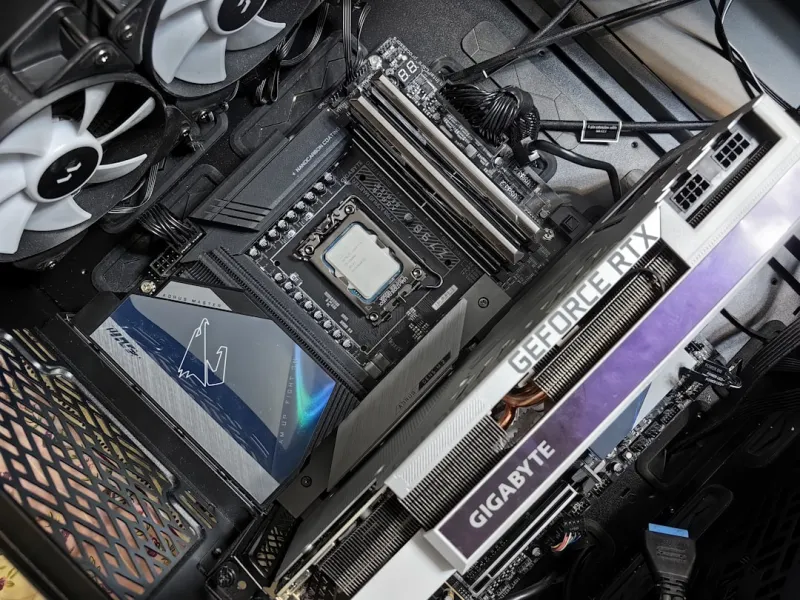
When I first opened a motherboard box back in the early 2010s, the experience felt like stepping into a high‑tech puzzle where every tiny component mattered. Fast‑forward to 2026, and that feeling has only intensified; motherboards have become the central nervous system of a machine that must juggle AI workloads, ultra‑fast storage, and relentless gaming demands—all while staying secure and power‑efficient. As someone who builds PCs for a living and lives for the thrill of squeezing every last ounce of performance, I’ve learned that the board you choose can make or break the entire project. It’s no longer just about fitting a CPU and a few sticks of RAM; it’s about selecting a platform that can evolve with emerging standards like PCIe 6.0, DDR6, and integrated AI accelerators. In this post I’ll walk you through the trends that matter, the hard choices you’ll face, and the practical steps to future‑proof your rig without blowing your budget.
Why Motherboards Matter More Than Ever
In 2026 the motherboard has transcended its traditional role as a passive carrier of components. Modern boards are now active participants in performance, security, and even AI inference. With the rise of on‑board AI co‑processors, many high‑end motherboards now feature dedicated Tensor cores that can offload machine‑learning tasks from the CPU, dramatically reducing latency for applications like real‑time video upscaling or voice assistants. This shift mirrors the broader industry move highlighted in the New Frontier of Software Development article, where software and hardware converge to deliver smarter experiences. Moreover, the proliferation of PCIe 6.0 slots means you can now plug in storage devices that top 100 GB/s read speeds, a game‑changer for content creators and gamers alike. When you pair that bandwidth with DDR6 memory, you’re looking at a system that can sustain massive data streams without bottlenecks—something that simply wasn’t feasible a few years ago.
Security has also climbed to the top of the motherboard agenda. Today’s boards come equipped with built‑in hardware root of trust, enhanced TPM 2.0 modules, and firmware that can self‑verify against malicious tampering. This is crucial as ransomware and AI‑generated malware become more sophisticated, a topic explored in depth in our Silent Evolution piece. A robust motherboard can provide a solid foundation for Secure Boot and can even isolate compromised peripherals through segmented I/O lanes. For users who demand uptime and data integrity—whether you’re a streamer, a remote worker, or an AI researcher—choosing a board with advanced security features isn’t a luxury; it’s a necessity that protects both performance and peace of mind.
Key Features to Prioritize in 2026
When evaluating chipsets, the first decision point is the CPU ecosystem: AMD’s AM5 platform versus Intel’s LGA 1700 successors. AMD’s recent releases have leaned heavily into AI‑centric instruction sets, while Intel has doubled down on hybrid cores that blend performance and efficiency cores for dynamic workload balancing. The choice influences not only raw performance but also the type of PCIe lanes you’ll receive—AMD typically offers more lanes directly from the CPU, which can be a boon for multi‑GPU or high‑speed storage configurations. Beyond raw specs, consider the board’s VRM design. A high‑quality VRM with robust cooling can sustain a 125 W+ CPU under continuous load, essential for overclockers and AI developers who push the envelope. Look for digital power phases, extended heatsinks, and even active cooling solutions if you plan to run the system 24/7.
Form factor remains a personal but strategic choice. While ATX continues to dominate for its expansion flexibility, the resurgence of mini‑ITX boards equipped with full‑size VRMs and PCIe 6.0 slots shows that size no longer dictates capability. If you’re building a compact workstation that needs to fit into a small office or a living‑room entertainment hub, a well‑designed mini‑ITX can deliver desktop‑level performance without the footprint. However, remember that smaller boards often sacrifice extra M.2 slots and additional USB ports, so plan your peripheral needs ahead of time. In 2026, the market is rich with hybrid solutions that blend the best of both worlds, allowing you to pick a size that matches your space constraints while still delivering the power you require.
Connectivity is another arena where motherboards have taken huge strides. USB 4.0 and Thunderbolt 4 are now standard on most premium boards, offering up to 40 Gbps transfer rates and universal compatibility across devices. Meanwhile, Wi‑Fi 7 is emerging, promising multi‑gigabit wireless speeds that can keep up with the fastest Ethernet‑backed LANs. Speaking of Ethernet, many high‑end boards now ship with 2.5 GbE or even 5 GbE ports, ensuring that network‑intensive tasks—like AI model training over a NAS or live‑streaming 8K content—don’t become bottlenecked. For those who want to future‑proof their network infrastructure, consider motherboards that support both a dedicated 2.5 GbE LAN and a secondary 10 GbE via an add‑in card, a setup highlighted in the Networking in 2026 article.
Putting It All Together: Building Your Future‑Ready Rig
Now that we’ve covered the what, let’s talk about the how. Start by mapping your workload requirements: are you primarily gaming, rendering, or training AI models? This determines the balance between CPU cores, GPU bandwidth, and storage speed you’ll need. Pair a motherboard with a chipset that offers the appropriate lane distribution—look for at least four PCIe 6.0 x16 slots if you anticipate multiple GPUs or future expansion. Next, ensure your power delivery can handle the combined draw; a 12‑phase VRM with a high‑quality MOSFET is a solid baseline. Don’t forget to allocate enough RAM slots for DDR6 to keep your memory bandwidth in the sweet spot, especially for AI‑heavy tasks that thrive on rapid data shuffling.
When you’re ready to assemble, take advantage of the firmware tools that modern boards provide. Many manufacturers now include AI‑driven BIOS tuning assistants that can automatically optimize voltage curves based on your specific CPU and cooling setup. This not only saves time but also reduces the risk of instability—something I’ve learned the hard way after a few mis‑tuned overclocks. Additionally, enable hardware‑based security features like Secure Boot, and make sure the TPM is active to protect your encryption keys. For those looking to extend the life of their system, the Future‑Ready PC Upgrades guide offers a roadmap for incremental improvements that keep your rig competitive for years without a full rebuild.
In the end, a motherboard is more than a piece of metal with sockets; it’s the strategic foundation that determines how gracefully your system scales with technology. By focusing on AI‑ready features, robust power delivery, expansive connectivity, and iron‑clad security, you’ll build a platform that not only meets today’s demands but also adapts to the innovations of tomorrow. As we continue to push the boundaries of what a personal computer can do, remember that the smartest investment you can make is in a board that anticipates the next wave of hardware evolution—because in 2026, the only constant is change.




