
When I first cracked open a fresh ATX board back in the early 2020s, I felt the same thrill that still courses through my veins today. In 2026, the motherboard isn’t just a passive platform; it’s the living, breathing heart of a power‑user rig, dictating everything from raw performance to long‑term stability. I’ve spent countless hours soldering, tweaking BIOS settings, and wrestling with firmware bugs, and each lesson has reinforced a single truth: the right motherboard can turn a good build into a legendary one. That’s why I’m devoting this deep dive to the nuances that separate the hobbyist’s “just‑works” board from a truly future‑ready chassis. Whether you’re a seasoned overclocker, a content creator chasing seamless 8K edits, or a developer building AI models on‑the‑fly, the motherboard you choose will be the linchpin that either powers your ambition or throttles it.
Chipset Evolution and What It Means for You
The leap from PCIe 5.0 to PCIe 6.0 this year has been nothing short of seismic. With double the bandwidth, you can finally saturate high‑end GPUs and next‑gen SSDs without hitting a bottleneck. But a chipset that supports PCIe 6.0 is only half the story; you need a board with robust lane distribution and minimal electrical interference. I’ve seen users pair a top‑tier CPU with a mid‑range motherboard, only to discover that lane sharing crippled their 4‑lane NVMe drives during heavy AI training runs. Meanwhile, DDR5 has matured, but the early DDR6 modules are beginning to appear on premium boards, promising higher frequencies and lower latency—perfect for memory‑intensive workloads like real‑time ray tracing. In my recent builds, I’ve leaned into boards that offer both DDR5 and DDR6 compatibility, giving me the flexibility to upgrade memory without a full platform swap. Remember, the chipset isn’t just a label; it’s a roadmap of what your system can truly achieve today and tomorrow.
Power Delivery, VRM Design, and Overclocking Confidence
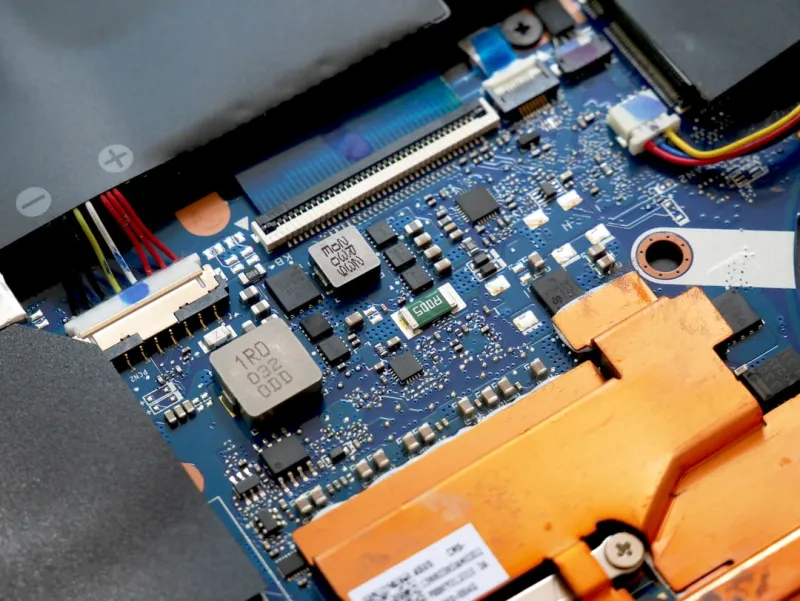
Power delivery is where many hobbyists stumble, especially when chasing the highest boost clocks. A solid VRM (Voltage Regulator Module) design with ample phases and quality components like Japanese capacitors can mean the difference between a stable 5.2 GHz overclock and a crash‑and‑burn scenario that leaves you troubleshooting for days. I recall a build where a budget board’s VRM overheated within minutes of a stress test, forcing me to downgrade the CPU multiplier dramatically. Modern motherboards now sport digital PWM controllers and AI‑driven power management that adapt in real time, keeping temperatures in check while maintaining performance headroom. For power users, I recommend scrutinizing the VRM cooling solution—heatsinks, heatpipes, even active fans—and checking the manufacturer’s thermal specs under load. A well‑engineered power stage not only fuels higher frequencies but also extends component lifespan, a crucial factor when you’re planning a build that should serve you for several years without a major refresh.
Form factor choices have become more strategic than aesthetic. While ATX still dominates the high‑performance market with its generous expansion slots, micro‑ATX and mini‑ITX boards have closed the gap in VRM quality and connectivity, thanks to denser component placement. I recently built a compact 2‑U workstation using a mini‑ITX board that featured a 14‑phase VRM and dual PCIe 6.0 x16 slots—perfect for a dual‑GPU AI setup that fits under a single‑rack server chassis. The key is to align the form factor with your case constraints and future upgrade path. A larger board offers more PCIe slots, M.2 drives, and USB ports, but it also consumes more space and may require a bigger power supply. Conversely, a smaller board can still deliver flagship performance if you choose one designed with high‑end components, making it a viable option for space‑constrained labs or home offices.
Connectivity is the silent workhorse that often gets overlooked until you’re scrambling for ports during a deadline. The latest motherboards now ship with multiple USB 4.0 Type‑C ports, Thunderbolt 4 support, and a raft of M.2 slots that can handle both PCIe 6.0 SSDs and traditional SATA drives. If you’re still holding onto a massive SATA‑based storage array for archival footage, you’ll appreciate the continued presence of SATA III ports, but don’t ignore the strategic advantage of having dedicated M.2 slots that support both NVMe and SATA‑based modules. For a deep dive into why spinning disks still matter for power‑users, check out the hard drives guide that walks you through balancing speed and capacity without breaking the bank.
Beyond raw specs, the BIOS/UEFI experience can make or break your tinkering workflow. Today’s boards feature AI‑assisted overclocking, which learns your silicon’s sweet spot and applies voltage curves automatically. I’ve relied on these tools to achieve stable overclocks on both AMD and Intel platforms without diving into the minutiae of manual timing adjustments. Security is another pillar: hardware TPM 2.0, Secure Boot, and firmware rollback protection are now standard, shielding you from the latest supply‑chain attacks that have plagued the industry. Keeping the BIOS updated is essential—many vendors release micro‑code patches that improve memory compatibility and fix obscure bugs that could otherwise cause intermittent crashes during long rendering sessions.
Choosing a motherboard isn’t a one‑size‑fits‑all decision; it’s a tailored process that must align with your primary workloads. If your focus is high‑frame‑rate gaming, prioritize boards with low‑latency networking, robust audio codecs, and ample PCIe lanes for multi‑GPU configurations. For creators working with 8K video or 3D rendering, look for boards that support dual‑channel DDR6, multiple M.2 slots for fast scratch disks, and a strong VRM for sustained CPU boost. AI enthusiasts will benefit from motherboards that feature PCIe 6.0 x16 slots and dedicated AI accelerator slots, ensuring that your GPUs can communicate at peak bandwidth. I found the perfect motherboard guide invaluable when mapping out a build that needed to juggle both gaming and deep‑learning tasks without compromise.
Budget constraints are a reality, even for power users who love to splurge on cutting‑edge hardware. The trick is to identify which features are essential now and which can be deferred. A board with a solid VRM and future‑proof PCIe slots might cost a bit more, but it saves you from a costly motherboard swap when you upgrade to a next‑gen GPU or CPU. Conversely, you can often skip exotic features like integrated Wi‑Fi 7 if you already have a wired 10 GbE network, reallocating those funds toward higher‑capacity RAM or a faster SSD. My personal budgeting rule is simple: allocate roughly 15‑20 % of your total build cost to the motherboard, ensuring you get a platform that won’t become a bottleneck within the next two to three upgrade cycles.
Integration with the rest of your system is where the motherboard truly proves its worth. Pairing a high‑end CPU with a mismatched board can lead to sub‑optimal performance, especially when it comes to power delivery and thermal management. I always cross‑reference the motherboard’s CPU support list and verify that the VRM can handle the processor’s TDP plus headroom for overclocking. Additionally, ensure that your power supply has sufficient amperage on the +12 V rail to feed both the GPU(s) and the motherboard’s VRM under peak load. For a holistic view of the upgrade process, the PC upgrade playbook offers a step‑by‑step guide that aligns motherboard selection with PSU, cooling, and case considerations.
In closing, the motherboard is the nexus where every component converges, and its quality dictates how harmoniously that convergence sings. My own builds over the past five years have taught me that skimping on the board is the fastest route to frustration—random BSODs, throttled performance, and an endless cycle of firmware updates that never seem to solve the core issue. By focusing on chipset capabilities, robust power delivery, strategic form factor, comprehensive connectivity, and a BIOS that empowers rather than intimidates, you set the stage for a system that not only meets today’s demanding workloads but also gracefully accommodates tomorrow’s innovations. Keep this checklist in mind, and you’ll craft a motherboard foundation that stands the test of time, letting you push the limits of what a power‑user rig can achieve.




