
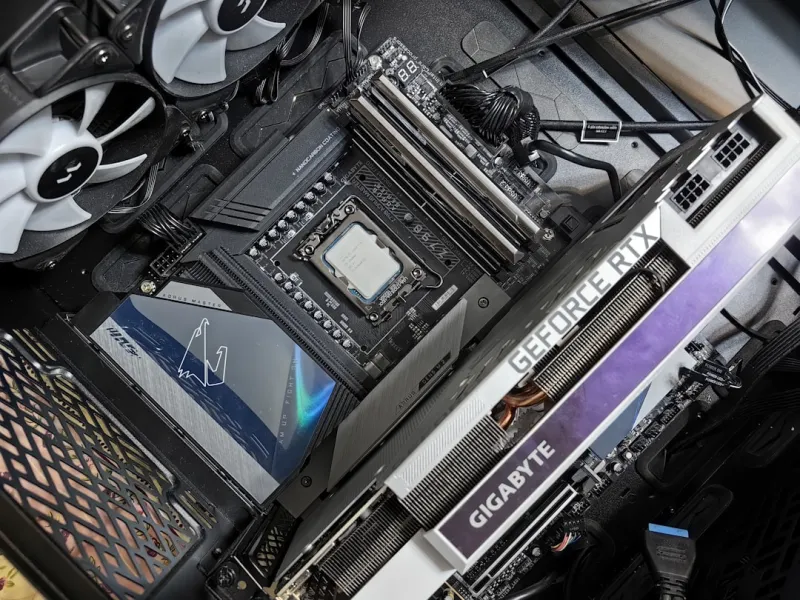
When I first built a workstation for AI‑assisted video editing back in the early 2020s, the motherboard was the quiet hero that held everything together. Fast‑forward to 2026, and the board has evolved into a sophisticated platform that can make or break a power‑user’s productivity. It’s no longer just a passive PCB; it’s an active participant in performance, power efficiency, and security. In this article I’ll walk you through the decision matrix I use every time I design a new rig, sharing the nuances that most spec sheets gloss over. Expect a mix of technical depth, real‑world anecdotes, and actionable tips that will help you avoid costly missteps and future‑proof your build for the next wave of hardware innovations.
Let’s start with the chipset, the brain behind the board’s capabilities. In 2026 Intel’s 700‑series and AMD’s X800‑series both bring a slew of features, but their philosophies diverge. Intel’s chipset leans heavily into integrated AI accelerators and a richer set of PCIe lanes, while AMD emphasizes a more generous PCIe lane distribution across the CPU and a higher baseline of PCIe 6.0 support. If your workflow relies on multiple GPUs for deep‑learning inference, Intel’s direct‑CPU lane count can reduce latency. Conversely, AMD’s architecture shines when you need a balanced mix of GPUs, high‑speed storage, and networking without sacrificing core count. My rule of thumb: match the chipset to the bottleneck you anticipate—AI workloads tip toward Intel, while a diversified workstation leans toward AMD.
PCIe 6.0 is finally mainstream in 2026, and that changes how we think about expansion. The theoretical 64 GT/s bandwidth per lane translates into tangible gains for next‑gen graphics cards and ultra‑fast NVMe SSDs. However, not every slot on a board is created equal; lane bifurcation and bandwidth sharing can throttle performance if you’re not careful. I always map out my intended lane usage before buying a board, ensuring that the primary GPU occupies a full x16 slot that runs at native PCIe 6.0 speeds, while secondary slots are reserved for storage or networking cards that can tolerate slight bandwidth reductions. This strategic placement not only maximizes throughput but also preserves headroom for future upgrades, keeping your system relevant as new PCIe 6.0 devices hit the market.
The VRM (voltage regulator module) is the unsung workhorse that determines how cleanly power reaches the CPU, especially under overclocking or heavy multi‑threaded loads. In 2026, we see VRM designs that employ up to 20 phases with premium gallium nitride (GaN) MOSFETs, delivering tighter voltage regulation and lower thermal output. If you’re running a 16‑core “Zen 5” or an “Alder Lake‑X” enthusiast processor, a robust VRM isn’t optional—it’s essential for stability and longevity. Look for boards with solid heatsinks, ample thermal pads, and preferably a digital power controller that can be fine‑tuned via BIOS. A strong VRM not only supports higher boost clocks but also reduces the risk of throttling during sustained workloads like 3D rendering or scientific simulations.
Memory support has become a pivotal differentiator. DDR5 is now the baseline, but DDR6 is creeping into the high‑end segment, offering higher frequencies and lower power draw. The motherboard you choose must not only list the supported speeds but also provide adequate DIMM slots with proper signal trace routing. Poor memory handling can cause the dreaded “why memory issues crash even the best PCs—and how to fix them” scenario that haunts many builders. I recommend pairing a board with at least four DIMM slots and a BIOS that supports XMP 3.0 profiles out of the box, which simplifies the overclocking process. For anyone wrestling with memory instability, the guide How to Pinpoint and Fix Memory Problems Before They Cripple Your Workflow is a lifesaver.
Connectivity has exploded thanks to USB4, Thunderbolt 4, Wi‑Fi 7, and 10 GbE Ethernet, turning the motherboard into a central hub for both wired and wireless data. When evaluating a board, check the number of USB4 ports—these are future‑proof for high‑speed peripherals and external GPUs. Wi‑Fi 7 offers multi‑gigabit speeds with lower latency, which is a boon for cloud‑based rendering pipelines. Meanwhile, a dedicated 10 GbE NIC can shave seconds off large dataset transfers. I often prioritize boards that combine these features on a single chipset, reducing the need for additional PCIe add‑in cards and freeing up lanes for GPUs or storage.
Storage integration is another area where the right motherboard can streamline your workflow. Look for at least three M.2 slots, with at least two supporting PCIe 6.0 x4 for blazing‑fast NVMe drives. Some high‑end boards also include a built‑in RAID controller, allowing you to set up mirrored or striped arrays without a separate card. If you’re juggling massive video libraries or training datasets, consider a hybrid approach: a PCIe 6.0 SSD for active projects and a high‑capacity SATA or QLC NVMe drive for archival storage. My favorite read on balancing these priorities is Hard Drive Strategies for Power Users: Balancing Speed, Capacity, and Longevity, which breaks down the trade‑offs in a clear, actionable way.
Firmware has become far more than a static BIOS; modern UEFI interfaces now include AI‑driven tuning assistants that can recommend optimal power curves and memory timings based on your hardware configuration. This is where the Motherboard Playbook shines, offering step‑by‑step guidance on leveraging these tools. I always start by updating to the latest firmware, then enable “Smart Tuning” or similar features before diving into manual tweaks. The AI assistants can save hours of trial‑and‑error, especially when dealing with complex VRM configurations or hybrid memory setups. Remember, a well‑maintained BIOS not only boosts performance but also patches security vulnerabilities that could otherwise expose your system to firmware‑level attacks.
Security is no longer an afterthought, particularly for power users who handle sensitive data or run critical services. Look for motherboards that incorporate a discrete TPM 2.0 chip, support for Secure Boot, and hardware‑based encryption accelerators. With the rise of sophisticated ransomware in 2026, integrating encryption at the board level can offload processing from the CPU and ensure that data at rest remains protected even if the OS is compromised. For deeper insight into safeguarding your hardware, the article Why Modern Power Users Must Rethink Encryption Strategies in 2026 outlines why traditional software‑only approaches are insufficient.
Looking ahead, the next generation of motherboards will likely embrace modular designs, allowing you to swap out VRM modules or add extra PCIe lanes without replacing the entire board. While that vision is still on the horizon, today’s boards already offer a solid foundation for future upgrades. My final piece of advice: treat the motherboard as the long‑term backbone of your workstation, not just a component you pick once and forget. Regularly revisit the firmware, monitor thermal performance, and stay informed about emerging standards. By doing so, you’ll ensure that your build remains a high‑performing, secure, and adaptable platform well into the next wave of technological breakthroughs.
In summary, mastering motherboard selection in 2026 requires a holistic view of chipset capabilities, PCIe 6.0 bandwidth, VRM robustness, memory and storage flexibility, connectivity, and security features. Pair these technical criteria with your specific workflow demands—whether it’s AI model training, 8K video editing, or massive data analytics—and you’ll craft a system that not only meets today’s challenges but also adapts gracefully to tomorrow’s. For deeper dives into related topics, explore our other guides on power‑user upgrades, Windows optimization, and AI‑driven desktop strategies. Happy building, and may your lanes always be full‑duplex!




