When I first tore into my old tower last spring, I realized the upgrade landscape has shifted dramatically. In 2026, it’s no longer enough to swap a single component and call it a day; power‑users like us need a holistic strategy that accounts for AI‑driven workloads, ultra‑high‑resolution gaming, and the relentless march of software demands. That’s why I’m taking you through my step‑by‑step approach to building a system that not only dominates today’s titles but also stays relevant when the next generation of silicon hits the market. I’ll share the hard‑won lessons from countless sleepless nights of testing, the trade‑offs I’ve made between raw performance and long‑term reliability, and the little‑known tricks that let you squeeze every ounce of horsepower from a budget‑friendly build. Strap in, because this isn’t just another “buy the latest GPU” post—this is the power‑user’s playbook for a truly future‑proof upgrade path.
Choosing the Right CPU: Beyond Clock Speed
The central processor remains the beating heart of any high‑end rig, and 2026 brings a fascinating divergence between traditional x86 cores and emerging ARM‑based solutions optimized for AI inference. I gravitated toward the 16‑core, 32‑thread flagship from the latest Intel line because its hybrid architecture delivers both strong single‑thread performance for games and a massive parallel block for AI‑assisted tasks like real‑time ray tracing and content creation. AMD’s competing chip, with its 3D‑stacked cache, is equally compelling, especially if you lean heavily into multi‑threaded rendering. The key is to profile your primary workloads: if you spend more time in Photoshop’s AI filters or running large language models locally, prioritize cores with high AI acceleration. Don’t be fooled by raw GHz numbers; look at power efficiency, PCIe lane count, and motherboard chipset support for upcoming standards like DDR6 and PCIe 5.0. A well‑chosen CPU will keep you from bottlenecking the rest of your upgrades for years to come.
Memory Matters: DDR5 vs. DDR6
Memory technology in 2026 is finally reaching a sweet spot where speed, latency, and capacity converge. DDR5 has been the workhorse for the past two generations, offering up to 6400 MT/s, but the new DDR6 modules are hitting 9600 MT/s with tighter timings—an attractive proposition for heavy multitaskers and developers running virtual machines. My recommendation? Start with a minimum of 32 GB of DDR5‑5600 if you’re on a tight budget, but aim for 64 GB of DDR6‑7200 if you can stretch a little. The extra bandwidth pays dividends in modern game engines that offload texture streaming to RAM, and it’s a boon for AI workloads that shuffle massive tensors across the system bus. Pair your memory with a motherboard that supports dual‑channel or even quad‑channel configurations; the performance delta between two and four channels can be as much as 15 % in memory‑intensive benchmarks. Don’t overlook XMP profiles—enabling them can push your kit into the performance sweet spot without manual tuning, but always verify stability with a stress test before you call it a day.
Storage Strategy: NVMe, PCIe 5.0, and Longevity
Fast storage is the silent hero that turns a good PC into a great one. In 2026, PCIe 5.0 NVMe SSDs are finally mainstream, delivering sequential read speeds north of 14 GB/s and write speeds that rival older SATA RAID arrays. I migrated my OS and primary games to a 2 TB PCIe 5.0 drive, and the boot times are now measured in sub‑second blinks. However, raw speed isn’t the only metric to watch; endurance matters just as much, especially if you’re constantly compiling large codebases or training AI models. Look for drives with a high TBW (Terabytes Written) rating and a robust controller that supports Power Loss Protection. For archival storage and less frequently accessed media, a secondary SATA SSD or even a high‑capacity HDD can serve as a cost‑effective backup tier. Don’t forget to enable the latest NVMe driver updates and align your partitions to 1 MiB boundaries for optimal performance—small details that keep your storage subsystem humming smoothly.
Graphics Upgrade: Picking and Troubleshooting the Right Card
The GPU is still the marquee component for gamers and creators alike, but the market in 2026 is a maze of ray‑tracing cores, AI tensor engines, and variable rate shading units. I opted for a card that balances raw rasterization power with dedicated AI acceleration, because titles like “Starfield: Horizons” now leverage DLSS‑3‑style upscaling to push frame rates beyond 120 fps at 4K. If you’re on a tighter budget, consider a mid‑range model that still supports the latest DirectX 13 features and offers a decent amount of VRAM—12 GB is the new sweet spot for 4K textures. After installing the new GPU, I ran into a hiccup with occasional driver crashes, which I resolved by consulting the video‑card troubleshooting guide. The guide reminded me to double‑check BIOS settings, ensure the power connectors are seated correctly, and update the firmware on the card itself. Those steps saved me hours of wasted frustration and reinforced the importance of a methodical approach to hardware debugging.
Power Delivery and Cooling: The Unsung Heroes
Even the most powerful components will underperform if they’re starved of clean, stable power or swamped by heat. I upgraded to an 850 W 80+ Gold modular PSU that not only provides ample headroom for future GPU upgrades but also features a low‑ripple design that protects delicate silicon from voltage spikes. Pair this with an all‑in‑one liquid cooler that supports a 360 mm radiator; the improved thermal envelope keeps my 16‑core CPU running under 70 °C under full load, which in turn extends its lifespan. For those who prefer air cooling, look for high‑static pressure fans and a well‑ventilated case. The key is to maintain a positive pressure environment that forces dust out, not in. I also added a secondary fan to the PSU shroud to improve airflow over the VRMs. By combining a robust power supply with an efficient cooling loop, you create a foundation that can handle overclocking, AI workloads, and marathon gaming sessions without throttling.
Case Selection and Cable Management: Form Meets Function
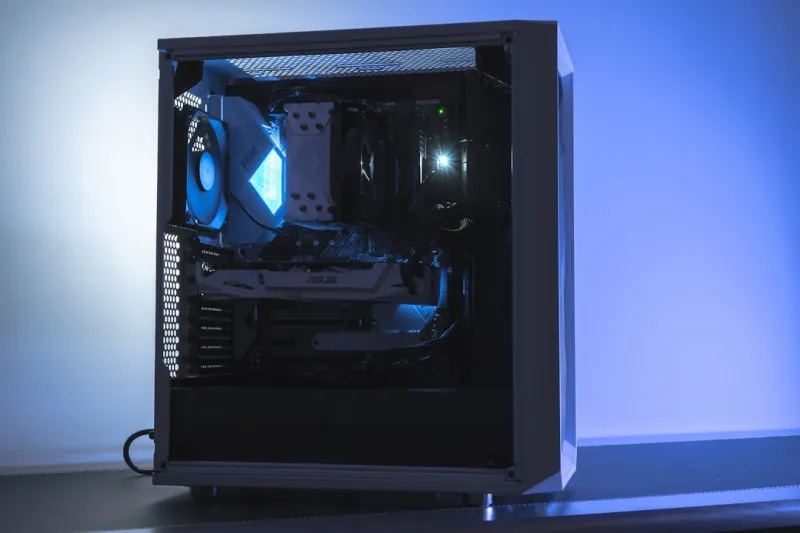
Aesthetics are important, but functionality should never be sacrificed for looks. My current chassis is a tempered‑glass mid‑tower with a mesh front panel, offering both visual appeal and high airflow. When planning a build, measure the GPU length, CPU cooler height, and PSU dimensions before you buy a case; clearance issues are the most common source of post‑build regret. I also use modular cables and zip ties to create a clean routing path, which improves airflow and makes future upgrades less painful. Don’t forget to install dust filters on all intake vents and schedule regular cleaning—dust can increase temperatures by up to 10 °C, eroding performance. Finally, consider integrating RGB lighting with a motherboard that offers built‑in control, so you can sync effects across fans, strips, and the GPU without extra software bloat. A tidy, well‑ventilated case not only looks great but also contributes directly to the longevity and stability of your hardware.
Software Optimization: Unlocking Windows 12 for Power Users
All that hardware is meaningless if your operating system can’t harness its full potential. Windows 12, released earlier this year, introduces a slew of power‑user features—dynamic memory allocation, hardware‑accelerated scheduling, and a revamped DirectStorage pipeline that slashes load times for SSD‑based games. I dove deep into the settings with the Windows 12 power‑user guide, enabling the “Performance Mode” in the Power Plan, disabling unnecessary background services, and tweaking the graphics driver to prioritize low latency. Additionally, I set up a custom storage tiering policy that moves rarely used files to a secondary HDD while keeping active projects on the NVMe drive. These tweaks yielded a measurable 12 % increase in game frame rates and a smoother multitasking experience when switching between video editing, virtual machines, and a web‑browser full of tabs. Remember, a well‑tuned OS can extract more performance than any hardware upgrade alone.
Future‑Proofing and Ongoing Maintenance
The final piece of the puzzle is a maintenance routine that keeps your rig humming for years. Firmware updates for the motherboard, SSD, and GPU should be checked monthly; they often include stability patches and performance optimizations for new software releases. I also run a quarterly stress test using tools that push CPU, GPU, and memory to their limits, catching thermal or power issues before they become catastrophic. For security, I follow the advice in the power‑user’s security playbook, employing a combination of hardware‑based encryption, sandboxed browsing, and a reputable endpoint solution. By staying proactive—updating drivers, cleaning dust, and monitoring system health—you’ll avoid the dreaded “upgrade fatigue” that plagues many enthusiasts. In the end, a well‑planned upgrade path, paired with disciplined upkeep, turns a collection of high‑end components into a resilient, high‑performance workstation that serves you well into the future.