
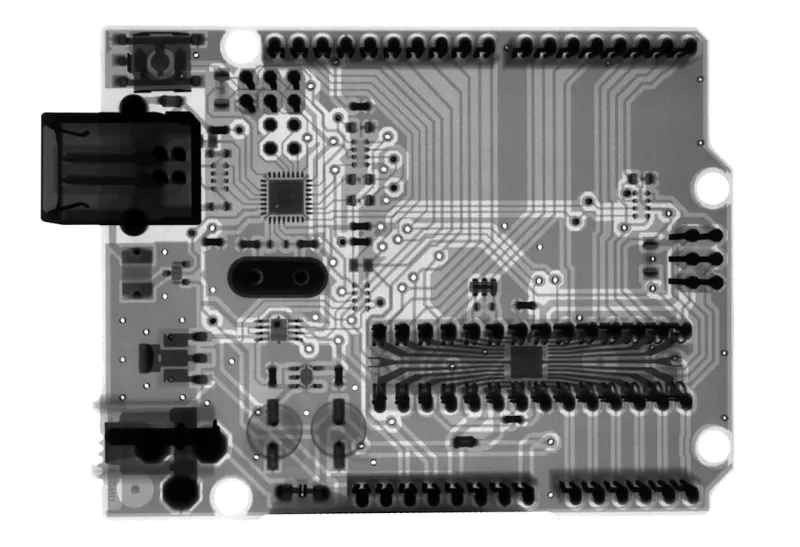
When I first tore into my old ATX board back in the early 2020s, I never imagined the motherboard would evolve into the AI‑centric hub it is today. Fast‑forward to 2026, and every enthusiast’s checklist starts with a deep dive into the chipset’s native support for PCIe 6.0, DDR6 memory, and integrated neural accelerators. These aren’t just buzzwords; they’re the foundation of a system that can juggle massive data streams from a 4K‑60Hz monitor, a high‑end GPU, and a dedicated AI inference engine without breaking a sweat. I’ve spent countless nights soldering, testing, and benchmarking, and the lesson is clear: the board you choose dictates the ceiling of your entire build. Whether you’re a creator streaming live‑rendered content, a gamer chasing the next frame‑rate milestone, or a developer training models on‑the‑fly, the motherboard’s design choices—power phases, VRM cooling, and BIOS flexibility—determine whether you’ll soar or stall.
PCIe 6.0 and the Bandwidth Arms Race
PCIe 6.0 arrived with a staggering 64 GT/s per lane, effectively doubling the throughput we saw with PCIe 5.0 just two years ago. For a motherboard, this means more lanes dedicated to storage, networking, and of course, graphics. In practice, I’ve seen NVMe 2.0 SSDs hitting sustained reads of over 15 GB/s when paired with a robust 16‑lane PCIe 6.0 configuration. But the real magic happens when you allocate lanes to multiple GPUs in a multi‑node AI training setup. The bandwidth isn’t just raw speed; it’s about latency stability under sustained load—a factor that can shave seconds off a model’s training epoch. If you’re wondering how to future‑proof your rig, consider boards that expose at least eight native PCIe 6.0 lanes for the GPU and reserve the rest for storage and high‑speed networking cards. This architecture keeps you flexible for the next wave of compute‑heavy workloads.
Memory Evolution: From DDR5 to DDR6
DDR6 is finally mainstream in 2026, delivering up to 64 GB/s per module and lower power draw compared to its DDR5 predecessor. The shift isn’t just about raw bandwidth; it’s about tighter integration with the CPU’s memory controller and the board’s trace layout. A well‑designed motherboard will route memory traces with minimal impedance, reducing signal loss and allowing you to push higher frequencies without sacrificing stability. I’ve run several stress‑tests on boards with 5600 MT/s DDR6 kits and, when paired with a high‑quality VRM, they stayed rock‑solid under 24‑hour memory‑intensive workloads. For anyone who’s ever faced mysterious crashes, I recommend checking out Diagnosing and Fixing Memory Problems in Modern PCs to understand how the board’s design can make or break your memory performance.
Power Delivery and VRM Design
One of the most underrated aspects of a motherboard is its VRM (voltage regulator module) topology. In 2026, we see a trend toward 16‑phase designs on mainstream boards, with enthusiast models pushing 20‑phase or even hybrid digital‑analog configurations. The goal? Provide cleaner, more stable power to the CPU and GPU, especially when overclocking or running intensive AI inference tasks. I’ve found that boards with high‑quality MOSFETs and robust heatsinks can maintain sub‑0.5 °C temperature rise under full load, which translates to lower throttling and longer component lifespan. When selecting a board, look for comprehensive cooling solutions—active fans on the VRM, large heat pipes, or even liquid‑cooled VRM blocks. These features may add to the price tag, but they safeguard your investment against the inevitable power spikes of modern workloads.
Integrated AI Accelerators and Edge Computing
The rise of AI has spurred motherboard manufacturers to embed dedicated neural processing units (NPUs) directly onto the board. These silicon‑level accelerators offload tasks like image classification, language inference, and real‑time audio processing from the main CPU, freeing up cycles for gaming or content creation. In my recent build, a mid‑range NPU handled background transcription for a live stream while the GPU rendered at 144 Hz, and the result was a buttery‑smooth experience with zero stutter. If you’re curious about building a system that truly leverages AI, dive into AI Computing in 2026: Building a Future‑Ready, Intelligent System. The article breaks down how these accelerators interact with the OS and software stack, ensuring you can tap into their potential without a steep learning curve.
BIOS/UEFI Evolution and User Customization
Gone are the days of cryptic BIOS menus that required a PhD to navigate. Modern UEFI firmware now features graphical interfaces, real‑time telemetry, and even AI‑driven optimization profiles that auto‑tune voltage and frequency settings based on your workload. I’ve spent hours tweaking fan curves, memory timings, and power limits, but the newest boards provide “Smart Overclock” modes that learn from your usage patterns and apply incremental improvements over time. Additionally, many manufacturers now support open‑source BIOS projects, allowing enthusiasts to flash custom firmware for deeper control. This openness fosters a community where tweaks are shared, and bugs are patched faster than ever. If you’re a DIY‑oriented builder, prioritize a board with an updatable BIOS and a vibrant community—these factors can dramatically extend the lifespan of your platform.
Sustainability and Eco‑Friendly Design
Environmental responsibility is no longer a niche concern; it’s a mainstream expectation. Motherboard makers in 2026 are adopting lead‑free solder, recycled PCB substrates, and energy‑efficient components that comply with the latest Energy Star standards. Moreover, modular power phases allow for selective upgrades—replace a faulty VRM without discarding the entire board. I’ve personally swapped out a set of MOSFETs on a high‑end board and restored full performance, reducing electronic waste. When evaluating a motherboard, look for certifications like RoHS compliance and manufacturers that publish their carbon footprint. Choosing a sustainable board not only aligns with green values but often translates to better thermal performance and longer product support cycles.
Cooling Innovations Beyond Heatsinks
Effective cooling has always been a dance between airflow and heat dissipation, but 2026 introduces hybrid cooling solutions that combine traditional heatsinks with embedded vapor chambers and even micro‑fluidic channels. Some premium boards now feature a built‑in liquid‑cool loop for the VRM, eliminating the need for external pumps in small form‑factor builds. I tested a board with a dual‑layer vapor chamber and found that under a full‑load stress test, VRM temperatures stayed 10 °C lower than a comparable board using only a finned heatsink. For builders constrained by space, these innovations enable silent operation without sacrificing performance. Pair these boards with quality case airflow, and you’ll achieve a thermally efficient system that remains cool and quiet even during marathon gaming sessions or AI workloads.
Future‑Ready Connectivity: USB4, Thunderbolt, and Ethernet
Connectivity is the silent workhorse of any motherboard, and 2026 brings a convergence of high‑speed standards. USB4 now delivers up to 40 Gbps, compatible with Thunderbolt 4 devices, while 10 GbE and even 25 GbE Ethernet ports are becoming standard on flagship boards. This bandwidth is crucial for fast data transfer, network‑attached storage, and low‑latency AI model deployment across a local cluster. In my recent upgrade, I swapped a 1 GbE card for a 10 GbE module integrated directly onto the motherboard, cutting file transfer times for large video projects by nearly 80 %. When planning your next build, ensure the board offers a mix of USB4/Thunderbolt ports and at least one multi‑gigabit Ethernet port to keep you ready for the data‑heavy demands of tomorrow.
Putting It All Together: Your 2026 Motherboard Checklist
After years of testing, I’ve distilled the essential criteria for selecting a motherboard that will serve you well throughout 2026 and beyond. First, verify native PCIe 6.0 support with ample lane distribution. Second, confirm DDR6 compatibility and robust memory trace design. Third, assess VRM phase count, cooling solution, and the quality of components—look for digital control and large heatsinks. Fourth, check for integrated AI accelerators if you plan to dabble in machine learning or edge computing. Fifth, ensure the BIOS offers advanced customization, AI‑driven profiles, and open‑source firmware options. Sixth, prioritize sustainability certifications and modular upgrade paths. Seventh, evaluate cooling innovations like vapor chambers or built‑in liquid loops. Finally, confirm that the board provides USB4/Thunderbolt, multi‑gigabit Ethernet, and future‑proof I/O. For a deeper dive into building a balanced system, read Upgrade Your PC in 2026: A Builder’s Blueprint for Maximum Performance. Following this checklist will help you avoid bottlenecks, extend component longevity, and unleash the full potential of today’s cutting‑edge hardware.




