
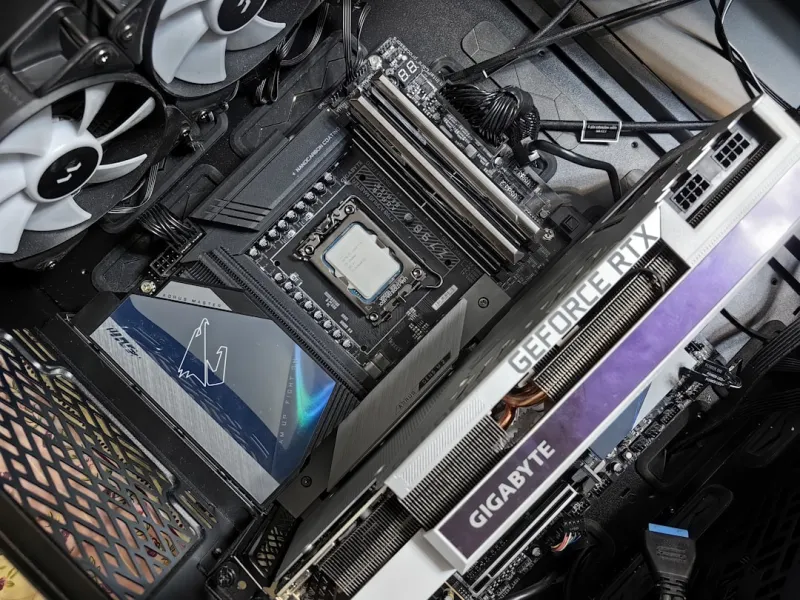
When I first tore into my first DIY rig back in the early 2010s, the motherboard was the mysterious heart that I barely understood. Fast‑forward to 2026, and that humble printed circuit board has transformed into a sophisticated platform that can juggle AI‑accelerated workloads, ultra‑fast storage, and a constellation of connectivity options—all while keeping power consumption in check. As a power‑user who lives on the edge of every tech release, I’ve learned that the motherboard you choose isn’t just a passive substrate; it’s the command center that dictates how far you can push your system before you hit a brick wall. In this deep dive, I’ll walk you through the critical considerations, from chipset selection to future‑proofing strategies, so you can build a board that doesn’t just meet today’s demands but anticipates tomorrow’s breakthroughs.
The 2026 Landscape: New Standards, New Possibilities
Motherboard design in 2026 is dominated by three game‑changing standards: PCIe 6.0, DDR6 memory, and the emerging AM5‑plus and LGA 1700‑plus sockets. PCIe 6.0 now delivers up to 64 GT/s per lane, meaning a single x16 slot can theoretically feed multiple high‑end GPUs or AI accelerators without choking bandwidth. Meanwhile, DDR6 modules—still in early adoption but rapidly gaining traction—push frequencies past 8 GHz, slashing latency for data‑intensive tasks like real‑time video rendering. The socket landscape is equally exciting: Intel’s latest “Meteor Lake” chips sit on LGA 1700‑plus, while AMD’s “Zen 5” processors use the refined AM5‑plus socket, both offering expanded power delivery and additional PCIe lanes. For a power‑user, this means you can now pair a single motherboard with a dual‑GPU AI workstation and a handful of NVMe drives, all while keeping the system stable and responsive.
Choosing the Right Chipset: Intel vs. AMD in 2026
The chipset you lock in will shape the entire ecosystem of your build. Intel’s Z9‑E series brings integrated AI acceleration, a feature that offloads certain tensor operations to dedicated silicon on the motherboard itself. It also supports Intel Thread Director 2.0, which dynamically balances workloads across CPU cores and the integrated AI engine. AMD’s X670‑E chipset, on the other hand, offers a more flexible PCIe lane distribution, allowing you to allocate up to 48 lanes to GPUs while reserving the rest for storage and networking. If your workflow leans heavily on AI inference, Intel’s built‑in accelerators can shave milliseconds off latency. But if you’re stacking multiple GPUs for deep‑learning training, AMD’s lane flexibility gives you a broader canvas. My own experience tells me to match the chipset not just to the CPU, but to the specific mix of GPU, storage, and peripheral demands you anticipate.
Power Delivery and VRM: The Unsung Heroes of Stability
In the era of power‑hungry GPUs and AI accelerators, a robust VRM (Voltage Regulator Module) is non‑negotiable. Look for motherboards boasting at least a 16‑phase power delivery for the CPU, with high‑quality chokes and capacitors rated for 105 °C. The reason? Modern CPUs can draw upwards of 250 W under load, and any fluctuation can cause throttling or, worse, system crashes. I’ve seen too many builds suffer from “brown‑out” events when the VRM can’t keep up, especially during prolonged AI training sessions. Additionally, pay attention to the board’s power‑good signals and built‑in monitoring tools—many now integrate with software suites that let you tweak voltage curves in real time, a feature that’s become indispensable for squeezing out that last ounce of performance without compromising longevity.
Connectivity: From USB4 to Wi‑Fi 7, What Matters Most
The connective tissue of any modern rig is as important as the compute power itself. USB4 has finally become the default on most high‑end boards, delivering up to 40 Gbps and supporting Thunderbolt 5 compatibility—perfect for fast external SSDs and 8K displays. Meanwhile, Wi‑Fi 7 (802.11be) is now standard on many motherboards, offering multi‑gigabit wireless speeds that rival wired Ethernet for most home setups. If you’re a content creator who streams 8K video while simultaneously training models, having a dual‑10GbE port plus Wi‑Fi 7 ensures you never hit a bottleneck. Don’t forget about the increasingly popular 2.5G Ethernet ports—these provide a sweet spot for high‑throughput, low‑latency networking without the cost of full 10G infrastructure.
Form Factor Realities: ATX, Micro‑ATX, and Mini‑ITX Considerations
While the classic ATX board still offers the most expansion slots and VRM phases, the rise of compact power‑user rigs has pushed micro‑ATX and even Mini‑ITX designs to new heights. Modern Mini‑ITX motherboards now pack 8‑phase VRMs and a full PCIe 6.0 x16 slot, making them viable for single‑GPU AI workstations that need to fit on a desk or in a portable case. However, the trade‑off is fewer SATA ports and limited M.2 slots, which can constrain storage expansion. If you anticipate a multi‑GPU build, an ATX board remains the safest bet, but for a mobile AI workstation or a high‑performance home theater PC, a well‑spec’d Mini‑ITX can be a sleek, powerful alternative.
BIOS, Firmware, and Security: Keeping Your Board Future‑Ready
Motherboard firmware is no longer a set‑and‑forget component; it’s a living interface that receives regular updates to patch vulnerabilities and unlock new features. In 2026, manufacturers are adopting signed firmware updates and integrating TPM 2.2 directly onto the board, enhancing hardware‑based security. I always keep an eye on my BIOS release notes, especially after major CPU launches, because a delayed update can mean missed support for the latest memory speeds or PCIe revisions. For a deeper dive into why staying on top of these updates is crucial, check out Why Staying Ahead of Critical 2026 Tech Updates Is a Power‑User’s Survival Guide. Regularly flashing the latest firmware not only secures your system but also ensures you can leverage every new performance tweak the vendor rolls out.
Future‑Proofing Your AI‑Ready Build
One of the biggest mistakes power‑users make is treating a motherboard as a one‑time purchase. In 2026, the best strategy is to select a board that leaves room for growth—extra M.2 slots, spare PCIe lanes, and robust VRM headroom are all essential. Look for boards that support both DDR5 and DDR6, as this gives you the flexibility to upgrade memory without swapping the entire platform. I also recommend checking whether the board’s BIOS supports “future‑socket” compatibility—a feature some manufacturers are beginning to offer, allowing you to upgrade the CPU without a full motherboard swap. For a comprehensive guide on building a system that can evolve with emerging technologies, see Future‑Proof Your AI‑Ready Power‑User PC in 2026. By planning for incremental upgrades, you protect your investment and keep your rig at the cutting edge for years to come.
Putting It All Together: My Checklist for the Perfect Motherboard
To wrap up, here’s the concise checklist I use before hitting “Add to Cart”:
- Chipset alignment with CPU and workload (Intel Z9‑E for AI acceleration, AMD X670‑E for lane flexibility).
- At least a 16‑phase VRM with 105 °C components.
- PCIe 6.0 x16 slot and multiple M.2 slots (PCIe 5.0 for NVMe SSDs).
- USB4/Thunderbolt 5 and Wi‑Fi 7 for high‑speed I/O.
- Support for DDR5/DDR6 memory, preferably with XMP 3.0 profiles.
- Robust BIOS update path with signed firmware.
- Form factor that matches your case and expansion plans.
When a board checks all these boxes, you’ve got a foundation that can handle intensive AI workloads, high‑resolution gaming, and the ever‑growing demand for faster storage without breaking a sweat. Remember, the motherboard is the backbone of any power‑user PC—choose wisely, keep it updated, and enjoy the limitless performance possibilities that 2026’s technology offers.




