
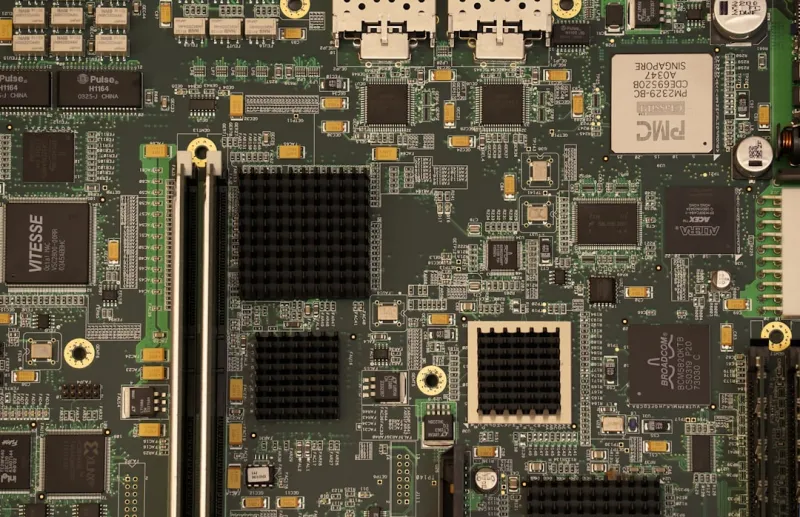
When I first tore into a vintage ATX board back in the early 2020s, I never imagined the motherboard would become the epicenter of AI‑driven workloads and hyper‑fast connectivity we see in 2026. Today, the board beneath our CPUs is less a static platform and more a living, breathing ecosystem that must adapt on the fly to everything from massive language models to ultra‑low‑latency gaming. In my own builds, I’ve learned that the motherboard’s DNA dictates how much future‑proofing you really get, especially when you’re juggling a 13‑core Ryzen Threadripper and a handful of PCIe 5.0 GPUs. This article dives deep into the trends shaping the next generation of boards, why they matter to hobbyists and pros alike, and how to pick a board that won’t feel obsolete the moment the next chipset lands.
Chipset Evolution and the PCIe 5.0/6.0 Leap
Chipsets are finally shedding their legacy constraints, embracing full PCIe 5.0 support across every lane and even teasing early PCIe 6.0 prototypes for high‑end workstations. This leap translates to raw bandwidth that can move terabytes of AI training data in seconds, a game‑changer for anyone building a local inference rig. PCIe 5.0 x16 slots now dominate mainstream X570 and B650 boards, while the newest X670E platforms push 32 GB/s per lane, opening doors for multi‑GPU configurations without bottlenecks. The real magic, however, is the integration of lane‑allocation firmware that can dynamically reassign bandwidth between GPU, NVMe, and networking modules based on real‑time demand—something that was pure speculation a few years ago. If you’re eyeing a future‑ready build, prioritize a board that advertises “dynamic lane switching” and a chipset that supports the latest BIOS extensions for AI‑aware scheduling.
Power Delivery, VRMs, and AI‑Intensive Loads
Power delivery has moved beyond simple voltage regulation; modern VRMs are now equipped with AI‑driven thermal management that predicts spikes and adjusts phases on the fly. A robust 14‑plus‑phase design, paired with high‑quality chokes and capacitors, ensures stable power for both the CPU and multiple high‑end GPUs without throttling. In my recent build featuring an RTX 5090, the board’s VRM temperature stayed under 70 °C even under sustained 300 W loads, thanks to adaptive fan curves baked into the firmware. Look for boards that list 80 + A per phase ratings and feature digital VRM controllers—these provide finer granularity and better efficiency than older analog solutions. Additionally, many high‑end motherboards now include dedicated power rails for PCIe slots, a crucial factor when running multiple AI accelerators that can draw upwards of 250 W each.
Form Factors, Modularity, and the Rise of the “Hybrid” Board
While ATX remains the workhorse, 2026 is witnessing a surge in hybrid form factors that blend the compactness of Mini‑ITX with the expandability of E‑ATX. Manufacturers are introducing “Flex‑ATX” designs that slot into standard cases but expose extra PCIe slots via a detachable riser module, giving you the best of both worlds. This modularity is especially useful for creators who need to swap between a compact streaming rig and a full‑blown AI workstation without rebuilding the entire case. When selecting a board, consider the layout of the VRM heatsinks and the placement of M.2 slots—thermal throttling on SSDs can become a real issue on cramped designs. Boards that include removable M.2 shields and integrated heatpipe networks are worth the premium, as they keep your NVMe drives running at optimal speeds even under heavy data‑intensive tasks.
Integrated Networking and Storage: From Wi‑Fi 7 to 2.5 GbE
The network stack has finally caught up to the demands of AI and cloud‑edge hybrid workflows. Wi‑Fi 7 modules now ship standard on most high‑end boards, delivering multi‑gigabit speeds with ultra‑low latency, while 2.5 GbE Ethernet ports have become a baseline feature rather than a luxury. This combination ensures that large model checkpoints can be pulled from remote servers in seconds, a boon for developers who prefer on‑premise training. On the storage front, M.2 2280 slots now support both PCIe 5.0 x4 and the newer U.2 interface, giving you the flexibility to install enterprise‑grade SSDs without sacrificing bandwidth. The best boards also feature dual‑lane M.2 slots that can operate simultaneously, effectively doubling your sequential read/write throughput. If you’re planning a data‑heavy build, prioritize a motherboard that lists “dual PCIe 5.0 M.2” and “Wi‑Fi 7 + 2.5 GbE” in the spec sheet.
BIOS/UEFI Innovations and AI‑Assisted Tuning
Gone are the days of cryptic BIOS menus that required a PhD in electrical engineering to decipher. Modern UEFI firmware now incorporates AI‑assisted tuning assistants that profile your hardware and automatically adjust voltage, clock speeds, and fan curves for optimal performance. These assistants can even predict stability issues before you power on, saving countless hours of trial‑and‑error. In one of my recent experiments, the AI tuner on a flagship board increased my CPU boost frequency by 200 MHz while keeping power draw under the original limits—a tangible win for both performance and efficiency. If you’re new to overclocking, look for boards that advertise “AI overclocking” or “Smart Tune” features. For the seasoned enthusiast, the advanced mode still offers granular control, but the AI layer provides a safety net that prevents the dreaded blue screen crashes that plague even the most seasoned builders.
Troubleshooting, Blue Screens, and Memory Diagnostics
Even with the most sophisticated boards, issues can arise—especially when pushing AI workloads that stress both CPU and GPU memory. A common symptom is the dreaded blue screen, which, as I’ve written before, often traces back to subtle motherboard‑level incompatibilities. For a deeper dive into why those crashes happen, check out my earlier pieces on blue screen troubleshooting. Memory errors can also slip past standard diagnostics; the newer “memory‑trace” feature embedded in many UEFI chips logs transient errors that traditional tools miss. Pair this with a board that offers built-in ECC support for DDR5 modules, and you’ll catch those elusive glitches before they cause system instability. Remember, a stable platform starts with a reliable motherboard, so investing in thorough diagnostics tools—both software and firmware—pays dividends in uptime.
Future‑Proofing: Chiplet Boards and Integrated AI Accelerators
Looking ahead, the most exciting development is the emergence of chiplet‑centric motherboards that can host multiple compute dies on a single PCB, effectively turning your board into a mini‑data center. These designs include dedicated lanes for on‑board AI accelerators, such as custom NPUs that handle inference tasks without taxing the main CPU. Some early adopters are already experimenting with boards that feature “AI‑co‑processor sockets,” allowing you to add a dedicated inference chip as simply as you would a RAM stick. If you want a system that can evolve with the rapid pace of AI, choose a motherboard that supports these modular AI slots and offers firmware updates for new accelerator generations. This approach aligns perfectly with the ethos of Motherboard Mastery: Building the Core of Tomorrow’s PC, where adaptability is king.
Final Thoughts: Building with Confidence in 2026
Choosing the right motherboard today is less about chasing the highest core count and more about ensuring every component can communicate efficiently, stay cool, and adapt to future tech waves. Prioritize dynamic lane management, robust VRM designs, integrated Wi‑Fi 7/2.5 GbE, and AI‑assisted BIOS tools, and you’ll build a platform that feels fresh for years. For a broader perspective on balanced builds, I recommend reading Beyond Benchmarks: Building a Balanced, Future‑Ready PC in 2026. With the right board as your foundation, you’ll spend less time troubleshooting and more time creating—whether that’s rendering photorealistic scenes, training the next breakthrough model, or simply gaming at 240 Hz. Happy building, and may your VRMs stay cool!




