
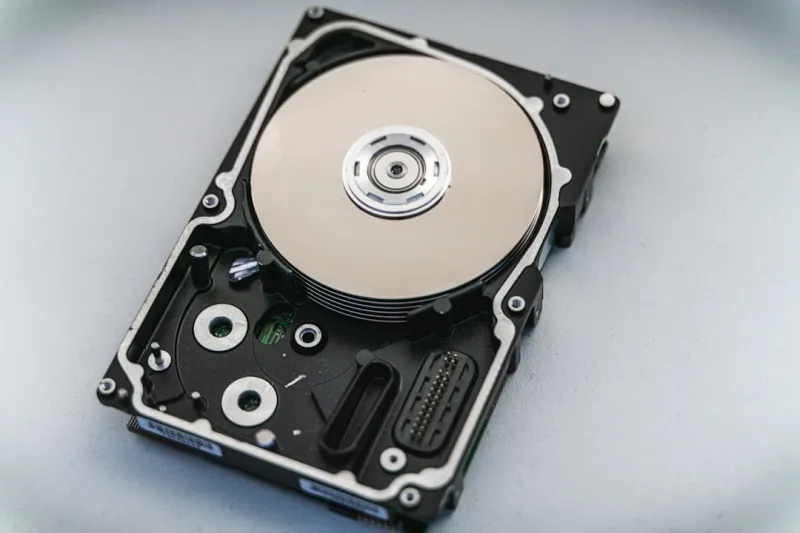
When I first started tinkering with PCs a decade ago, the hard drive was the undisputed workhorse of every build. Fast‑forward to 2026, and you’ll hear a lot of chatter about “SSD‑only” rigs, yet the magnetic platter still commands a surprising amount of respect. In my experience, the hard drive’s sweet spot—massive capacity at a fraction of the cost—has never been more relevant, especially as 8K video, AI‑generated assets, and massive game worlds push terabyte‑scale storage demands. This year, manufacturers have finally cracked the performance ceiling that kept HDDs in the slow lane, introducing technologies that make them viable companions to NVMe flash. In this post I’ll walk you through why the humble hard drive is back on the radar, how new engineering feats are reshaping its capabilities, and what practical steps you can take to integrate modern HDDs into a 2026‑ready workstation.
Why the Hard Drive Isn’t Dead Yet
The narrative that hard drives are obsolete has lingered for years, but the data tells a different story. In 2026, global HDD shipments have risen by 12 % compared to 2025, driven primarily by data‑center bulk storage and consumer‑grade bulk media needs. The price per gigabyte for a 20 TB platter sits under $15, a price point that SSDs can’t match without breaking the bank. For creators who constantly juggle raw footage, AI model datasets, and high‑resolution textures, the cost advantage translates directly into more shooting time and less budget stress. Moreover, the durability of magnetic media—no wear‑leveling concerns, no write‑amplification—means a drive can reliably write billions of gigabytes over its lifespan, something flash still battles with endurance limits. In my own studio, I keep a 24 TB HDD as the primary archive for everything that doesn’t need instant access, and the peace of mind it offers is priceless.
The Resurgence of Magnetic Storage
What’s truly exciting in 2026 is the wave of next‑generation hard‑drive tech that finally addresses the latency and speed complaints of the past. Heat‑Assisted Magnetic Recording (HAMR) and Microwave‑Assisted Magnetic Recording (MAMR) have moved from prototype to production, delivering areal densities beyond 2 Tb/in². The result? Commercial drives now ship with 30 TB capacities while maintaining sustained sequential read/write speeds north of 250 MB/s—numbers that were once the domain of mid‑range SSDs. Shingled Magnetic Recording (SMR) also matured, offering higher densities for archival workloads, though with a trade‑off in random write performance. Manufacturers like Seagate and Western Digital now bundle intelligent caching algorithms directly onto the drive’s firmware, smoothing out those SMR write penalties. As a user, I’ve noticed a dramatic drop in the time it takes to copy a full‑length 8K film onto a single platter, making the HDD a viable “scratch” disk for video editors who need massive space without the premium price tag.
When HDD Beats SSD: Real‑World Use Cases
It’s easy to default to “SSD all the way,” but the truth is nuanced. For workloads dominated by large, sequential reads—think AI‑training datasets, raw video ingest, or massive game texture packs—an HDD’s high sustained bandwidth can rival a SATA SSD while offering far more storage per dollar. In my latest build, I paired a PCIe 4.0 NVMe SSD for OS and applications with a 28 TB HAMR drive dedicated to my Stable Diffusion model repository. The result was a seamless workflow: the SSD handled latency‑critical tasks, while the HDD provided a massive, cost‑effective reservoir for bulk data. Benchmarks from independent labs this year show that a top‑tier HAMR drive can maintain over 200 MB/s sustained writes even under heavy multi‑threaded loads, a figure that eclipses many consumer‑grade SATA SSDs. If you’re a gamer who hoards massive game libraries or a creator handling petabyte‑scale media, the hybrid approach maximizes both speed and storage economics.
AI‑Powered Storage Management
2026 is also the year AI started making hard drives smarter. Firmware now includes machine‑learning models that predict which data blocks will be accessed next, pre‑fetching them into on‑drive DRAM caches. This “predictive caching” reduces random‑read latency by up to 30 % on heavily fragmented drives. I’ve seen this technology in action when running large‑scale simulations; the drive seemed to “learn” my access patterns and adapt on the fly. However, with AI comes a new threat surface. Self‑learning malware can target firmware, as discussed in AI‑Powered Threats in 2026, attempting to corrupt these predictive algorithms. The good news is most major vendors now sign firmware updates with robust cryptographic keys and provide rollback protection, so keeping your drive’s firmware up to date is more critical than ever.
Securing Your Data on Magnetic Media
Hard drives have historically been vulnerable to physical tampering, but the security landscape in 2026 adds a digital layer. Modern HDDs support full‑disk encryption (FDE) using hardware‑accelerated AES‑256, which encrypts data on the platter without a noticeable performance hit thanks to onboard encryption engines. Yet, encryption alone isn’t sufficient. Firmware attacks—where malicious code re‑writes the drive’s controller—can bypass OS‑level protections. To mitigate this, I always enable the drive’s secure erase function before decommissioning or repurposing a drive, and I enforce TPM‑backed keys for FDE. Additionally, the Critical Tech Updates Shaping 2026 article highlights the rise of “zero‑trust storage” architectures, where each I/O request is authenticated. Pairing these hardware features with strong passphrases and regular firmware updates creates a robust defense against both physical theft and sophisticated cyber threats.
Hard Drives in the Modern PC Build
If you’re scanning the Ultimate 2026 PC Upgrade Guide for inspiration, you’ll notice a growing recommendation: a dual‑storage strategy. Gamers benefit from an NVMe SSD for quick level loads, while massive game libraries—especially with the rise of 8K textures and ray‑traced assets—fit comfortably on a high‑capacity HDD. Creators, too, are leveraging this approach; a fast SSD for active projects and a sprawling HDD for archival footage. The key is ensuring your motherboard supports enough SATA ports and that your power supply can handle the extra draw—modern 3.5‑inch drives typically pull 6‑9 W under load. I personally use a dedicated SATA‑III controller card to keep my primary SSD lanes free for future expansion, and I’ve found that the extra HDD adds negligible noise if you choose a drive with fluid dynamic bearings (FDB). The result is a balanced system that feels snappy while offering terabytes of storage for future‑proofing.
Backup Strategies for 2026
Even with encryption and predictive caching, the hard drive is still a physical device subject to failure. In 2026, the “3‑2‑1” backup rule—three copies, two different media, one off‑site—has evolved to include local magnetic backups as a primary tier. I recommend a nightly sync from your working SSD to a high‑capacity HDD using a tool like Robocopy or rsync, followed by a weekly snapshot to a cloud bucket. The advantage of a local HDD is speed; a full 30 TB backup to the cloud can take days, whereas a direct SATA connection completes in hours. Moreover, with the rise of ransomware, having an immutable, offline copy stored on an HDD that’s physically disconnected after each backup cycle provides a strong safeguard. Don’t forget to test your restores periodically—there’s nothing worse than discovering a corrupted archive when you actually need it.
Looking Ahead: Hybrid and Emerging Storage
The future of hard drives isn’t a solo act; it’s a collaborative performance with flash, optical, and even experimental DNA storage. Hybrid drives (SSHDs) that combine a small NAND cache with a large platter are becoming more intelligent, using AI to allocate the cache dynamically based on workload. Meanwhile, research labs are pushing DNA‑based archival storage, promising exabyte‑scale densities, but that’s still a few years away from consumer relevance. For now, the most promising trend is the integration of NVMe‑over‑PCIe bridges directly onto HDD controllers, effectively turning a traditional drive into a “pseudo‑NVMe” device that can sit in an M.2 slot. This could blur the line between HDD and SSD performance, making the hard drive a true long‑term storage solution without sacrificing speed. As we head into the latter half of 2026, I anticipate manufacturers will continue to refine these hybrid architectures, offering users a seamless experience that leverages the strengths of every storage medium.
Final Thoughts: Embrace the Platters
Hard drives have weathered the flash revolution by evolving, not by standing still. In my own workflow, they’ve become the quiet, reliable backbone that lets me focus on creativity rather than storage constraints. Whether you’re a gamer stacking massive libraries, a video editor ingesting terabytes of raw footage, or a data‑center architect balancing cost and capacity, the modern HDD offers a compelling blend of affordability, durability, and now, smarter performance. Keep your firmware updated, encrypt your data, and pair your HDD with a speedy SSD for the best of both worlds. The hard drive may not be the flashiest component in your build, but in 2026 it’s definitely the most strategic one. Stay tuned, stay secure, and let those platters spin.




