Every time I boot up my rig in 2026, I’m reminded that the landscape of personal computing isn’t just evolving—it’s accelerating at a pace that feels almost sci‑fi. As a power user, I’ve learned that staying idle is the fastest way to fall behind, especially when the OS, applications, and hardware all receive AI‑driven upgrades in tandem. This post is my “must‑read” checklist of the most critical updates you need to know right now, from operating system overhauls to the newest security threats that are leveraging generative AI. By the end of this article, you’ll have a clear roadmap to keep your workstation humming, your data safe, and your workflow razor‑sharp, no matter how fast the tech curve bends.
Operating System Evolution: The AI‑First Shift
Microsoft’s latest OS release for 2026 isn’t just a polished interface—it’s a living, learning platform that anticipates your next move. The integration of AI copilots into core system services means that routine tasks like file indexing, memory management, and even driver updates are now handled autonomously, freeing you to focus on high‑impact work. However, this also introduces new layers of complexity: you need to understand how to fine‑tune the AI settings to avoid unwanted resource hogging. My go‑to guide for navigating these changes is the deep dive on The Operating System Evolution: Power‑User Strategies for an AI‑Driven 2026, which breaks down the most impactful tweaks you can make today. By mastering these settings, you’ll unlock smoother multitasking, faster boot times, and a more secure sandbox for your daily workloads.
Power‑User Productivity Hacks for AI‑Enhanced Apps
The AI overhaul isn’t limited to the OS; it’s permeating the applications we rely on every day. Microsoft Office, for example, now sports an AI assistant that can draft emails, generate spreadsheets, and even suggest PowerPoint designs based on the context of your document. While these features sound like a dream, they can also clutter the UI and consume precious RAM if left unchecked. I’ve found that customizing the assistant’s “suggestion frequency” and disabling background model training on idle machines yields a noticeable performance boost. For a step‑by‑step walkthrough, check out Unlocking Microsoft Office’s AI Edge for Power Users. Implementing those settings helped me shave off several seconds from my daily document creation cycle, which adds up to minutes saved each week—a tangible win for any power user juggling multiple projects.
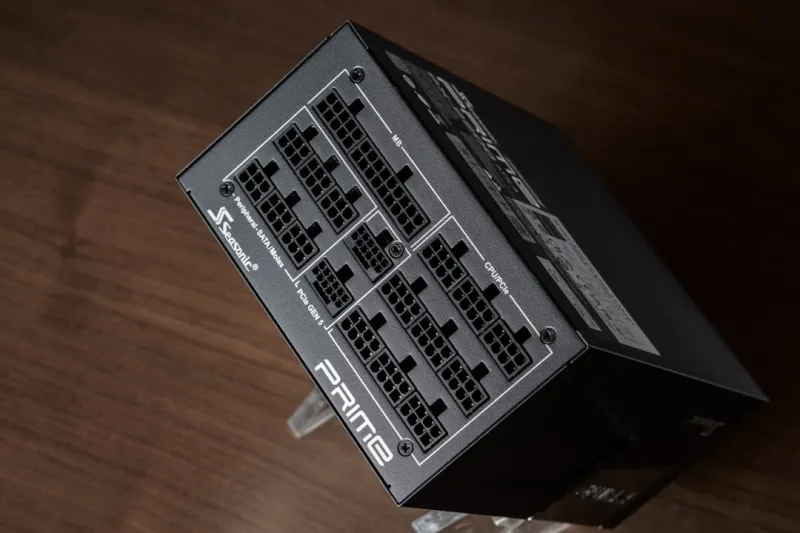
Hardware upgrades remain the backbone of any performance strategy, especially when AI workloads demand extra compute horsepower. In 2026, the sweet spot for a balanced build is a 13th‑gen CPU paired with a PCIe 5.0 NVMe SSD and a mid‑range RTX 5000 series GPU, which together provide ample headroom for AI inference tasks without breaking the bank. If you’re still on a legacy platform, I highly recommend the comprehensive upgrade guide at Unlock Maximum Power: A 2026 Guide to PC Upgrades for Power Users. The article walks you through component compatibility checks, BIOS configurations, and the most cost‑effective ways to boost your system’s AI processing capabilities, ensuring you’re not left behind as software demands increase.
Security has taken a dramatic turn in 2026 as malicious actors harness AI to craft adaptive malware that can bypass traditional signatures in seconds. This new generation of threats learns from your behavior, making static defenses obsolete. My personal playbook now includes continuous monitoring of process behavior using AI‑enhanced EDR tools, combined with a hardened Windows configuration that limits unnecessary services. For a deeper dive into defending against these sophisticated attacks, see Power‑User Playbook: Securing Your PC Against AI Threats. By implementing the recommended layered defenses, you’ll dramatically reduce the attack surface and keep your critical data out of the hands of AI‑powered adversaries.
Even with a rock‑solid OS and fortified security, hardware glitches can still derail your day. One of the most frustrating issues I’ve encountered recently is a GPU that refuses to initialize after a driver update—a problem that’s become more common as manufacturers push rapid AI driver optimizations. My troubleshooting flowchart starts with a clean driver rollback, followed by a BIOS setting tweak that disables the “Fast Boot” option, which can interfere with the GPU’s power sequencing. If you’re stuck in a similar loop, the step‑by‑step guide at GPU Won’t Play Nice? A Power User’s Troubleshooting Guide will walk you through diagnostics, firmware flashes, and even when to consider a hardware replacement.
Networking, too, has been reshaped by AI, with smart routers that dynamically allocate bandwidth based on real‑time application analysis. For power users running multiple VMs, remote build servers, and high‑resolution streaming, understanding how to configure these AI‑driven QoS settings is essential. The best practices involve setting static IP reservations for critical devices, creating custom traffic profiles, and leveraging the built‑in AI anomaly detection to spot potential bottlenecks before they affect productivity. The article Mastering Modern Networks: Power‑User Strategies for 2026 offers a clear roadmap for tuning your home or office network to meet the demands of AI‑heavy workloads.
Storage trends in 2026 are equally compelling, with NVMe drives now offering terabyte‑per‑second read speeds thanks to the maturation of PCIe 5.0 and emerging PCIe 6.0 prototypes. But speed isn’t the only metric that matters; encryption, wear‑leveling, and AI‑based predictive failure analysis are now standard features. By adopting a tiered storage strategy—fast NVMe for active projects and high‑capacity SATA or SMR drives for archival data—you can balance performance with cost. For an in‑depth look at how to architect such a setup, read Hard Drive Trends in 2026: Speed, Security, and Smart Storage Strategies. Implementing these recommendations will not only accelerate your workflow but also future‑proof your data against the evolving threat landscape.
In closing, the convergence of AI, hardware innovation, and security challenges makes 2026 a pivotal year for power users. The updates I’ve highlighted aren’t just nice‑to‑have enhancements—they’re essential tools that will keep your machine responsive, secure, and ready for the next wave of software breakthroughs. Take the time to audit your current setup, apply the targeted tweaks from the linked guides, and you’ll see measurable improvements in both performance and peace of mind. Remember, staying ahead isn’t about chasing every new feature; it’s about strategically integrating the right ones to amplify your productivity and safeguard your digital assets.