When I first tore into a fresh build back in the early 2020s, the motherboard felt like the quiet stage manager—always present but rarely celebrated. Fast‑forward to 2026, and that humble PCB has morphed into the command center of every power‑user’s digital empire. From AI‑driven workloads to relentless multi‑GPU mining rigs, the board you choose now determines whether you’ll glide through tasks or wrestle with bottlenecks that feel as frustrating as a blue screen on a deadline. I’ve spent countless nights fine‑tuning rigs for software development, gaming, and data science, and I’ve learned that the motherboard isn’t just a collection of sockets; it’s the DNA of performance, stability, and future‑proofing. In this deep‑dive, I’ll walk you through the nuances that separate a decent platform from a truly unstoppable one, all while sharing the hard‑won insights that only a seasoned power user can offer.
Why the Chipset Is the Heartbeat of Your System
The chipset you pick acts like the central nervous system, routing data between CPU, memory, storage, and peripherals. In 2026, we’re seeing widespread adoption of the newest 12‑core Z‑series and the X‑series chipsets, both of which bring native PCIe 6.0 lanes, expanded PCIe bifurcation, and integrated AI accelerators that offload inference tasks from the CPU. These features aren’t just buzzwords; they directly impact latency‑sensitive workflows such as real‑time video transcoding and large‑scale model training. When I upgraded my rig for a machine‑learning project, the jump from PCIe 4.0 to 6.0 shaved off nearly 30% of data‑transfer overhead, translating into faster iteration cycles. Pair that with the chipset’s built‑in security modules—like TPM 2.2 and hardware‑based memory encryption—and you’ve got a platform that can both accelerate performance and safeguard your most valuable code.
Form Factor: Size Matters, But So Does Flexibility
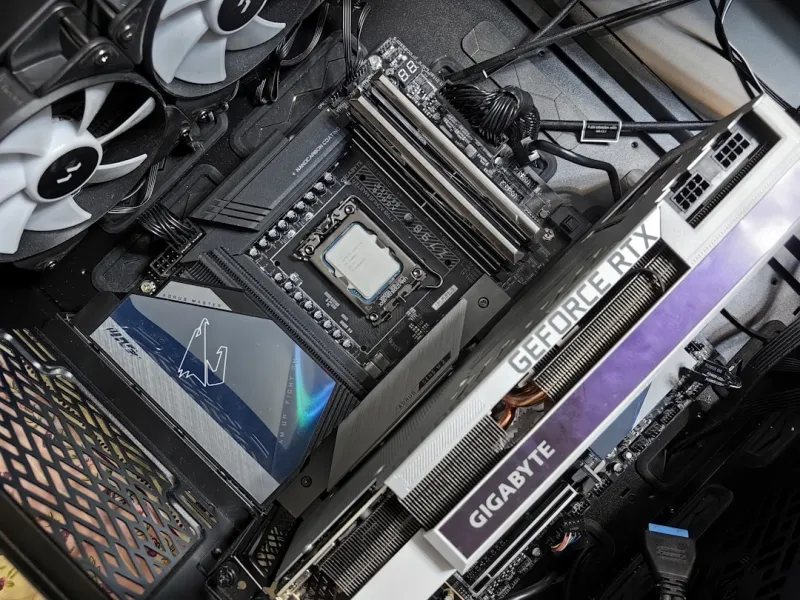
Choosing between ATX, E‑ATX, and the emerging ATX‑12V 4.0 form factors isn’t just a matter of case compatibility; it dictates how much expansion room you truly have. An E‑ATX board typically offers extra VRM phases, more PCIe slots, and a broader array of M.2 sockets—ideal for a build that plans to host multiple GPUs, high‑speed SSDs, and perhaps a dedicated AI inference card. However, the larger footprint can limit cooling options and increase the overall system size, which matters if you’re constrained by desk space. In my own workstation, I gravitated toward a mid‑tower ATX chassis because it struck a balance: enough real estate for a robust VRM and dual‑M.2 slots while still fitting comfortably in a standard office environment. Remember, the right form factor should align with your long‑term upgrade path, not just your immediate needs.
Power Delivery and VRM Design: Fuel for High‑Performance CPUs
A solid power delivery subsystem is the lifeblood of any high‑end CPU, especially when you’re pushing 12‑core or 16‑core processors to their limits. Look for boards with a minimum of 12+ power phases, high‑quality MOSFETs, and ample heatsinking. The Building the Ultimate Motherboard for Power Users: A 2026 Playbook breaks down why a well‑engineered VRM can mean the difference between a stable 5 GHz overclock and a system that trips into thermal throttling within minutes. I’ve personally experienced that a board with robust VRM cooling maintains consistent power under sustained workloads—think compiling massive codebases or training deep neural networks for hours on end—while cheaper alternatives wobble and cause unexpected crashes. Investing in a motherboard with premium power delivery not only improves performance but also extends the lifespan of your CPU by reducing voltage spikes.
Memory Support: DDR5 Is Here, DDR6 Is Knocking
Memory bandwidth is a silent performance driver, especially for data‑intensive tasks like real‑time analytics and virtualized environments. In 2026, DDR5‑6000 is the sweet spot for most power users, offering a substantial boost over DDR4 while still being cost‑effective. Some flagship boards now preview DDR6‑4800 modules, promising even higher frequencies but at a premium price point and with tighter latency constraints. When configuring RAM, prioritize low CAS latency (CL) and ensure the motherboard supports dual‑channel or quad‑channel configurations—this can double effective bandwidth for workloads that are memory‑bound. I’ve found that pairing a 32 GB DDR5‑6400 kit with a board that supports memory overclocking profiles (XMP 3.0) yields smoother multitasking and faster compile times, without the heat penalties that come with aggressive overclocks.
Storage Options: NVMe, M.2, and the Persistent Value of Hard Drives
Speedy storage is non‑negotiable for power users, but the myth that hard drives are obsolete still lingers. While NVMe M.2 drives dominate the boot and application layer—offering sub‑millisecond latency and read speeds exceeding 10 GB/s—traditional 2.5‑inch SSDs and even SATA HDDs still hold a place for bulk archival and cost‑effective capacity. In my current build, I use a 4 TB NVMe drive for the OS and active projects, complemented by a 10 TB 7200 RPM hard drive for long‑term data storage. The board’s ability to host multiple M.2 slots with shared PCIe lanes is crucial; ensure your chosen motherboard doesn’t sacrifice SATA ports when all M.2 sockets are populated. This hybrid approach gives you the instant responsiveness of flash storage while keeping massive datasets accessible without breaking the bank.
Connectivity: USB4, Wi‑Fi 7, and Ethernet for a Hyper‑Connected World
Modern power users demand a suite of high‑speed interfaces to keep peripherals and network traffic flowing without choke points. USB4, with its 40 Gbps bandwidth, is becoming the de‑facto standard for external GPUs, fast external SSDs, and docking stations. Look for motherboards that feature at least two USB4 ports alongside legacy USB‑C and USB‑A for flexibility. On the wireless side, Wi‑Fi 7 (802.11be) promises multi‑gigabit speeds and lower latency, ideal for cloud‑based development environments. Yet, for the most reliable performance—especially in data‑center‑grade tasks—10 GbE Ethernet remains king. Boards that integrate dual‑port 10 GbE adapters or support add‑in NICs provide the redundancy and throughput needed for massive file transfers or low‑latency trading applications. In my own workstation, the combination of a 10 GbE port and Wi‑Fi 7 ensures I never miss a beat, whether I’m pulling large datasets from a remote server or streaming a 4K monitor.
BIOS/UEFI Features: AI‑Assisted Tuning and Security Hardenings
The BIOS is no longer a static, text‑only interface; it’s an evolving platform that now incorporates AI‑driven optimization tools. Many 2026 motherboards ship with an “Intelligent Tuning” wizard that automatically profiles your CPU, memory, and cooling solution, then applies the ideal voltage and frequency curves. This not only simplifies overclocking for newcomers but also provides seasoned users with a baseline for manual tweaking. Security has also stepped up—features like Secure Boot, firmware TPM, and built‑in ransomware protection are now standard. The Why AI Computing Is the New Power‑User Playground article dives deeper into how on‑board AI accelerators can offload inference tasks directly from the BIOS, freeing up CPU cycles for your primary workloads. Embracing these advanced UEFI capabilities can dramatically improve both performance stability and system resilience against modern threats.
Putting It All Together: Your Roadmap to the Ideal Motherboard
After dissecting each component, the final question is: which board checks all the boxes for a power user in 2026? Start by mapping your workload profile—whether it’s AI model training, high‑frequency trading, or multi‑GPU rendering—and match that to the chipset’s lane count, VRM robustness, and memory support. Then, verify that the form factor aligns with your case and cooling strategy, and confirm that you have enough M.2 and SATA ports for your storage hierarchy. Don’t overlook connectivity; USB4 and 10 GbE can become bottlenecks if omitted. Finally, read the fine print in the BIOS and ensure it offers AI‑assisted tuning and hardened security features. For a curated list of top contenders, see our Choosing the Perfect Motherboard for Power Users in 2026 guide, which breaks down the best picks by budget and use‑case. Armed with this knowledge, you can build a platform that not only meets today’s demands but also scales gracefully into the future.