
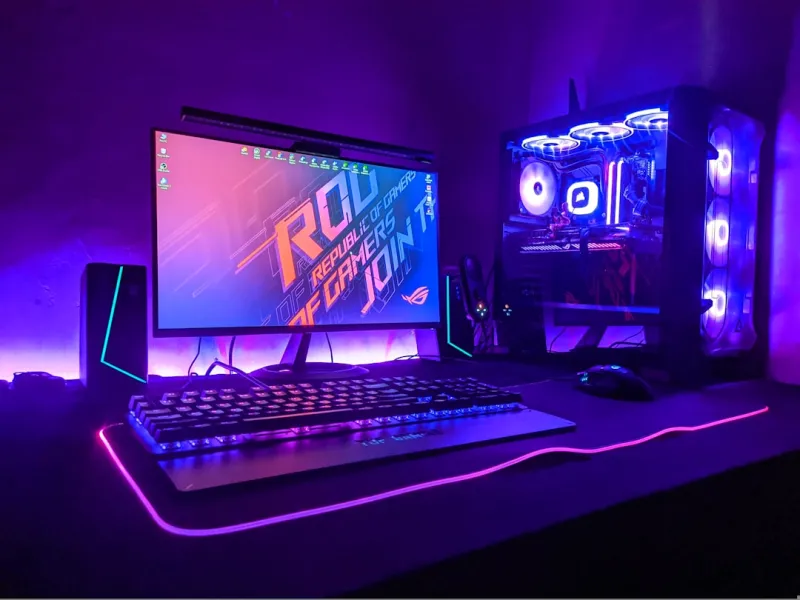
When I first opened my toolbox this spring, the smell of fresh thermal paste reminded me why I love tinkering with PCs. 2026 isn’t just another calendar year; it’s the moment when AI‑driven workloads, high‑resolution gaming, and remote‑work demands converge, making the upgrade decision far more strategic than ever before. If you’re still running a 2019‑era CPU or a legacy DDR4 kit, you’re not just missing out on speed—you’re paying a performance tax on every task, from video rendering to AI‑assisted code completion. In this post I’ll walk you through the components that matter most right now, why each upgrade makes sense in the current tech climate, and how to avoid the common pitfalls that turn a dream build into a budget nightmare. By the end, you’ll have a clear roadmap that aligns with the 2026 tech landscape, ensuring your rig stays relevant for the next several years.
Why Upgrade Now? The 2026 Landscape
The tech world in 2026 is defined by two megatrends: AI integration at the hardware level and the relentless push for higher visual fidelity. Manufacturers are embedding dedicated AI accelerators into CPUs and GPUs, meaning software that once relied on cloud‑based inference can now run locally with minimal latency. This shift not only improves performance but also reduces bandwidth costs for gamers and creators alike. Meanwhile, 4K‑60Hz monitors have become the baseline, and many creators are already experimenting with 8K content pipelines that demand massive throughput. Upgrading now positions you to leverage these advances without the need for a complete overhaul in just a year or two. The cost‑to‑benefit ratio peaks when you pair a modern processor with a compatible motherboard that supports PCIe 5.0, DDR5/DDR6 memory, and the latest AI‑ready features.
CPU Choices: From 13‑Core to AI‑Accelerated Units
Choosing a CPU in 2026 is less about core count and more about the integration of AI inference engines and power efficiency. The flagship 13‑core processors from the leading vendors now include on‑die tensor cores, which accelerate tasks like real‑time ray tracing, neural network upscaling, and even background security scans. If you’re a content creator, look for a model that advertises a “AI Boost” clock—a feature that dynamically ramps up the AI cores when you launch software like DaVinci Resolve or Adobe Photoshop with AI‑enhanced filters. For gamers, the boost translates to smoother frame rates when using AI upscaling technologies such as DLSS 3.5 or AMD’s FidelityFX Super Resolution 3. Remember to pair your CPU with a motherboard that supports the latest socket and power delivery standards to avoid bottlenecks.
Graphics: The Rise of Ray‑Traced 4K and AI Upscaling
Graphics cards have taken a quantum leap this year, with the newest RTX 7000 series and Radeon 8000 line delivering unprecedented ray‑traced performance at 4K and beyond. What truly sets them apart is the integration of AI‑powered upscaling engines that let you render at lower native resolutions while still outputting crisp, high‑definition images. This not only frees up VRAM but also reduces power consumption—a critical factor as power‑aware design becomes a selling point for many users. If you plan to game at 144 Hz, look for a GPU with at least 16 GB of GDDR6X memory and a robust cooling solution to maintain boost clocks under sustained loads. Pairing these cards with a monitor that supports Variable Refresh Rate (VRR) and HDMI 2.1 ensures you can fully exploit the hardware’s capabilities.
Memory: DDR5 vs DDR6, What’s Worth the Buck
Memory technology in 2026 has matured to a point where DDR6 is no longer a niche product for enthusiasts—it’s becoming mainstream for high‑performance builds. DDR5‑5600 kits still offer excellent value for most users, but DDR6‑7200 modules provide the bandwidth needed for AI‑heavy workloads and next‑gen game engines that stream massive texture data. When deciding, consider your primary use case: if you’re mainly gaming, a high‑speed DDR5 kit with tight CAS latency will serve you well. However, for AI model training, video editing, or running multiple virtual machines, the extra bandwidth of DDR6 can shave seconds off render times. And if you’re encountering memory glitches, check out Why Your RAM Is Acting Up in 2026 and How to Fix It Fast for troubleshooting tips before you invest in new modules.
Storage: PCIe 5.0 NVMe vs the Emerging 6.0 Standard
Storage speeds have become a decisive factor in overall system responsiveness. PCIe 5.0 NVMe SSDs now routinely hit 14 GB/s sequential read speeds, slashing load times for massive game worlds and 8K video projects. While PCIe 6.0 devices are trickling onto the market, they’re still priced at a premium that most hobbyists find prohibitive. For most builds, a 2 TB PCIe 5.0 drive offers a sweet spot between capacity, performance, and cost. If you’re a professional who works with terabytes of raw footage daily, consider a dual‑drive configuration: a fast PCIe 5.0 SSD for the OS and applications, paired with a high‑capacity SATA or PCIe 4.0 drive for archival storage. Ensure your motherboard has enough M.2 slots and supports the thermal solutions required to keep these drives cool under heavy I/O.
Motherboards: AI‑Ready Foundations
The motherboard you choose is the foundation that determines how future‑proof your build truly is. In 2026, the most sought‑after boards feature AI‑ready firmware, integrated power‑management chips, and support for PCIe 5.0 across multiple lanes. Look for models that advertise “AI‑Optimized BIOS”—these include presets that automatically tune memory timings and CPU power curves for AI workloads. Additionally, high‑quality VRM designs with at least a 12‑phase power delivery system are essential for maintaining stable overclocks on the newest processors. For those who love to tinker, a board with a robust set of USB‑4 and Thunderbolt 4 ports ensures you can connect the latest peripherals without bottlenecks. Need a deeper dive into what makes a motherboard truly AI‑ready? Check out Motherboards in 2026: The AI‑Ready, High‑Performance Foundations for a comprehensive guide.
Power Delivery and Cooling: Staying Efficient in 2026
With higher performance components comes an increased demand for clean, reliable power and effective thermal management. Modern 80 PLUS Platinum or Titanium power supplies deliver up to 94% efficiency at typical loads, reducing heat and electricity bills—a win for both the environment and your wallet. When selecting a PSU, aim for a unit that provides at least 30% headroom above your calculated wattage; this prevents throttling during peak loads such as intensive AI inference or prolonged gaming sessions. Cooling solutions have also evolved: hybrid liquid‑air coolers now incorporate AI‑driven fans that adjust speed based on real‑time temperature data, delivering whisper‑quiet operation without sacrificing performance. For compact builds, consider AIO coolers with a 360 mm radiator and low‑profile fans, ensuring you maintain optimal airflow even in tight cases.
Software Synergy: AI‑Infused Operating Systems
Hardware upgrades only reach their full potential when paired with an operating system that can harness AI capabilities. The latest AI‑infused OS releases in 2026, such as Windows 2026 with built‑in predictive resource allocation, automatically prioritize foreground applications, allocate memory more intelligently, and even prefetch data based on your usage patterns. These systems also feature smarter security layers that learn from your behavior to block suspicious activity before it becomes a threat. If you haven’t yet explored how an AI‑centric OS can boost your new hardware, read more in AI‑Infused Operating Systems in 2026. Upgrading your OS alongside your hardware ensures you get the most out of every core, thread, and gigabyte of memory you’ve invested in.
Security Considerations When Upgrading
Every upgrade introduces new attack surfaces, especially as AI becomes a double‑edged sword in cybersecurity. Modern CPUs now embed hardware‑level encryption keys that can be leveraged by the OS to secure boot and protect sensitive data in RAM. However, the same AI accelerators that speed up workloads can be exploited by malicious code if not properly sandboxed. It’s crucial to keep your firmware, BIOS, and drivers up to date, as manufacturers frequently release patches that address AI‑related vulnerabilities. For a deeper look at how AI‑powered threats are reshaping security in 2026, explore the article on AI‑Powered Threats in 2026. Implementing a hardware‑rooted security module, such as a TPM 2.0 chip, adds an extra layer of defense against firmware attacks, ensuring your upgraded rig remains resilient.
Future‑Proofing: Build for the Next Five Years
Future‑proofing in 2026 means thinking beyond the next game release; it’s about anticipating the evolution of AI workloads, higher resolution standards, and even quantum‑assisted computing on the horizon. Choose components with upgrade paths in mind: a motherboard with extra PCIe 5.0 slots, a PSU with modular cables for future expansion, and a case that supports larger radiators or additional drive bays. Investing in a high‑capacity NVMe SSD now can save you from having to replace storage when 8K editing becomes commonplace. Finally, keep an eye on emerging standards like DDR6‑X and PCIe 6.0; while they may be pricey today, a board that already supports them will save you a costly motherboard swap down the line. By aligning your upgrade strategy with these forward‑looking considerations, you’ll enjoy a seamless, high‑performance experience for years to come.




