When I first cracked open a brand‑new motherboard back in 2015, the sheer amount of circuitry felt like a miniature cityscape. Fast forward to 2024, and that feeling is amplified a thousandfold. Motherboards have morphed from mere circuit boards into sophisticated platforms that dictate everything from power efficiency to AI‑accelerated workloads. As someone who’s spent countless late nights soldering, overclocking, and troubleshooting, I’ve learned that the board you choose is the foundation of your entire system’s destiny. In this post, I’ll walk you through the decision‑making process that turned my hobby into a future‑proof rig, sharing the nuanced trade‑offs that manufacturers rarely highlight in glossy marketing sheets. Whether you’re a seasoned builder or a first‑time enthusiast, understanding the subtle interplay of chipset, VRM design, and expansion options will save you time, money, and a lot of headaches down the line.
Understanding Chipsets: The Brain Behind the Board
The chipset is essentially the motherboard’s nervous system, handling communication between the CPU, memory, storage, and peripherals. In 2024, we see a clear split between mainstream Intel 13th‑gen platforms and AMD’s Ryzen 7000 series, each offering distinct advantages. Intel’s Z790 chipset, for example, shines with PCIe 5.0 lanes and robust overclocking headroom, while AMD’s X670E brings native support for DDR5 and a more generous I/O layout. However, the choice isn’t just about raw specs; it’s about aligning the chipset’s strengths with your workload. If you’re leaning into GPU‑heavy tasks like 4K rendering or AI inference, the extra PCIe lanes of a Z790 could be a game‑changer. Conversely, creators who prioritize high‑speed storage and massive memory bandwidth may gravitate toward AMD’s offering. The key is to map your primary use cases onto the chipset’s feature set, ensuring you extract every ounce of performance without paying for capabilities you’ll never tap.
VRM Design: Power Delivery That Matters
Voltage Regulator Modules (VRMs) are the unsung heroes that keep your CPU fed with clean, stable power. In today’s high‑performance builds, a robust VRM can be the difference between a smooth overclock and a system that sputters under load. Look for boards with at least a 14‑phase design for high‑end CPUs, and pay attention to the quality of the MOSFETs and cooling solutions. A well‑engineered VRM not only supports higher boost clocks but also improves longevity by reducing thermal stress. I’ve personally seen the benefits of a solid VRM when running stress tests on a 7950X; the board stayed cool, and the CPU maintained its boost frequency without throttling. Don’t be fooled by flashy aesthetics—prioritize thermal performance and component quality over RGB lighting. A board with a solid VRM will handle future CPU upgrades gracefully, making it a cornerstone of any future‑proof strategy.
Expansion Slots and PCIe Evolution
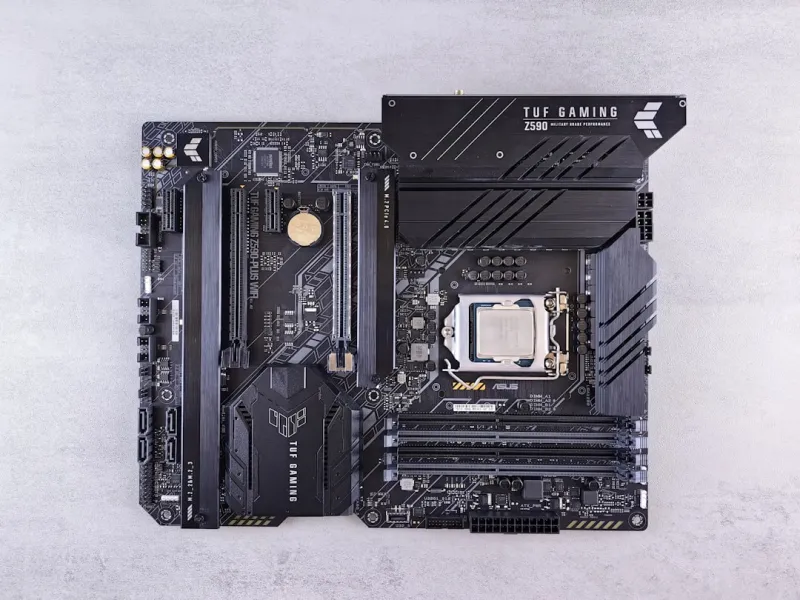
The PCIe landscape has exploded with the introduction of PCIe 5.0, doubling bandwidth compared to its predecessor. While not every user needs this level of throughput today, it’s a forward‑looking feature that can protect your investment for years. When selecting a motherboard, assess the number and placement of PCIe slots: a primary x16 slot for your graphics card, secondary slots for NVMe SSDs, and perhaps an additional x8 slot for a dedicated capture or AI accelerator card. Remember that lane distribution can affect performance—some boards split the x16 slot into two x8 slots when both are populated, which could bottleneck high‑end GPUs. If you anticipate adding multiple expansion cards, prioritize boards with ample PCIe 5.0 lanes and well‑routed traces. This foresight ensures you won’t need a costly upgrade when next‑gen GPUs or storage solutions demand more bandwidth.
Memory Compatibility and Overclocking Potential
DDR5 has become the standard for new builds, promising higher frequencies and lower power consumption. However, not all DDR5 kits are created equal, and motherboard support varies widely. Look for boards that list the highest validated memory speeds on their QVL (Qualified Vendor List); this indicates that the manufacturer has tested those modules for stability. Additionally, the number of DIMM slots matters—four slots give you flexibility for future upgrades without replacing existing modules. Overclocking enthusiasts should seek motherboards with robust memory trace designs and BIOS options that allow fine‑grained timing adjustments. In my recent build, leveraging a board with strong memory support allowed me to push a 6000 MHz kit to 6400 MHz with tight timings, translating into measurable gains in content‑creation workloads. A well‑chosen motherboard can thus serve as a catalyst for extracting maximum performance from your RAM investments.
Connectivity: USB, Thunderbolt, and Networking
Modern motherboards are becoming connectivity hubs, integrating a plethora of ports that cater to both gamers and professionals. USB 4.0 and Thunderbolt 4 are now commonplace, offering up to 40 Gbps data rates and daisy‑chaining capabilities. For gamers, a high‑speed Ethernet port (2.5 GbE or even 10 GbE) ensures low‑latency online play, while creators benefit from 2.5 GbE for rapid file transfers. Wi‑Fi 6E is another critical feature, delivering faster wireless speeds and lower interference. When evaluating boards, check the quantity and placement of these ports—front‑panel accessibility can be a game‑changer for frequent device swapping. For an in‑depth look at choosing the right platform, see my guide on Motherboard Mastery in 2024, where I break down how each connectivity option fits different user profiles.
BIOS and Firmware: The Software Layer You Can’t Ignore
Even the most hardware‑centric builder must respect the importance of BIOS. A clean, intuitive BIOS layout can dramatically simplify tweaking voltage curves, fan profiles, and boot priorities. Manufacturers like ASUS, MSI, and Gigabyte have each refined their UEFI interfaces, but the real differentiator is how quickly they roll out firmware updates. A board with a proactive update schedule can patch security vulnerabilities and improve hardware compatibility long after purchase. I’ve experienced firsthand the peace of mind that comes from a BIOS that auto‑updates via a secure internet connection—no manual flashing required. Moreover, advanced features like AI‑driven fan control and automated memory overclocking can be a boon for less‑technical users. When selecting your motherboard, prioritize those with a reputation for stable firmware and robust support channels; this future‑proofs your rig against emerging threats and performance bottlenecks.
Future‑Proofing: Building a Platform That Grows With You
The ultimate goal of any build is longevity. A motherboard that can accommodate next‑gen CPUs, newer memory standards, and expanded storage without requiring a full system overhaul is a wise investment. Look for boards that support both current and upcoming socket revisions, or at least have a clear upgrade path outlined by the manufacturer. Modular VRM designs, ample PCIe lanes, and extensive BIOS options all contribute to a platform that remains relevant. For a broader perspective on building a future‑proof system, explore my comprehensive Computer Hardware Playbook, which delves into the synergy between motherboard choice, cooling solutions, and power supplies. By aligning your motherboard’s capabilities with your long‑term goals, you ensure that each upgrade feels like a step forward rather than a costly detour.
Conclusion: Your Motherboard, Your Vision
Choosing a motherboard in 2024 is less about chasing the flashiest specs and more about crafting a balanced platform that aligns with your personal computing vision. Whether you’re building a battle‑ready gaming machine, a content‑creation workstation, or a hybrid system for AI experimentation, the board you select will dictate the ceiling of your performance and the ease of future upgrades. By scrutinizing chipset features, VRM robustness, expansion flexibility, memory support, connectivity, and firmware reliability, you set the stage for a system that not only meets today’s demands but also adapts to tomorrow’s innovations. Remember, the motherboard is the silent architect of your rig’s destiny—choose wisely, and your build will stand the test of time.